Jeff Taylor
Principal Data Consultant
Database Consulting, LLC
Azure Data Factory (ADF)
Your New SSIS

Jeff Taylor
Principal Data Consultant
Database Consulting, LLC


Super Hero Suit
Jeff Taylor
Principal Data Consultant
Database Consulting, LLC
Azure Data Factory (ADF)
Your New SSIS

Audience Poll
Who's in the room?
- Who's running SQL Server Integration Services (SSIS) today?
- Where do your packages run? SQL Agent? SSIS Catalog (SSISDB)? Azure?
- Who has started using Azure Data Factory (ADF)?
- Who's in the cloud? Hybrid? Still on-premises?
Agenda
- What is it? - Concepts and Activities
- SSIS to ADF - What maps to what
- Building Pipelines - Parameters, Triggers, Error Handling
- Running It - Monitoring, Security, Deployment
- Cost - Large vs. Small
- Demo
ADF - What is it?
Something Sweet!
Azure Data Factory is a 'code-free' (almost) cloud-based ETL/ELT data-driven integration service AT SCALE!
Extract, Load, Transform
You can still code if you want
ADF - What is it?
Something Sweet!
- Ingest - 100+ Native connectors
- Control flow - Pipelines
- Data Flow - Transformations
- Schedule
- Monitor
ADF - What is it?
Top-level concepts
- Pipelines - managing flow
- Activities - tasks
- Datasets - source and destination data
- Linked services - connection strings
- Data Flows - no-code transformations
- Integrated Runtimes - execution - (on-premise or in cloud)
SSIS to ADF
What maps to what?
- Control Flow - Pipeline
- Data Flow Task - Copy activity or Mapping Data Flow
- Connection Manager - Linked Service
- Precedence Constraints - Dependencies (Success, Failure, Completion, Skipped)
- Foreach Loop Container - ForEach activity
SSIS to ADF
What maps to what?
- Script Task - Azure Function, Notebook or Custom activity
- Execute SQL Task - Script or Stored Procedure activity
- Project Parameters - Pipeline and Global Parameters
- Environments - Global Parameters and Azure Key Vault
- SQL Agent Job - Trigger
- SSIS Catalog (SSISDB) Reports - Monitor hub
SSIS to ADF
Lift and Shift
- Azure-SSIS Integration Runtime (IR) - Runs your existing packages in Azure
- Execute SSIS Package activity - Call a package from a pipeline
- Package Location - SSIS Catalog (SSISDB), Azure Files or package store
- Billed While Running - Start and stop the IR on a schedule
- Self-hosted IR as a Proxy - Reach on-premises data
ADF - Activities


ADF - What is it?
Something Sweet!

Something Sweet!
ADF - What is it?
Something Sweet!
ADF - What is it?

Something Sweet!
ADF - What is it?

Something Sweet!
ADF - What is it?

Something Sweet!
ADF - What is it?

Something Sweet!
ADF - What is it?

Something Sweet!
ADF - What is it?

Something Sweet!
ADF - What is it?

Something Sweet!
ADF - What is it?

Something Sweet!
ADF - What is it?

Something Sweet!
ADF - What is it?

Something Sweet!
ADF - What is it?

Something Sweet!
ADF - What is it?

Something Sweet!
ADF - What is it?

Something Sweet!
ADF - What is it?

ADF - Parameters
Metadata driven
- Pipeline Parameters - Passed in at run time
- Global Parameters - Shared across every pipeline in the factory
- Variables - Set and changed during the run
- Dynamic Content - Expressions that start with @
- Lookup + ForEach - One pipeline, every table
ADF - Incremental Load
Watermark pattern
- Lookup - Get the old watermark
- Lookup - Get the new watermark from the source
- Copy - Only the rows between the two
- Stored Procedure - Save the new watermark
ADF - Triggers
Your new SQL Agent
- Schedule - Wall clock, like a SQL Agent schedule
- Tumbling Window - Fixed time slices, with backfill and dependencies
- Storage Event - A file lands in Blob Storage or Data Lake
- Custom Event - Your app publishes to Event Grid
- Manual - Trigger now, or from the REST API
ADF - Error Handling
Old Method
- OnError Event Handler - Package or task level
- Precedence Constraint - The red arrow on failure
- Checkpoints - Restart from the failed task
ADF - Error Handling
New Method
- Upon Failure Path - Run a step only when an activity fails
- Retry and Timeout - Set on every activity
- Fail Activity - Stop the run with your own error message and code
- Try/Catch - Upon Failure to a logging step
- Rerun from Failed Activity - Pick up where it broke
ADF - Monitor
Where did it break?
- Monitor Hub - Pipeline, activity and trigger runs
- Rerun - From the start or from the failed activity
- Alerts - Azure Monitor alerts on failed runs
- Diagnostic Settings - Send run history to Log Analytics
- Retention - Run history is kept for 45 days
ADF - How?
What is needed...
- A Resource Group - Manage and monitor costs
- Code Repo - To store ADF source code - Azure DevOps
- Data Storage - Azure Data Lake
- Database - Serverless Azure SQL
ADF - Security
Keep secrets out
- Managed Identity - No passwords in linked services
- Azure Key Vault - Store connection strings and secrets
- Self-hosted Integration Runtime (IR) - Reach on-premises data, outbound only on port 443
- Managed Virtual Network (VNet) - Private endpoints to your data sources
ADF - Deployment
Source control first
- Git Integration - Azure DevOps or GitHub
- Collaboration Branch - main, with feature branches for changes
- Publish - Builds Azure Resource Manager (ARM) templates
- Continuous Integration and Delivery (CI/CD) - Promote Dev, Test and Prod with a pipeline
ADF - Deployment
Automate it
- Automated Publish - npm package @microsoft/azure-data-factory-utilities
- Parameters File - Different connections per environment
- Pre and Post Deployment Script - Stop triggers, deploy, start triggers
- Global Parameters - Deployed with the ARM template
ADF - SQL
Configuration - Large

ADF - Data
Size - Large


ADF - $
Cost - Large

ADF - SQL
Configuration - Small

ADF - Data
Size - Small


ADF - $
Cost - Small

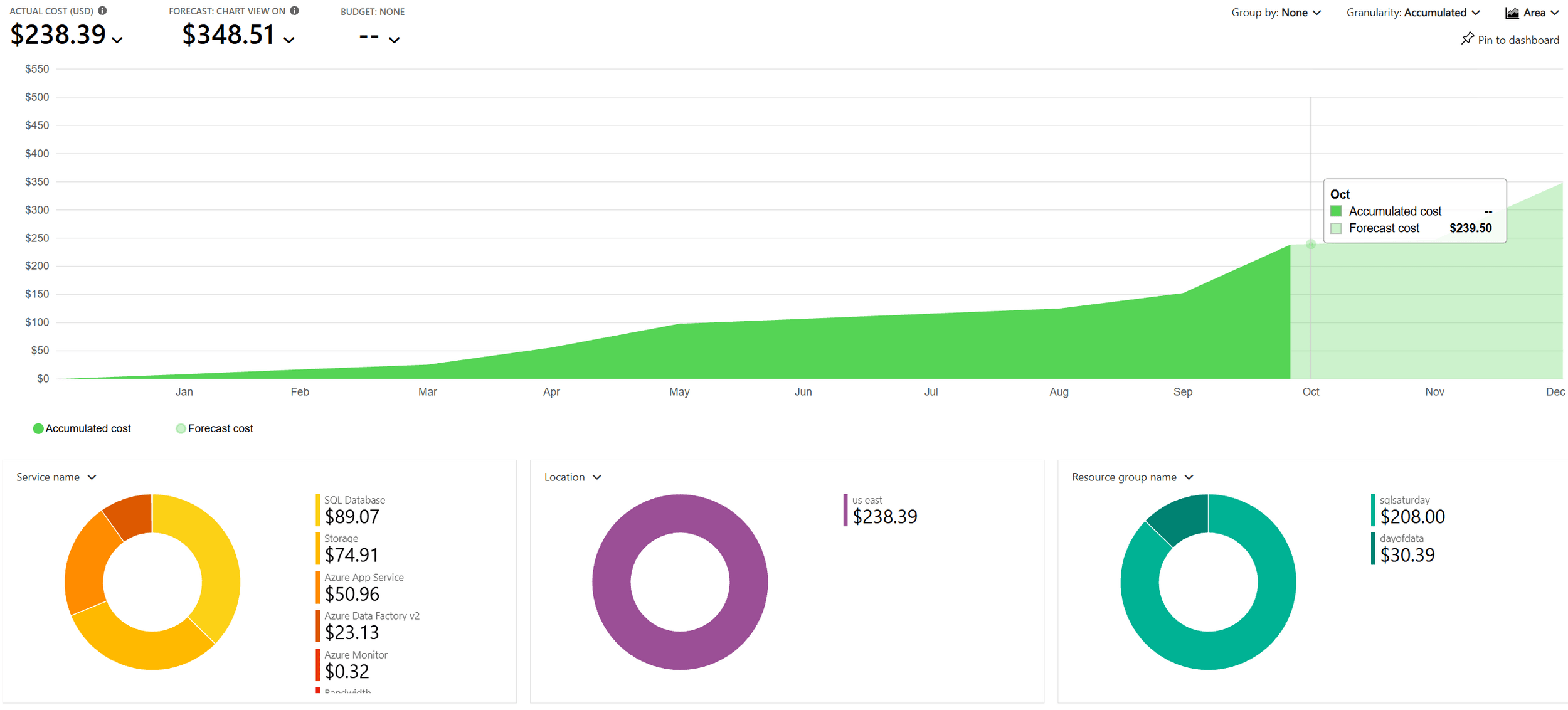
What did ADF cost?
$84.88 - Small
$326.40 - Large
ADF - Demo
DEMO TIME
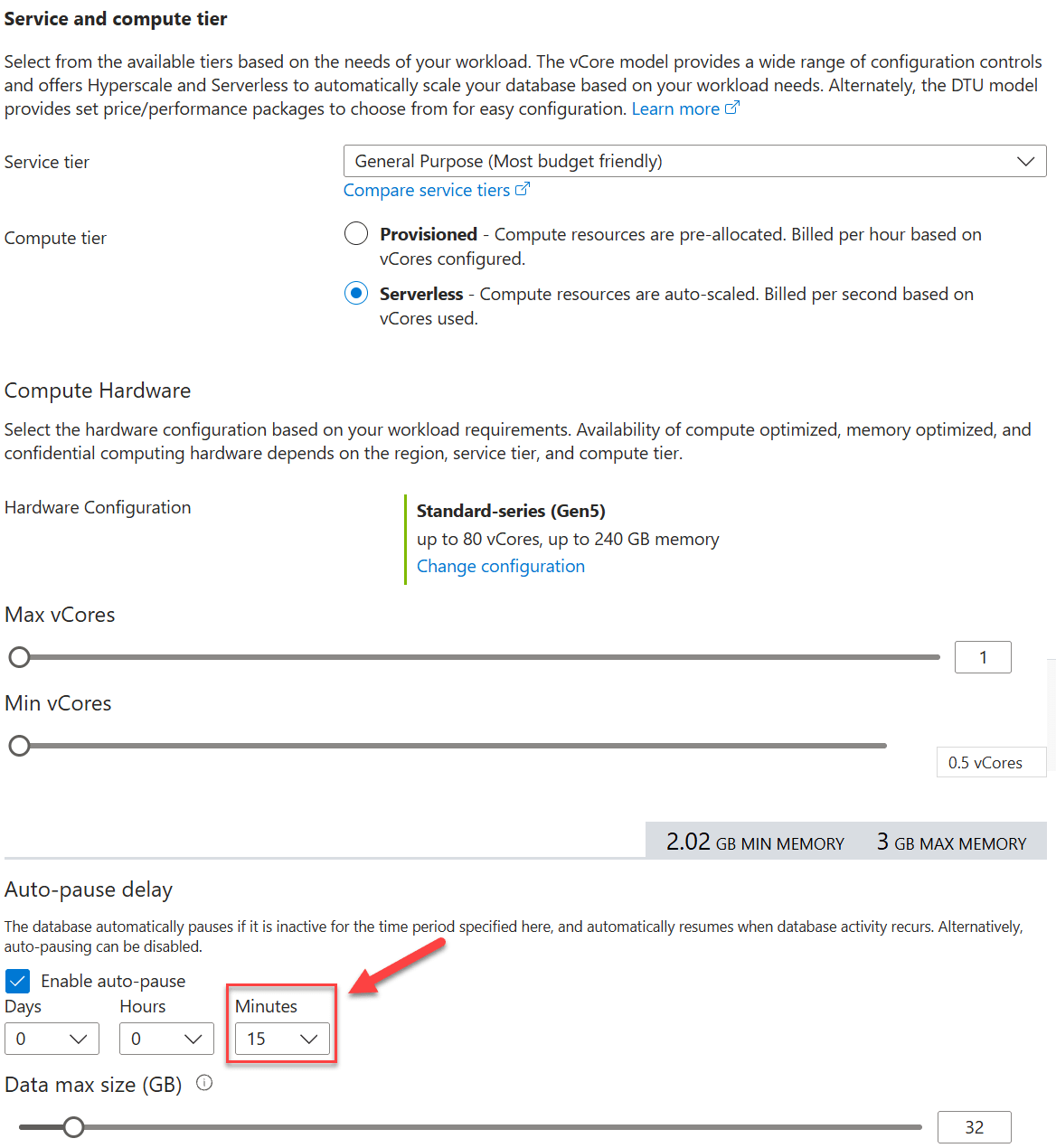
ADF - SQL
Configuration - DoD
What did ADF cost?
Recap
Best Practices
- Parameterize
- Source control first
- Key Vault everything
- Alert on failure
- Start small
- Watch the meter
Resources
- Azure Data Factory - https://learn.microsoft.com/azure/data-factory
- SSIS Migration - https://learn.microsoft.com/azure/data-factory/scenario-ssis-migration-overview
- Incremental Load - https://learn.microsoft.com/azure/data-factory/tutorial-incremental-copy-overview
- Error Handling - https://learn.microsoft.com/azure/data-factory/tutorial-pipeline-failure-error-handling
- Continuous Integration and Delivery (CI/CD) - https://learn.microsoft.com/azure/data-factory/continuous-integration-delivery
- Pricing - https://azure.microsoft.com/pricing/details/data-factory
Questions

Thank you!
Jeff Taylor
Thank you for attending my session today.
If you have any additional questions, please don't hesitate to reach out.



Azure Data Factory (ADF) - Your New SSIS
By reviewmydb