The Browser’s
Element Inspector
as a
Power Tool
A little bit of
context
DESIGNER
ART DIRECTOR
PROJECT MANAGER
FRONT END
FRONT END

DESIGNER
ART DIRECTOR
FRONT END
PROJECT MANAGER

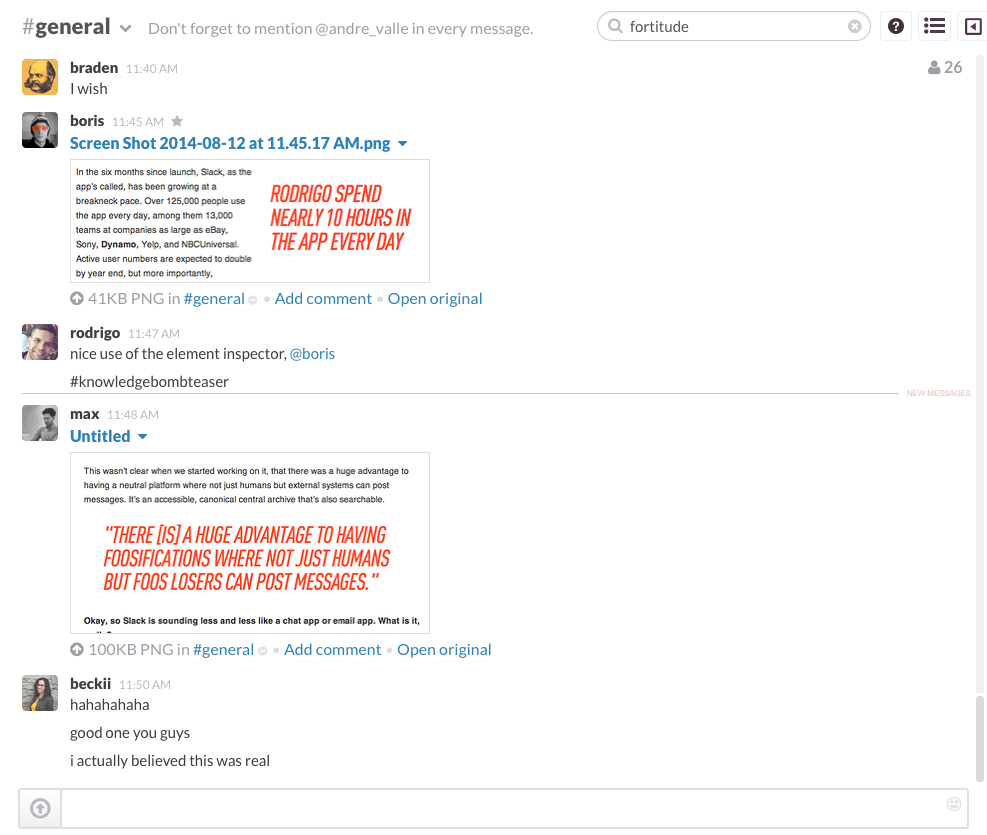

Hahahahaha.
Good one you guys.
I actually believedthis was real.
THINGS YOU CAN DO
DO
-
DESIGN AND CONTENT QA
-
TESTING LAYOUT VARIATIONS
-
PROTOTYPING / WIREFRAMING
-
LEARNING HTML AND CSS
-
SIMULATING A MOBILE DEVICE
THINGS YOU
NEED




THINGS TO KEEP
IN MIND
-
THE ELEMENT INSPECTOR DOES NOT OPERATE ON THE SERVER SIDE OF THINGS
-
TWEAKING SHOULD BE LIMITED FOR SMALL, STATIC, VISUAL CHANGES
-
ANY CHANGES ARE LOST UPON PAGE REFRESH

AND HERE ARE SOME
HANDS ON
EXAMPLES
rodrigodalcindev.github.io/eipowertool
BONUS
HACK

AIRBNB.COM
jackthreads.COM

The Browser’s Element Inspector as a Power Tool
By Rodrigo Dalcin
The Browser’s Element Inspector as a Power Tool
A quick hands-on workshop about how to use the browser's element inspector as a power tool to sketch, test and preview front-end changes on a website. This presentation introduces efficient workflow practices and shows some things that not everyone is familiar with like simulating a mobile browser on your screen, changing and re-ordering content on the spot and even using the browser as a blank canvas to piece together a quick webpage prototype from scratch. I believe everyone at the office could be empowered by this, specially designers, back end devs and project managers.