(A brief)
Intro to html & Css
with Convert to Code & Bri Piccari
WElcome!
Here's some ground rules:
01. There are no 'dumb' questions.
02. Don't hesitate to ask for help.
03. Have fun!
how this is going to work.
Say hi to your teaching assistants.
And now, a bit about you:
01. Who are you?
02. What school do you go to?
03. What grade are you in?
04. Why do you want to learn front end development/code?
hi, i'm bri.
Freelance Designer & Front End Developer
Partner of Shake & Shift
Organizer of Shine Lancaster, a ladies in tech/workplace meetup
President of AIGA Central Pennsylvania, a place for designers to come together
Yoga Teacher-in-training

What is front end development?
html + css + JavaScript
or, in other words, the visible elements of a webpage.
What we won't dive into tonight:
01. Web Design
02. Back End Development
03. JavaScript
what is html?
hypertext markup language!
It's otherwise the structure of the content your website - similar to an outline.
What is CSS?
cascading style sheets!
This is the look and feel of a website, the styles it displays.
any questions so far?
getting started.
file structure
01. Create a new folder on your desktop, called "convert to code"
All of your site's files will live in this folder!
file structure
02. Inside that folder, create a new folder called "images".
pop quiz.
What is html?
pop quiz.
What is html?
The structure of your site, including content and images.
pop quiz.
What is CSS?
pop quiz.
What is CSS?
The look and feel of the website!
let's get started
with html
step one
Open your text editor of choice.
step two
Create a new file & save it inside your convert to code folder with the name index.html

HTML ELEMENTS
These components make up your page and can include text, images, and structural elements.
Elements are opened and closed by tags. Tags define an element's purpose.
<p>This is a paragraph tag.</p>

<div>This is a container tag.</div>

<div>
    <p>Tags can nest inside other tags.</p>
</div>
Most HTML elements require an opening and a closing tag. These tags signify a beginning and an end.
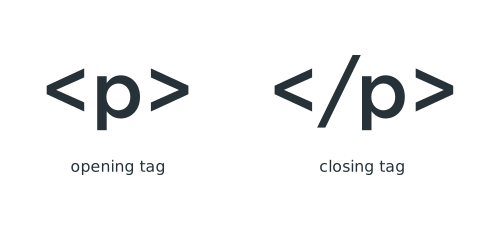
However, some elements are considered empty and are exceptions to this.

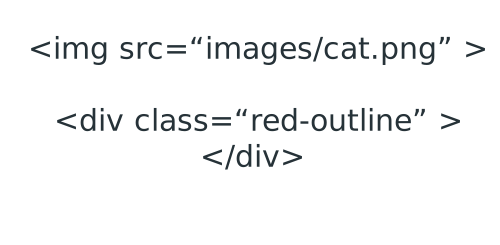
Some elements also take attributes. Attributes provide additional information about an element from a defined value.
Values, such as classes, ids, sources and more, are contained within quotes.
Before we get too far, we need to tell our browser what kind of document we have, and dictate that we plan to use HTML to write our code.
In your HTML document, add the following:
<!DOCTYPE html>
<html>

</html>
Inside your HTML tags, we need to add head and body tags.
<!DOCTYPE html>
<html>
<head>

</head>

<body>


</body>
</html>
Inside the head tags, we can add a title element that dictates the title of the page we are building!
Go ahead, name your site!
<!DOCTYPE html>
<html>
<head>
    <title>Converting to Code</title>
</head>

<body>


</body>
</html>
Nesting
As mentioned earlier, elements have the ability to nest. Nesting helps create the outline previously mentioned. When nesting, whatever is opened first, closes last:
<!DOCTYPE html>
<html>
<head>
    <title>Converting to Code</title>
</head>

<body>
    <div>
        <p>This is a nested element - four levels in.</p>
    <div>
</body>
</html>
Questions?
DIVS
Divs are incredibly common. They contain other nested HTML elements, and help organize content. Divs play a large role when it comes to styling your website.
<!DOCTYPE html>
<html>
<head>
    <title>Converting to Code</title>
</head>

<body>
    <div>
        <p>This is an excellent paragraph about the wonders of
           structuring your content properly.</p>

        <p>Don't forget to close your paragraph tags!</p>
    <div>
</body>
</html>
html5 sections
The latest iteration of HTML, HTML5, introduced a number of titled div sections that directly relate to where they should be used. Some of these elements are header, footer, section, article and figure.
<!DOCTYPE html>
<html>
<head>
    <title>Converting to Code</title>
</head>

<body>
    <section>
        <p>This is an excellent paragraph about the wonders of
           structuring your content properly.</p>

        <p>Don't forget to close your paragraph tags!</p>
    </section>
</body>
</html>
Add three divs inside a main div in your HTML file.
Your file should look like this:
<!DOCTYPE html>
<html>
<head>
    <title>Converting to Code</title>
</head>

<body>
    <div>
        <div>

        </div>
        <div>

        </div>
        <div>

        </div>
    <div>
</body>
</html>
Paragraphs
Paragraphs are defined with a <p> tag. They help organize content into a readable format.
<p>This is where content lives on your website. This can be about anything at all!</p>Headings
Think of headings like the titles of your paragraphs. There are 6 levels of headings for 6 levels of content. H1 being the top heading, often the title of the page.
        <h1>The Wonders of HTML</h1>
        <p>This is an excellent paragraph about the wonders of
           structuring your content properly.</p>
Inside the first div that is nested within your main div, add a h1, h2 and p tag (with the copy from your sample file).
<!DOCTYPE html>
<html>
<head>
    <title>Converting to Code</title>
</head>

<body>
    <div>
        <div>
           <h1>A Bit About Front End Development</h1>
          <h2>And Why You Should Learn It</h2>
          <p>Lorem ipsum dolor sit amet, consectetur adipiscing elit. Morbi a vestibulum leo, sed volutpat lacus. Maecenas et venenatis nibh. Fusce pulvinar nisl id turpis aliquet suscipit.</p>
        </div>
        <div>

        </div>
        <div>

        </div>
    <div>
</body>
</html>
Formatting
<em> makes your text italicized. <strong> makes it bold.
When using either of these tags, wrap all the words that should be formatted within an opening and closing tag.
<!DOCTYPE html>
<html>
<head>
    <title>Converting to Code</title>
</head>

<body>
    <div>
        <h1>The Wonders of HTML</h1>
        <p>This is an <em>excellent paragraph</em> about the wonders of
           structuring your content properly.</p>

        <h2>The Importance of Closing Your Tags</h2>
        <p>Don't forget to <strong>close</strong> your paragraph tags!</p>
    <div>
</body>
</html>
Give it a shot! See what adding <em> and <strong> does to the copy inside your <p> tag!
Links
Links consist of three components:
<a> tag, href attribute and a title attribute.
<!DOCTYPE html>
<html>
<head>
    <title>Converting to Code</title>
</head>

<body>
    <div>
        <h1>The Wonders of HTML</h1>
        <p>This is an <em>excellent paragraph</em> about the wonders of
           structuring your content properly.</p>
        <a href="http://www.codeacademy.com">Learn More</a>

        <h2>The Importance of Closing Your Tags</h2>
        <p>Don't forget to <strong>close</strong> your paragraph tags!</p>
    <div>
</body>
</html>
Inside the second div within your main div, add the rest of your copy, including the links.
    <div>
      <h3>What Languages Make Up Front End Development?</h3>

      <p>Phasellus lobortis orci at dictum lacinia. Ut bibendum lectus at nulla pellentesque, ut tristique erat molestie. Donec suscipit fringilla libero, id sollicitudin enim aliquet ut. Integer et risus at nibh facilisis hendrerit eu et sem. Ut blandit tellus ac turpis dictum vehicula. Proin ac ante neque.</p>

      <p>HTML, CSS, JavaScript </p>

      <h3>Resources to Learn</h3>

          <a href="http://codeacademy.com">CodeAcademy</a>

          <a href="http://teamtreehouse.com">Treehouse</a>

          <a href="http://w3schools.com">W3Schools</a>


      <h3>The Future of Front End Development Looks Bright</h3>
      <p>Integer lacinia justo posuere lectus viverra, ultricies eleifend nisl bibendum. Donec sit amet leo vitae ante vulputate euismod lacinia ut nisi. Nullam sed sapien elementum, vestibulum massa et, accumsan orci. Donec feugiat, risus vel iaculis cursus, metus tellus condimentum velit, nec rutrum ante enim quis tortor. In hac habitasse platea dictumst. Donec tristique elit justo, sit amet feugiat dolor sollicitudin venenatis. </p>

      <p>Phasellus purus urna, posuere vitae dui quis, congue convallis diam. Nullam rutrum, dui auctor gravida aliquet, risus tortor pretium purus, non tristique ligula dui sed turpis. Sed rhoncus mollis velit, in ornare ligula sagittis nec. Nunc vel massa ligula. Phasellus vulputate ut metus quis eleifend. Aliquam ut eros sit amet lectus scelerisque suscipit et a est. Cras ut metus lorem. Quisque quis tortor at augue interdum molestie.</p>
    </div>
Lists
Lists come in two forms: ordered and unordered. Unordered lists display bullet points. Ordered lists display a numbered list.
<ul>
    <li> Item #1</li>
    <li> Item #2</li>
    <li> Item #3</li>
    <li> Item #4</li>
    <li> Item #5</li>
</ul>


<ol>
    <li> Item #1</li>
    <li> Item #2</li>
    <li> Item #3</li>
    <li> Item #4</li>
    <li> Item #5</li>
</ol>
Where in our content could we use an unordered list?
Where could we use an ordered list?
    <div>
      <h3>What Languages Make Up Front End Development?</h3>

      <p>Phasellus lobortis orci at dictum lacinia. Ut bibendum lectus at nulla pellentesque, ut tristique erat molestie. Donec suscipit fringilla libero, id sollicitudin enim aliquet ut. Integer et risus at nibh facilisis hendrerit eu et sem. Ut blandit tellus ac turpis dictum vehicula. Proin ac ante neque.</p>

      <ol>
        <li>HTML</li>
        <li>CSS</li>
        <li>JavaScript</li>
      </ol>

      <h3>Resources to Learn</h3>
        <ul>
           <li>
              <a href="http://codeacademy.com">CodeAcademy</a>
           </li>
           <li>
              <a href="http://teamtreehouse.com">Treehouse</a>
           </li>
           <li>
              <a href="http://w3schools.com">W3Schools</a>
           </li>
        </ul>

      <h3>The Future of Front End Development Looks Bright</h3>
      <p>Integer lacinia justo posuere lectus viverra, ultricies eleifend nisl bibendum. Donec sit amet leo vitae ante vulputate euismod lacinia ut nisi. Nullam sed sapien elementum, vestibulum massa et, accumsan orci. Donec feugiat, risus vel iaculis cursus, metus tellus condimentum velit, nec rutrum ante enim quis tortor. In hac habitasse platea dictumst. Donec tristique elit justo, sit amet feugiat dolor sollicitudin venenatis. </p>

      <p>Phasellus purus urna, posuere vitae dui quis, congue convallis diam. Nullam rutrum, dui auctor gravida aliquet, risus tortor pretium purus, non tristique ligula dui sed turpis. Sed rhoncus mollis velit, in ornare ligula sagittis nec. Nunc vel massa ligula. Phasellus vulputate ut metus quis eleifend. Aliquam ut eros sit amet lectus scelerisque suscipit et a est. Cras ut metus lorem. Quisque quis tortor at augue interdum molestie.</p>
    </div>
Images
Every good website has images! Image tags consist have two attributes: src & alt
        <img src="https://www.instagram.com/p/BVKpKI9Bupz/?taken-by=brisayswhaat"
             alt="Fern, the cat">
    <div>
      <h3>What Languages Make Up Front End Development?</h3>

      <p>Phasellus lobortis orci at dictum lacinia. Ut bibendum lectus at nulla pellentesque, ut tristique erat molestie. Donec suscipit fringilla libero, id sollicitudin enim aliquet ut. Integer et risus at nibh facilisis hendrerit eu et sem. Ut blandit tellus ac turpis dictum vehicula. Proin ac ante neque.</p>

      <ol>
        <li>HTML</li>
        <li>CSS</li>
        <li>JavaScript</li>
      </ol>

    <img src="images/fern.png">

      <h3>Resources to Learn</h3>
        <ul>
           <li>
              <a href="http://codeacademy.com">CodeAcademy</a>
           </li>
           <li>
              <a href="http://teamtreehouse.com">Treehouse</a>
           </li>
           <li>
              <a href="http://w3schools.com">W3Schools</a>
           </li>
        </ul>

      <h3>The Future of Front End Development Looks Bright</h3>
      <p>Integer lacinia justo posuere lectus viverra, ultricies eleifend nisl bibendum. Donec sit amet leo vitae ante vulputate euismod lacinia ut nisi. Nullam sed sapien elementum, vestibulum massa et, accumsan orci. Donec feugiat, risus vel iaculis cursus, metus tellus condimentum velit, nec rutrum ante enim quis tortor. In hac habitasse platea dictumst. Donec tristique elit justo, sit amet feugiat dolor sollicitudin venenatis. </p>

      <p>Phasellus purus urna, posuere vitae dui quis, congue convallis diam. Nullam rutrum, dui auctor gravida aliquet, risus tortor pretium purus, non tristique ligula dui sed turpis. Sed rhoncus mollis velit, in ornare ligula sagittis nec. Nunc vel massa ligula. Phasellus vulputate ut metus quis eleifend. Aliquam ut eros sit amet lectus scelerisque suscipit et a est. Cras ut metus lorem. Quisque quis tortor at augue interdum molestie.</p>
    </div>
Questions?
Getting started with CSS
Create a new file, and save it in the same folder as your index.html file, but name it style.css
Keep your index.html file open, and add the following line inside the head tag.
<link rel="stylesheet" type="text/css" href="style.css">
CSS SYNTAX
CSS is written differently than HTML; CSS uses curly brackets, semi-colons, and colons to create declarations. Declarations consist of a property and its corresponding value. Declaration groups are groups of declarations that apply to a single tag.
h1 {
    font-family: Helvetica, Arial, sans-serif;
    color: green;
    font-size: 32px;
}
Elements
We want to attach our styles to our HTML elements. But how? HTML elements can be added by writing them out in our stylesheet, or by giving them a class or id.
h1 {
    font-family: Helvetica, Arial, sans-serif;
    color: green;
    font-size: 32px;
}
Classes v. ids
The general rule to follow is that classes can be used more than once, whereas IDs should only be used on a single element. Classes can help keep visual elements consistent.
Can you give an example of what might make a good class?
Giving an element a class allows developers to not repeat themselves and keep their code 'D.R.Y' (Don't Repeat Yourself). This is also useful for keeping the visual elements of your website consistent with the design provided.
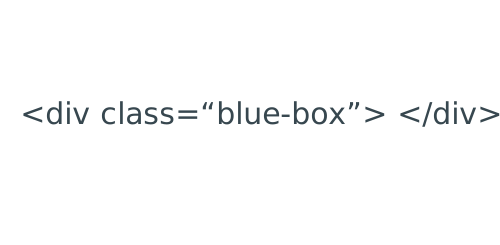
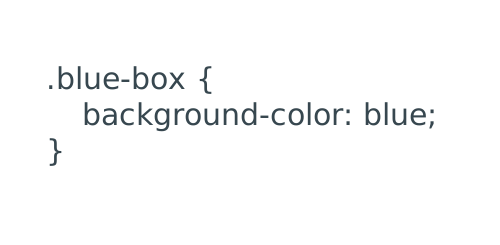
class
On the HTML side, classes are defined using:
On the CSS side, classes are defined using:
color
Color can be defined four ways:
1. Color Name: black
2. Hexadecimal Value: #000000
3. RGB Value: rgb(255, 255, 255)
4. HSL Value: hsl(0, 100%, 100%)
Let's add some color.
In your stylesheet, write out the element body.
Give that element a background-color.
body {
    background-color:
}
In your html document:
1. Give your first div a class called "wrapper".
2. On the second div, add a class called "header".
<div class="wrapper">

    <div class="header">
      <h3>What Languages Make Up Front End Development?</h3>

      <p>Phasellus lobortis orci at dictum lacinia. Ut bibendum lectus at nulla pellentesque, ut tristique erat molestie. Donec suscipit fringilla libero, id sollicitudin enim aliquet ut. Integer et risus at nibh facilisis hendrerit eu et sem. Ut blandit tellus ac turpis dictum vehicula. Proin ac ante neque.</p>

      <ol>
        <li>HTML</li>
        <li>CSS</li>
        <li>JavaScript</li>
      </ol>

    <img src="images/fern.png">

      <h3>Resources to Learn</h3>
        <ul>
           <li>
              <a href="http://codeacademy.com">CodeAcademy</a>
           </li>
           <li>
              <a href="http://teamtreehouse.com">Treehouse</a>
           </li>
           <li>
              <a href="http://w3schools.com">W3Schools</a>
           </li>
        </ul>

      <h3>The Future of Front End Development Looks Bright</h3>
      <p>Integer lacinia justo posuere lectus viverra, ultricies eleifend nisl bibendum. Donec sit amet leo vitae ante vulputate euismod lacinia ut nisi. Nullam sed sapien elementum, vestibulum massa et, accumsan orci. Donec feugiat, risus vel iaculis cursus, metus tellus condimentum velit, nec rutrum ante enim quis tortor. In hac habitasse platea dictumst. Donec tristique elit justo, sit amet feugiat dolor sollicitudin venenatis. </p>

      <p>Phasellus purus urna, posuere vitae dui quis, congue convallis diam. Nullam rutrum, dui auctor gravida aliquet, risus tortor pretium purus, non tristique ligula dui sed turpis. Sed rhoncus mollis velit, in ornare ligula sagittis nec. Nunc vel massa ligula. Phasellus vulputate ut metus quis eleifend. Aliquam ut eros sit amet lectus scelerisque suscipit et a est. Cras ut metus lorem. Quisque quis tortor at augue interdum molestie.</p>
    </div>


</div>
In your CSS document:
1. Declare .wrapper
2. Declare .header
3. Give each of those a background color!
.wrapper {

}

.header {

}
.wrapper {
background-color: orange;
}
.header {
background-color: lightblue;
}In your CSS document, list out the heading tags from your HTML document, along with your paragraph tag.
Hint: There should be three heading tags
To add color to your text elements, define color as such:
h1 {
    color: gray;
}

h2 {
    color: navy;
}

h3 {
    color: orange;
}

p {
    color: aqua;
}
Multiple values
Some CSS declarations will accept more than one value to a property. These lists will typically act as fall-backs if the first value is missing, or unable to be translated to the browser.
Font-family is an example of this:
p {
    color: aqua;
    font-family: Helvetica, Arial, sans-serif;
}
type styles
CSS can define font-families, colors, font-sizes, styles, weights, and more. Let's take a look at our heading elements:
h1 {
    color: blue;
}
Add a font-family, font-size, color, and font-weight to your heading elements:
h1 {
    font-family: 'Times New Roman', Georgia, serif;
    color: blue;
    font-size: 36px;
    font-weight: bold;
}

h2 {
    font-family: Helvetica, Arial, sans-serif;
    color: aqua;
    font-size: 21px;
    font-weight: bold;
}
Width, height, max-width, min-width, max-height and min-height can all help size and layout your website. These declarations apply to almost any element and most commonly take pixel values.
However, down the road, you can use relative sizing and percentage based sizing.
Add a height and width to some of the divs in your website and see how they interact with one another.
any questions?
deck
By Bri Piccari