Serverless PHP with Bref
PHPDD 2026
Carsten Windler
The content of this talk reflects my experiences and opinions with Bref. Neither I'm saying that our approach should be treated as best-practice, nor am I in any way affiliated with the project.
DISCLAIMER

1. BASICS
-
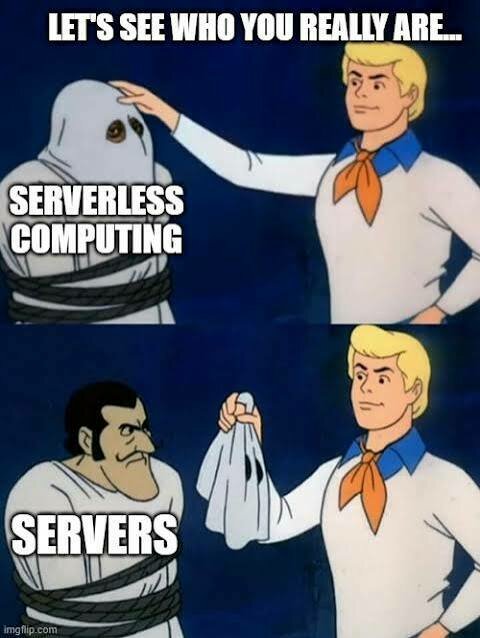
Small code packages (Lambda functions)
-
Server maintained by a provider
-
Low maintenance effort
-
Highly scalable (in theory)
-
Single execution is cheap
Serverless?
-
Plan A's B2B API
-
Fluctuating utilization rate
-
Need to scale fast occasionally
-
Response times not overly important
-
Open to many languages
-
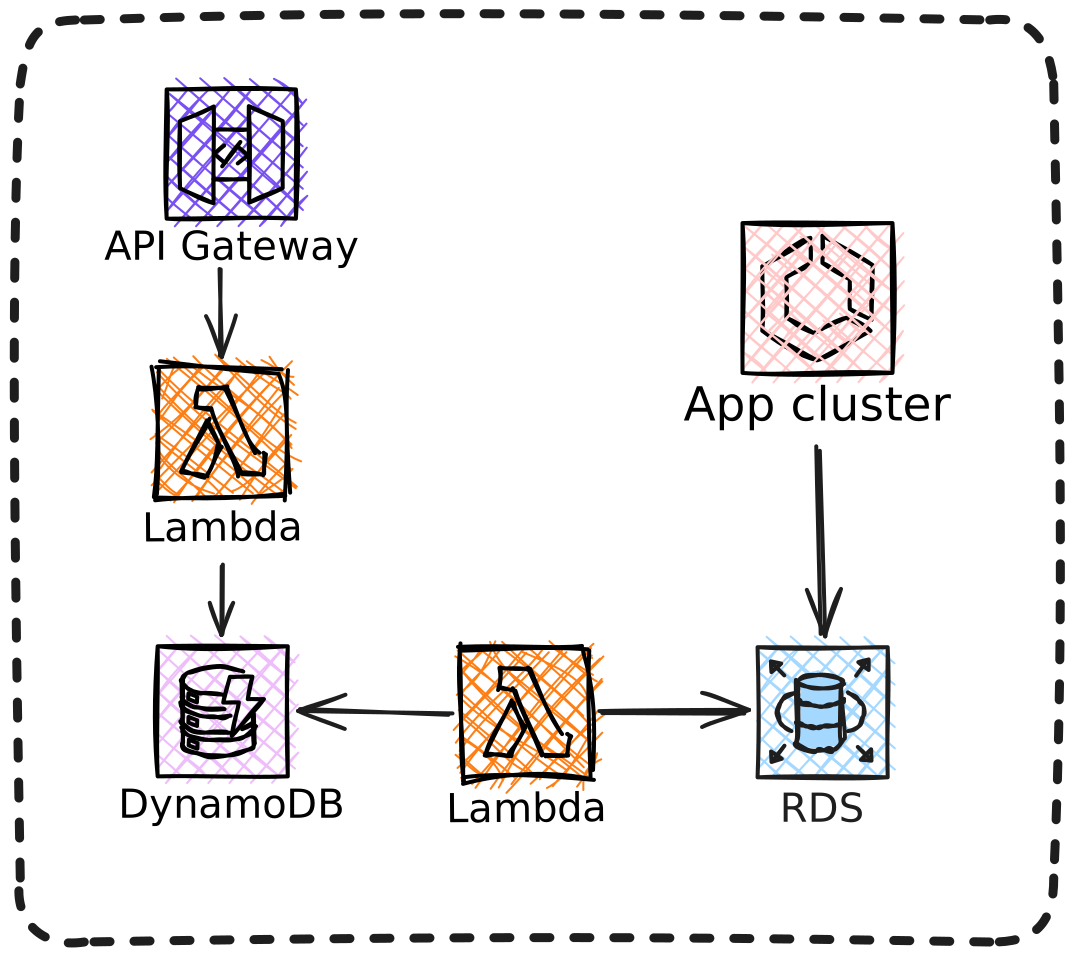
AWS Infrastructure
Our problem
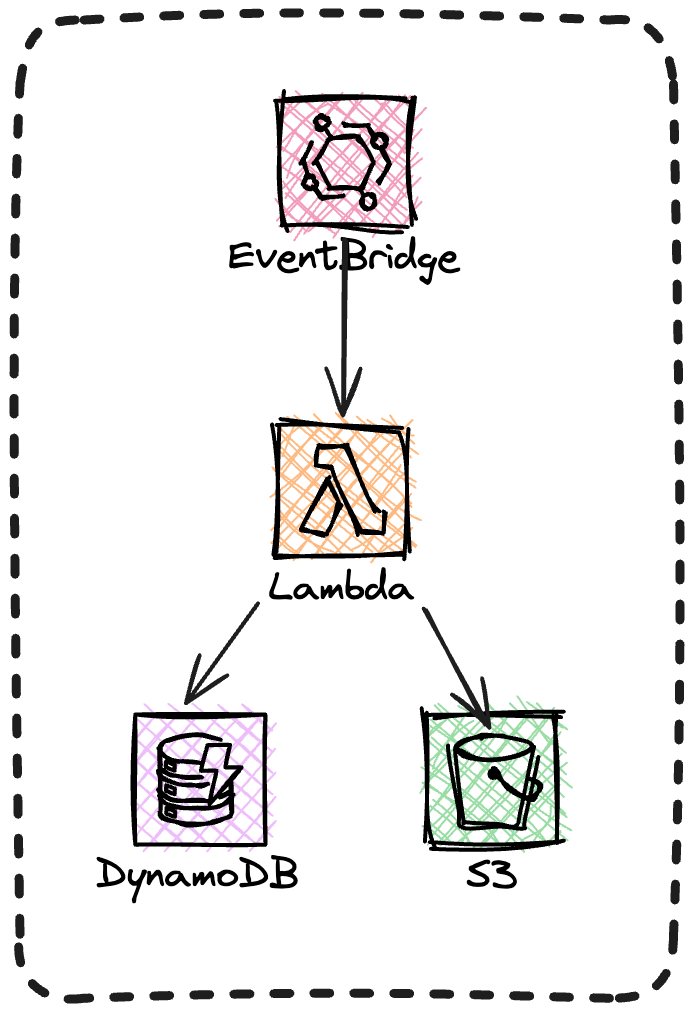
-
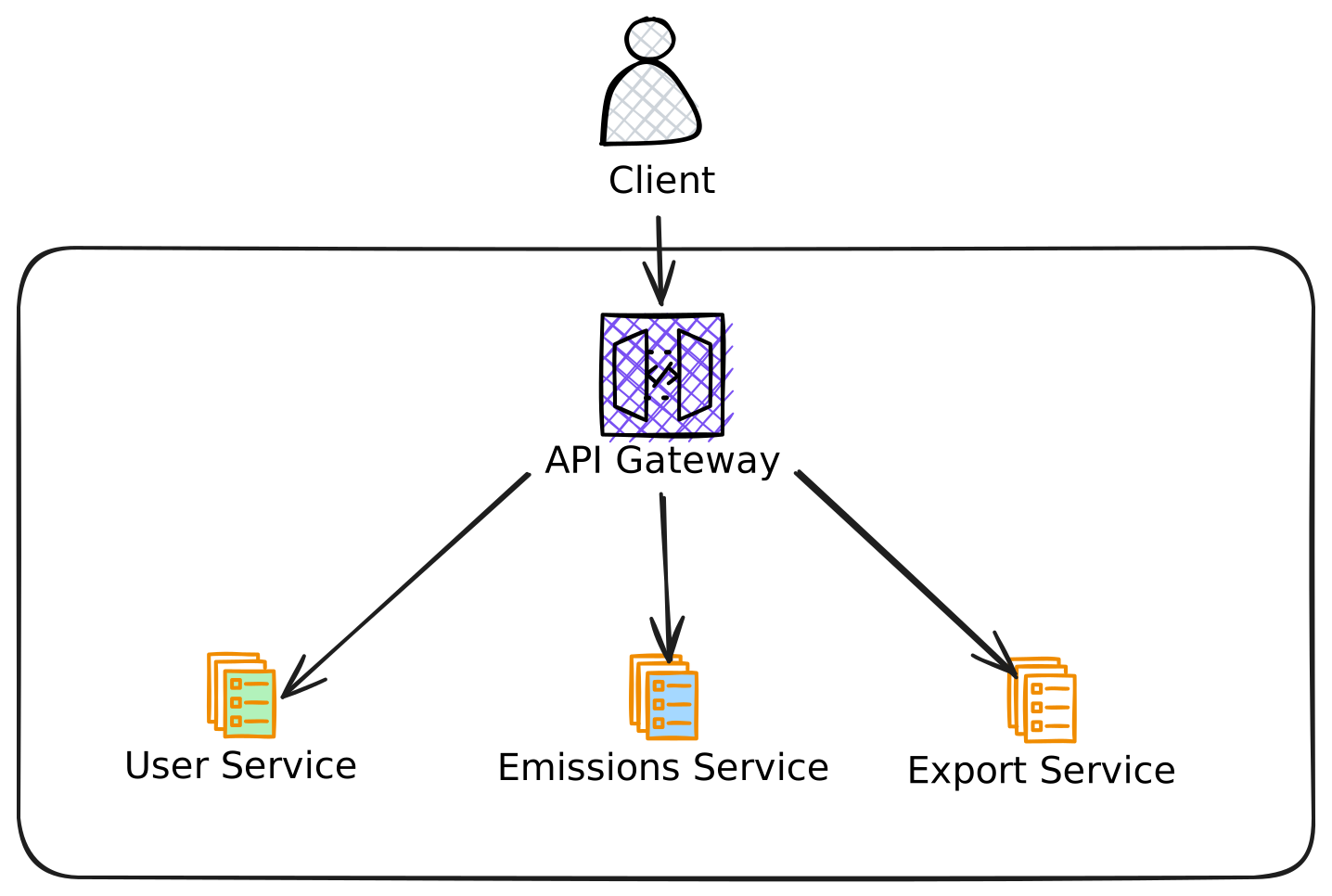
API Gateway pattern
-
AWS ApiGateway (REST)
-
Authentication, Rate limiting...
-
Variable stack
-
-
PHP
-
API Design-First (OpenAPI 3.0)
-
GitHub Actions
-
Terraform
Our approach
-
AWS has no PHP Lambda runtime (shame!)
-
Bref provides Lambda layer + runtime
-
Tools for local development
-
Bref is not a framework
Why Bref?

2. OUR SETUP
-
Bref 3.x
-
AWS ApiGateway (API)
-
AWS Eventbridge (cronjobs)
-
Automated tests
-
PHPUnit, Cypress
-
-
Code quality
-
PHP-CS-Fixer, PHPStan
-
-
OpenAPI schema validation
Our setup
Code structure
docker-compose.yml (uses base file)
Makefile (uses base file)
Our Lambda's are basically tiny PHP projects
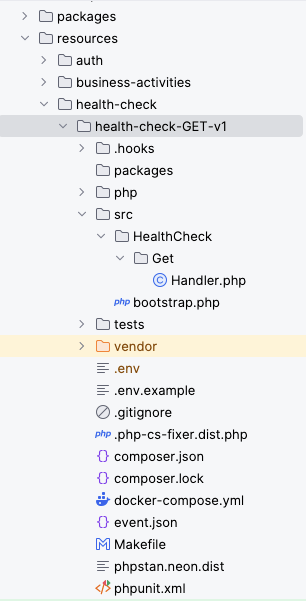
Organized by API resources
Shared code packages
Named by HTTP verb and version
Main entry point
-
Entry point
-
Autoloading, DI
-
Instanciate handler
Bootstrap
<?php // bootstrap.php

use PlanAEarth\ExternalApi\Resource\HealthCheck\Get\Handler;

require_once __DIR__.'/../vendor/autoload.php';

return new Handler();-
Extends our abstract handler
-
main()is the main function
Event handler
<?php // Handler.php

namespace PlanAEarth\ExternalApi\Resource\HealthCheck\Get;

class Handler extends \PlanAEarth\LambdaPhp\Event\Handler
{
    public function main(): array
    {
        return $this->response([
            'timestamp' => time(),
            'status' => 'OK',
        ]);
    }
}
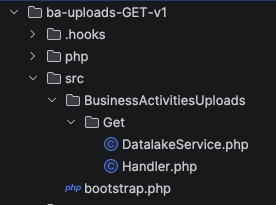
<?php // bootstrap.php

use GuzzleHttp\Client;
use PlanAEarth\ExternalApi\Resource\BusinessActivitiesUploads\Get\DatalakeService;
use PlanAEarth\ExternalApi\Resource\BusinessActivitiesUploads\Get\Handler;

require_once __DIR__.'/../vendor/autoload.php';

$guzzleClient = new Client();
$baseDatalakeUrl = env('DATALAKE_BASE_URL');

return new Handler(
    new DatalakeService($guzzleClient, $baseDatalakeUrl),
);
"Dependency Injection"
AbstractHandler
-
Extends Bref Handler
-
Provide Event context
-
Parameter validation
-
query, path
-
-
Monitoring
-
Logging
-
Error handling
-
Authorization
class Handler extends \PlanAEarth\LambdaPhp\Event\Handler
{
    protected array $permissionGroups = ['business-activities:read'];

    public function __construct(
        private readonly TemplateService $templateService
    ) {
    }

    public function main(): array
    {
        $parameters = $this->validateParameters(
            requiredPathParameters: [ 'ba_type' ],
            requiredQueryStringParameters: [
              'calculation_method',
              'category_name'
            ],
        );

        $body = $this->getBody();

        // Super secret code here

        return $this->response($result);
    }
}
3. DEVELOPMENT
# Docker compose
docker compose run app vendor/bin/bref-local --path=event.json src/bootstrap.php

# Makefile
make run
Run the Lambda locally
{
  "queryStringParameters": {
    "parameter1": "value1,value2",
    "parameter2": "value"
  },
  "requestContext": {
    "authorizer": {
      "claims": {
        "username": "t.ester",
        "groups": "business-activities:read,business-activities:write",
        "email": "t.ester@plana.earth"
      }
    }
  },
  "body": "body content",
  "pathParameters": {
    "parameter1": "value1"
  }
}
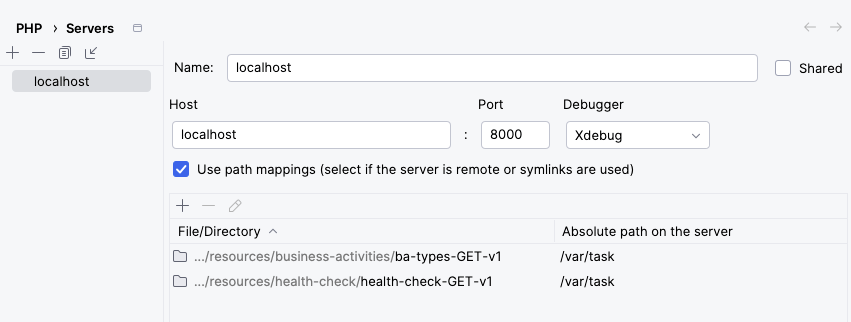
Debugging locally

-
Xdebug installed in Docker dev containers
-
php.ini changes required
-
XDebug settings problem
Unit tests
 public function testHandle(): void
 {
 	$someServiceMock = $this->createMock(SomeService::class);

    $handler = new Handler($someServiceMock);

    $responseArray = $handler->handle(
    	$this->loadJsonFixture(__DIR__ . '/fixtures/event.json'),
        Context::fake()
    );

    $this->assertEquals(200, $responseArray['statusCode']);
 }
Deployments
- Partly automated through Github Actions
- Not using "serverless" (the framework)
- Reducing dependencies
- Deploy through
makescript- 1. Copy code to temp folder
- 2. Remove dev code
- 3. Zip folder
- 4. Upload to S3
- 5. Instruct Lambda to update
aws s3 cp $(NAME).zip \
    s3://$(S3_BUCKET_NAME_DEV)/$(NAME).zip

aws s3api wait object-exists \
	--bucket $(S3_BUCKET_NAME_DEV) \
	--key $(NAME).zip \
	--cli-read-timeout 60 \
	--cli-connect-timeout 60

aws lambda update-function-code
	--function-name $(NAME) \
	--region $(AWS_REGION) \
	--s3-bucket $(S3_BUCKET_NAME_DEV) \
	--s3-key $(NAME).zip \
	--no-cli-pager
-
\Bref\Logger\StderrLogger()
-
Cloudwatch
-
EMF Emitter
-
-
Bugsnag
-
Exceptions and errors
-
- Slack 😬
Logging & Monitoring

4. PITFALLS
Cold start latency
Lambdas are only provisioned when needed. Starting the execution environment can take several seconds.

Options:
- Provisioned Concurrency
- Keep functions warm
- Optimize the deployment package
- Increase memory allocation
Timeouts
- AWS Lambdas max execution time is 15 minutes
- AWS ApiGateway times out after 28 seconds
- Log timeouts
Filesystem Limitations
- Lambdas don't share a filesystem
- They do have an ephemeral storage
- You have to use e.g. S3
Rate Limiting
Lambdas scale fast. Make sure to set thresholds early and protect your DB.


5. IN THE WILD
-
Cold start latency
-
No problem for us specifically
-
Improve through larger instances and smaller functions
-
-
Performance
-
Also no problem for us
-
AWS ApiGateway adds latency
-
-
Scaling
-
Unlimited*
-
*unless you have no DB or other bottlenecks
-
Scaling and performance

https://www.pexels.com/photo/vector-illustration-of-cheerful-man-in-flying-rocket-6289027/
Lambda size and performance
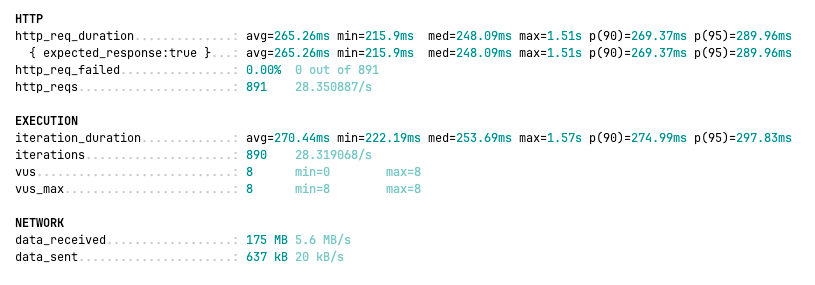
512MB
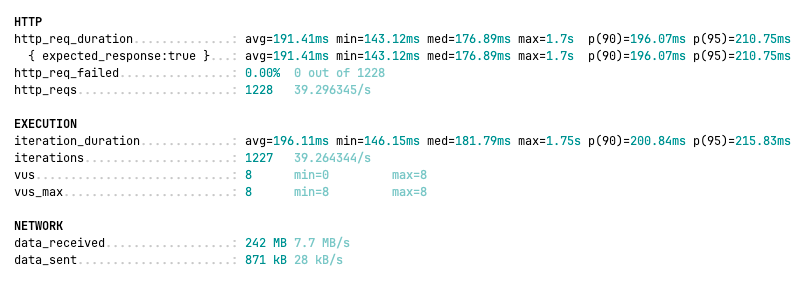
2048MB
-
Be picky with dependencies
-
AWS SDK: ~52MB (~6.7 compressed)
-
AsyncAWS: ~1.1MB for DynamoDB
-
-
Remove unnecessary code
-
Benefits
-
Faster cold starts
-
Edit in AWS Console
-
Keep your functions small

https://unsplash.com/photos/brown-sand-with-heart-shaped-stones--mMEEkgj5fU

-
AWS
-
Layer updates through Terraform
-
-
Local
-
Docker compose
-
All extend from single base file
-
-
Composer updates
-
Can be cumbersome
-
Help through scripts and/or AI
- Redundant, as no composer base file possible (afaik)
-
Maintenance

https://unsplash.com/photos/person-holding-gray-and-black-metal-tool-5tYUk7sZzqc
6. CONCLUSIONS
-
Low maintenance
-
Flexible
-
Quick editing in AWS Console (if necessary)
-
(Unlimited) scaling
-
Pay per use
-
Less carbon emissions
Serverless PHP - what we liked
Serverless PHP - what not
-
Code organization, redundancy
-
IDE problems
-
Onboarding of team members
-
Vendor lock-in
-
Bref
-
AWS
-

https://unsplash.com/photos/orange-fruit-on-white-table-22dqS6wPgzY
Carsten Windler
linkedin.com/in/cwindler
carsten@windler.dev


Thank you!

windler.dev

@cwindler@mastodon.green
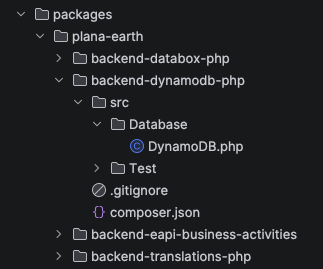
<?php

namespace PlanAEarth\DynamoDbPhp\Database;

use AsyncAws\DynamoDb\DynamoDbClient;

class DynamoDB
{
    public static function getClient(): DynamoDbClient
    {
        $dynamoDbClientConfig = [
            'region' => env('AWS_REGION'),
            'accessKeyId' => env('DYNAMODB_ACCESS_KEY'),
            'accessKeySecret' => env('DYNAMODB_ACCESS_SECRET'),
        ];

        return new DynamoDbClient($dynamoDbClientConfig);
    }
}
Packages
〞
To framework, or not to framework, that is the question.
– The unknown dev
if (!function_exists('env')) {
    function env(string $envName, string $default = ''): string
    {
        if (!isset($_ENV[$envName])) {
            if ($default !== '') {
                return $default;
            }

            throw new EnvironmentVariableNotSetException("Environment variable $envName not set");
        }

        return $_ENV[$envName];
    }
}

if (!function_exists('logger')) {
    function logger(): LoggerInterface
    {
        return new StderrLogger(env('LOG_LEVEL', LogLevel::INFO));
    }
}
Helper
AWS
-
IaC (Terraform)
-
AWS
-
ApiGateway
-
Lambda
-
SNS/SQS
-
DynamoDB
-
Eventbridge
-
resource "aws_lambda_function" "health-check-GET" {
  function_name    = "${local.global_prefix}-${local.lambda_health_check_get_name}-v1"
  handler          = "src/bootstrap.php"
  runtime          = "provided.al2"
  layers           = [
    var.php_bref_layer_arn,
    var.newrelic_lambda_layer_arn
  ]
  role             = aws_iam_role.external_api_lambda_execution_role.arn
  memory_size      = 256
  timeout          = 5
  s3_bucket        = local.lambda_s3_bucket
  s3_key           = "${local.lambda_health_check_get_name}-v1.zip"

  vpc_config {
    subnet_ids         = var.vpc_private_subnets
    security_group_ids = [aws_security_group.external-api-lambda-security-group.id]
  }

  environment {
    variables = {
		# ...
    }
  }
}-
Simple
-
Clearly separated
-
Fast
-
Easy to deploy
-
Easy to debug
Pros
-
Overhead
-
redundant composer
-
-
IDE problems
-
multiple vendor folders
-
packages
-
debugging (XDebug setup)
-
-
AWS IaC separated from code
Cons
- BASICS
- OUR SETUP
- DEVELOPMENT
- PITFALLS
- IN THE WILD
- CONCLUSIONS
Serverless PHP with Bref (PHPDD)
By Carsten Windler