







Content ITV PRO
This is Itvedant Content department
Business Scenario
In this lab, we will explore the architecture and development approach for the Medicare Healthcare Management System, a full-stack app using React, Spring Boot, and MySQL.
Project Introduction & Development Guidelines
What is the Project All About?
1
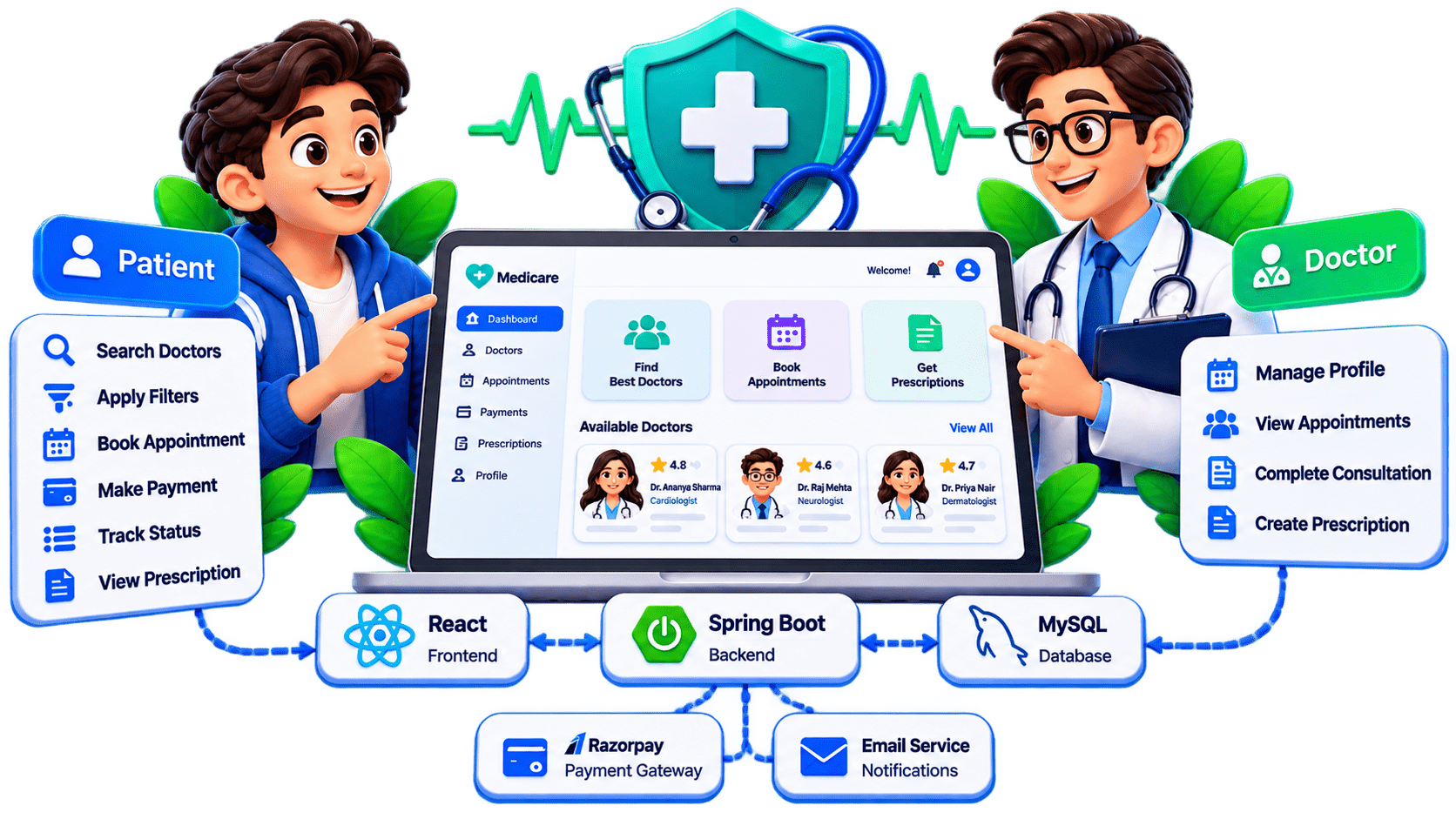
The Medicare Healthcare Management System is a full-stack web application designed to simplify the process of finding doctors, booking appointments, making consultation payments, managing doctor schedules, and handling digital prescriptions.
The project provides separate functionality for two major users:
Patient
Doctor
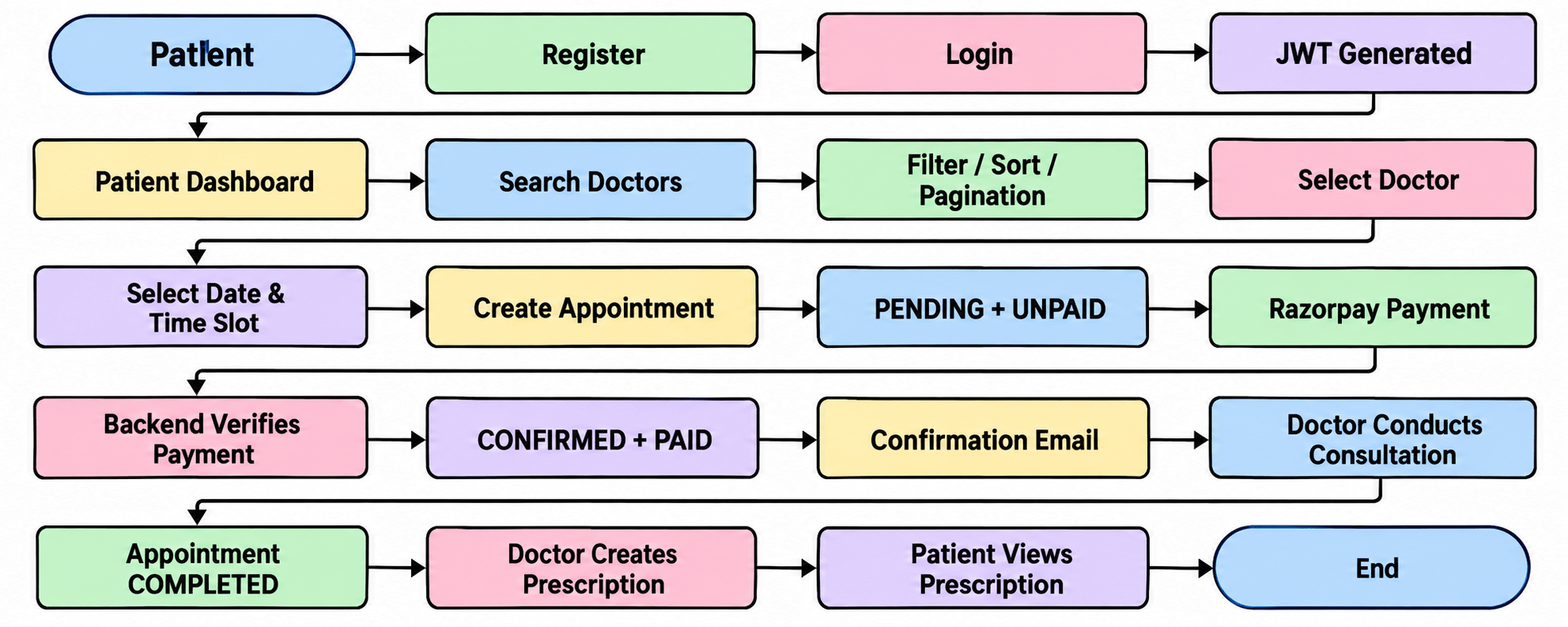
A patient can register, log in, search for doctors, apply filters, book an appointment, make a payment, track appointment status, and view prescriptions after the consultation.
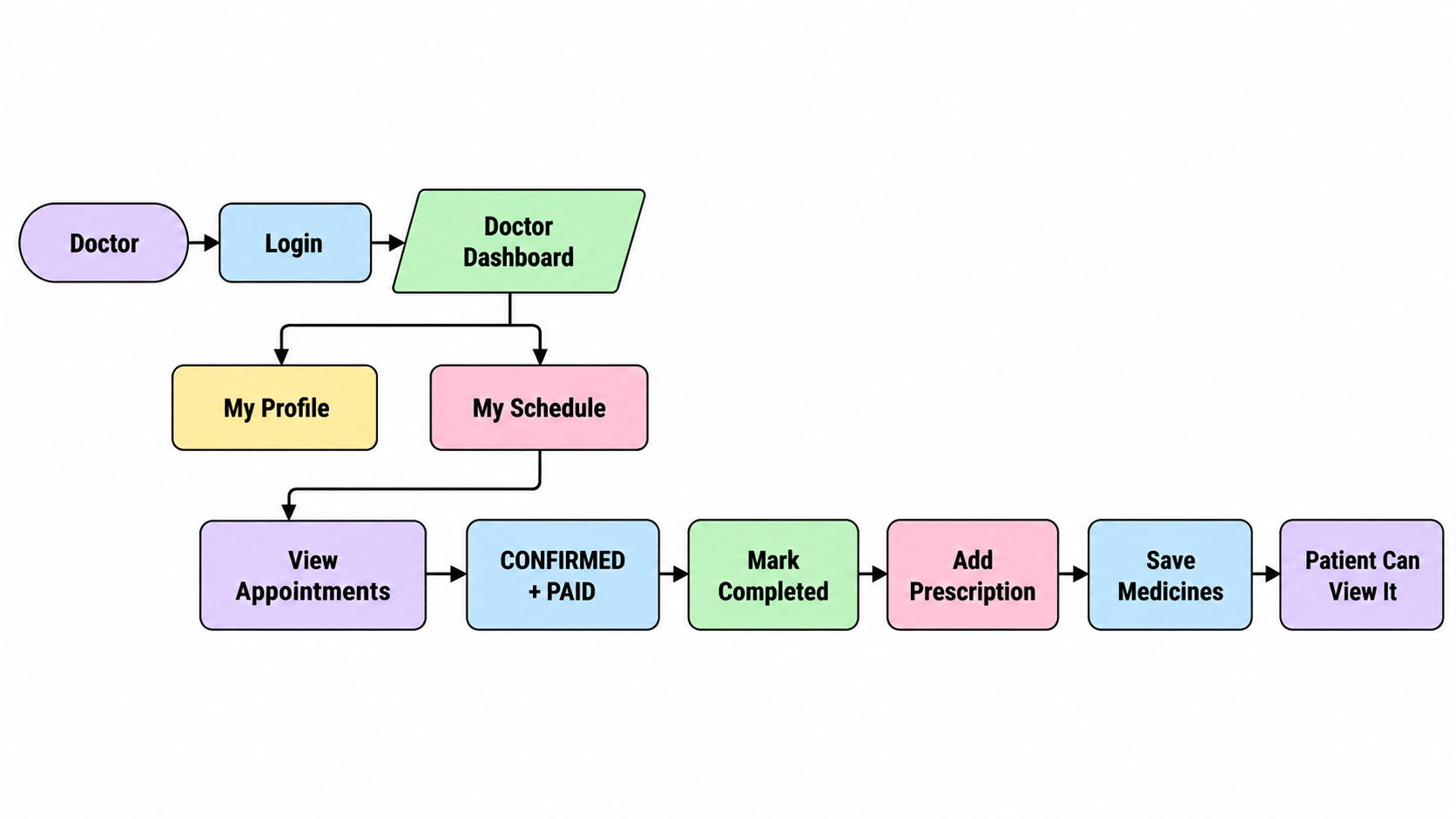
A doctor can log in, manage their professional profile, view scheduled appointments, complete consultations, and create prescriptions for patients.
Why Did We Choose This Project?
2
Healthcare appointment systems are commonly used in hospitals, clinics, telemedicine applications, and healthcare platforms.
We selected this project because it allows us to understand several important full-stack development concepts within a single application.
Through this project, students will learn how different technologies communicate with each other in a real application.
The project covers:
Online payment integration
Email notifications
Prescription management
REST API development
Frontend-backend integration
Exception handling
Form validation
Security and ownership validation
User registration and login
Authentication using JWT
Role-based authorization
Database relationships
Doctor profile management
Searching and filtering data
Pagination and sorting
Appointment booking
What Are We Going to Create?
3
Patient Module
Register into the system
Login using email and password
View their dashboard
View their profile
Search for doctors
Search doctors by name
Filter doctors by specialization
Select a doctor
Select appointment date
Select available time slot
Book an appointment
Make payment using Razorpay Test Mode
View appointment history
Cancel an unpaid appointment
Patient Module
Filter doctors by consultation fee
Sort doctors
View doctors using pagination
View appointment status
View payment status
View prescription after consultation
Receive appointment confirmation email
Patient Module
Login into the system
View doctor dashboard
Create and manage doctor profile
Add specialization
Add years of experience
Set consultation fees
View payment status
Complete confirmed appointments
Create prescription
Add diagnosis
Add multiple medicines
Add dosage
Doctor Module
View scheduled patient appointments
View patient information
View appointment date and time
Add frequency
Add duration
Add doctor notes
Technologies Used
4
The project uses the following technologies:
React, Vite, JavaScript, Bootstrap, Axios, React Router, Context API
Java, Spring Boot, Spring Web, Spring Data JPA, Hibernate, Spring Security, JWT Authentication, Bean Validation
MySql
Razorpay Payment Gateway, Email / SMTP Service
Eclipse / Spring Tool Suite, Visual Studio , Postma, MySQL Workbench, Git, GitHub
       USER
         │
         ▼
   React Frontend
         │
      REST API
         ▼
 Spring Boot Backend
         │
    ┌────┼────┐
    ▼    ▼    ▼
 MySQL Razorpay Email
Technologies Used
5
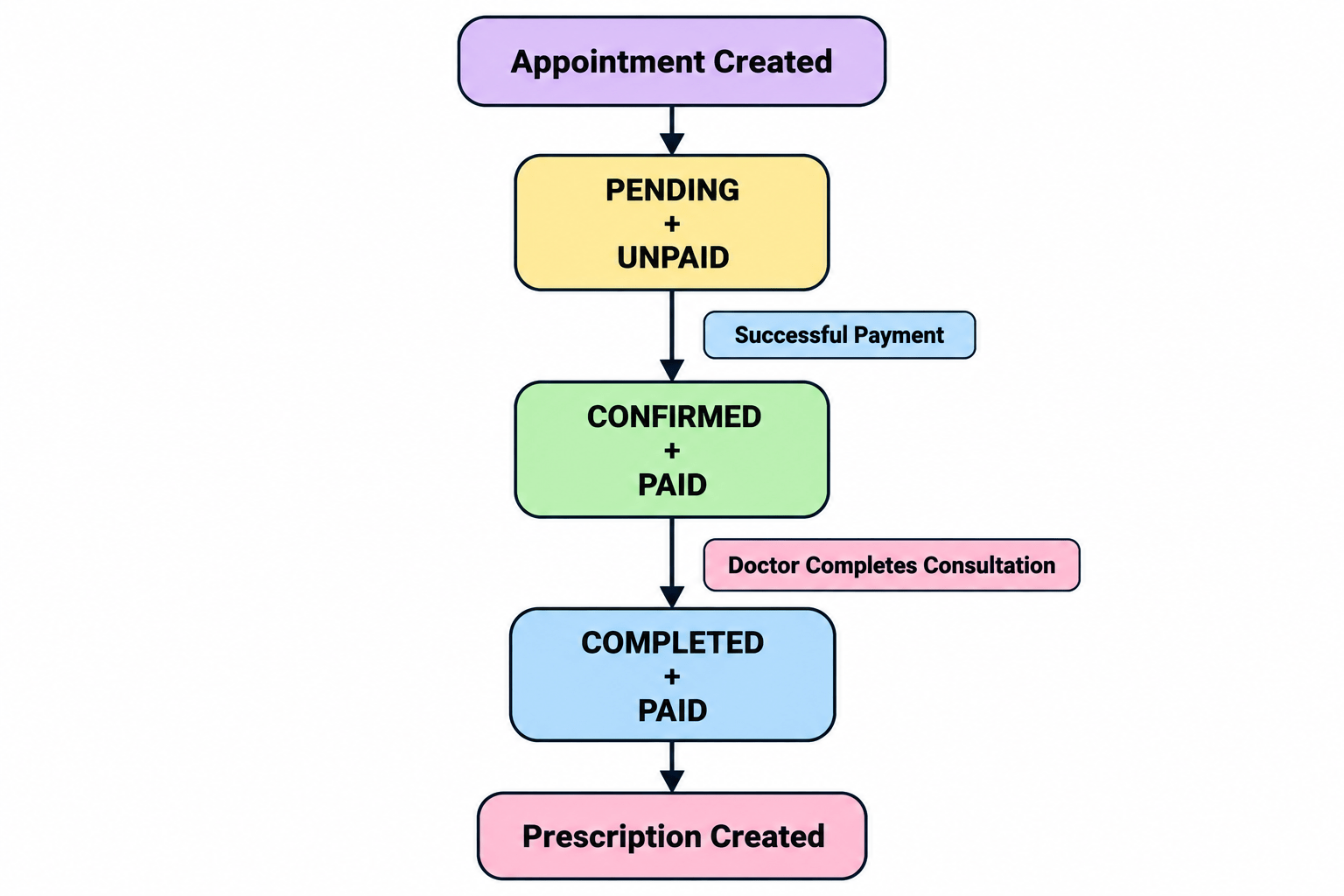
Complete Application Flow
6
PENDING + UNPAID
        │
        ▼
    CANCELLED
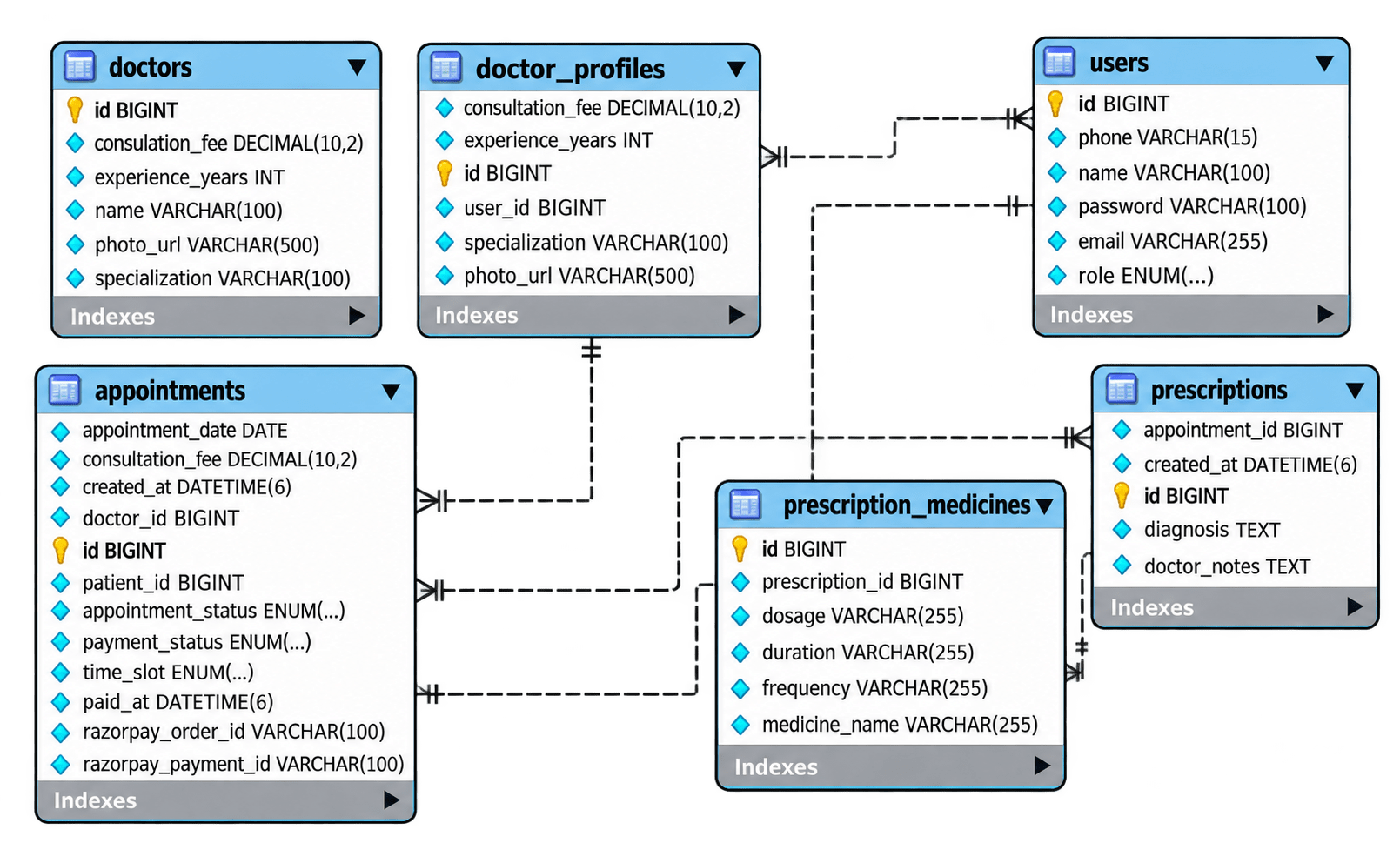
ER Diagram of the Project
7
The supplied ER diagram currently shows both doctors and: doctor_profiles
DoctorProfile itself does not contain: name because name belongs to: User
List<DoctorProfile> findByUser_NameContainingIgnoreCase(String name);DoctorProfile -> User -> Name -> Containing -> IgnoreCase
Dr. Ananya Sharma
ANANYA
ananya
AnAnYa
all work because of: IgnoreCase
But there is a problem...
specialization
name
maxFee
specialization + name
specialization + maxFee
name + maxFee
specialization + name + maxFee
findBySpecializationIgnoreCaseAndConsultationFeeLessThanEqualAndUser_NameContainingIgnoreCase(...)Add a Doctor Response DTO
4
{
    "id": 1,
    "user": {
        "id": 2,
        "name": "Dr. Ananya Sharma",
        "email": "ananya@example.com",
        "phone": "9876543211",
        "role": "DOCTOR"
    },
    "specialization": "Cardiologist",
    "experienceYears": 8,
    "consultationFee": 1200
}email phone role
Doctor ID
Doctor Name
Specialization
Experience
Fee
Photo
Create DoctorResponse
5
dto/
└── DoctorResponse.java
package com.medicare.dto;
import java.math.BigDecimal;

public class DoctorResponse {

    private Long id;
    private String name;
    private String specialization;
    private Integer experienceYears;
    private BigDecimal consultationFee;
    private String photoUrl;
Create:
    public DoctorResponse(
            Long id,
            String name,
            String specialization,
            Integer experienceYears,
            BigDecimal consultationFee,
            String photoUrl) {

        this.id = id;
        this.name = name;
        this.specialization = specialization;
        this.experienceYears = experienceYears;
        this.consultationFee = consultationFee;
        this.photoUrl = photoUrl;
    }

    public Long getId() {
        return id;
    }

    public String getName() {
        return name;
    }

    public String getSpecialization() {
        return specialization;
    }

    public Integer getExperienceYears() {
        return experienceYears;
}
public BigDecimal getConsultationFee() {
return consultationFee;
}
public String getPhotoUrl() {
return photoUrl;
}
}Update DoctorProfileRepository
6
Instead of allowing users to type any random value such as:
repository/
└── DoctorProfileRepository.java
Create:
package com.medicare.repository;
import java.math.BigDecimal;
import java.util.List;
import org.springframework.data.jpa.repository.JpaRepository;
import org.springframework.data.jpa.repository.Query;
import org.springframework.data.repository.query.Param;
import com.medicare.entity.DoctorProfile;

public interface DoctorProfileRepository
        extends JpaRepository<DoctorProfile, Long> {

    boolean existsByUserId(Long userId);

    @Query("""
            SELECT d FROM DoctorProfile d JOIN d.user u WHERE
                (:specialization IS NULL
                   OR LOWER(d.specialization) = LOWER(:specialization))
            AND
                (:maxFee IS NULL OR d.consultationFee <= :maxFee)
            AND
                (:name IS NULL
                  OR LOWER(u.name) LIKE CONCAT(CONCAT('%', LOWER(:name)), '%'))
            """)
    List<DoctorProfile> searchDoctors(
@Param("specialization")
String specialization,
@Param("maxFee")
BigDecimal maxFee,
@Param("name")
String name
);
}Understand JPQL
7
Notice: DoctorProfile and not: doctor_profiles
Why JOIN d.user u?
DoctorProfile -> User -> Name
Optional Specialization
(:specialization IS NULL
OR LOWER(d.specialization) = LOWER(:specialization))Did user provide specialization? │ ┌───┴───┐ NO YES │ │ ignore match specialization filter
Maximum Fee
(:maxFee IS NULL OR d.consultationFee <= :maxFee)
means if: maxFee = 1000 return doctors charging:
₹300
₹500
₹700
₹900
₹1000
₹1200
₹1500
₹2000
Doctor Name Search
LOWER(u.name)
LIKE CONCAT(CONCAT('%', LOWER(:name)), '%')Update DoctorService
8
package com.medicare.service;
import java.math.BigDecimal;
import java.util.ArrayList;
import java.util.List;
import org.springframework.stereotype.Service;
import com.medicare.dto.DoctorProfileRequest;
import com.medicare.dto.DoctorResponse;
import com.medicare.entity.DoctorProfile;
import com.medicare.entity.Role;
import com.medicare.entity.User;
import com.medicare.exception.DoctorNotFoundException;
import com.medicare.exception.UserNotFoundException;
import com.medicare.repository.DoctorProfileRepository;
import com.medicare.repository.UserRepository;

@Service
public class DoctorService {

    private final DoctorProfileRepository doctorRepository;
    private final UserRepository userRepository;

    public DoctorService(
            DoctorProfileRepository doctorRepository,
            UserRepository userRepository) {
this.doctorRepository = doctorRepository;
this.userRepository = userRepository;
}
public DoctorResponse createDoctor(DoctorProfileRequest request) {
User user = findUserById( request.getUserId() );
if (user.getRole() != Role.DOCTOR) {
throw new IllegalArgumentException(
"Doctor profile can only be created for a DOCTOR user"
);
}
if (doctorRepository.existsByUserId(user.getId())) {
throw new IllegalArgumentException(
"Doctor profile already exists for this user"
);
}
DoctorProfile doctor = new DoctorProfile();
doctor.setUser(user);
doctor.setSpecialization(
request.getSpecialization()
); doctor.setExperienceYears(request.getExperienceYears());
doctor.setConsultationFee(request.getConsultationFee());
doctor.setPhotoUrl( request.getPhotoUrl());
DoctorProfile savedDoctor = doctorRepository.save(doctor);
return mapToDoctorResponse(savedDoctor);
}
public List<DoctorResponse> searchDoctors(
String specialization, BigDecimal maxFee, String name) {
specialization = normalizeText(specialization);
name = normalizeText(name);
if (maxFee != null && maxFee.compareTo(BigDecimal.ZERO) <= 0) {
throw new IllegalArgumentException(
"Maximum consultation fee must be greater than zero"
);
}
List<DoctorProfile> doctors = doctorRepository.searchDoctors(
specialization, maxFee, name);
List<DoctorResponse> responses = new ArrayList<>();
for (DoctorProfile doctor : doctors) {
responses.add(mapToDoctorResponse(doctor));
}
return responses;
} public DoctorResponse getDoctorById(Long id) {
DoctorProfile doctor = findDoctorById(id);
return mapToDoctorResponse(doctor);
}
public DoctorResponse updateDoctor(Long id, DoctorProfileRequest request) {
DoctorProfile doctor = findDoctorById(id);
doctor.setSpecialization(request.getSpecialization());
doctor.setExperienceYears(request.getExperienceYears());
doctor.setConsultationFee(request.getConsultationFee());
doctor.setPhotoUrl(request.getPhotoUrl());
DoctorProfile updatedDoctor =doctorRepository.save(doctor);
return mapToDoctorResponse(updatedDoctor);
}
public void deleteDoctor(Long id) {
DoctorProfile doctor = findDoctorById(id);
doctorRepository.delete(doctor);
}
private DoctorProfile findDoctorById(Long id) {
return doctorRepository.findById(id).orElseThrow(() ->
new DoctorNotFoundException("Doctor not found with id: "
+ id));
}
private User findUserById(Long id) { return userRepository
.findById(id)
.orElseThrow(() ->
new UserNotFoundException(
"User not found with id: " + id
)
);
}
/*
* Converts DoctorProfile entity into the simpler
* response sent to the frontend.
*/
private DoctorResponse mapToDoctorResponse(
DoctorProfile doctor) {
return new DoctorResponse(
doctor.getId(),
doctor.getUser().getName(),
doctor.getSpecialization(),
doctor.getExperienceYears(),
doctor.getConsultationFee(),
doctor.getPhotoUrl()
);
}
/*
* Empty request parameters should behave
* the same as parameters that were not supplied.
*/ private String normalizeText(String value) {
if (value == null || value.isBlank()) {
return null;
}
return value.trim();
}
}Why normalizeText()?
""
" "
"     "
null
so those empty filters don't affect the query.
Update DoctorController
9
@GetMapping
public ResponseEntity<List<DoctorProfile>>
getAllDoctors()
will now become dynamic.
package com.medicare.controller;
import java.math.BigDecimal;
import java.util.List;
import org.springframework.http.HttpStatus;
import org.springframework.http.ResponseEntity;
import org.springframework.web.bind.annotation.DeleteMapping;
import org.springframework.web.bind.annotation.GetMapping;
import org.springframework.web.bind.annotation.PathVariable;
import org.springframework.web.bind.annotation.PostMapping;
import org.springframework.web.bind.annotation.PutMapping;
import org.springframework.web.bind.annotation.RequestBody;
import org.springframework.web.bind.annotation.RequestMapping;
import org.springframework.web.bind.annotation.RequestParam;
import org.springframework.web.bind.annotation.RestController;
import com.medicare.dto.DoctorProfileRequest;
import com.medicare.dto.DoctorResponse;
import com.medicare.service.DoctorService;

import jakarta.validation.Valid;

@RestController
@RequestMapping("/api/doctors")
public class DoctorController {

    private final DoctorService doctorService;

    public DoctorController(DoctorService doctorService) {
this.doctorService = doctorService;
}
@PostMapping
public ResponseEntity<DoctorResponse>
createDoctor(@Valid @RequestBodyDoctorProfileRequest request) {
DoctorResponse savedDoctor = doctorService.createDoctor(request);
return ResponseEntity.status(HttpStatus.CREATED).body(savedDoctor);
}
@GetMapping
public ResponseEntity<List<DoctorResponse>>
searchDoctors(
@RequestParam(required = false)
String specialization,
@RequestParam(required = false)
BigDecimal maxFee,
@RequestParam(required = false)
String name) {
List<DoctorResponse> doctors =
doctorService.searchDoctors(specialization,maxFee,name);
return ResponseEntity.ok(doctors);
}
@GetMapping("/{id}")
public ResponseEntity<DoctorResponse>
getDoctorById(@PathVariable Long id) { return ResponseEntity.ok(
doctorService.getDoctorById(id)
);
}
@PutMapping("/{id}")
public ResponseEntity<DoctorResponse>
updateDoctor(
@PathVariable Long id,
@Valid
@RequestBody
DoctorProfileRequest request) {
return ResponseEntity.ok(doctorService.updateDoctor(id,request)
);
}
@DeleteMapping("/{id}")
public ResponseEntity<Void> deleteDoctor(@PathVariable Long id) {
doctorService.deleteDoctor(id);
return ResponseEntity.noContent().build();
}
}/api/doctors/all /api/doctors/filter /api/doctors/search /api/doctors/by-name /api/doctors/by-fee
Test: Get All Doctors
10
GET http://localhost:8080/api/doctorsSearch by Specialization
11
GET http://localhost:8080/api/doctors?specialization=Cardiologist
200 OK
[
    {
        "id": 1,
        "name": "Dr. Ananya Sharma",
        "specialization": "Cardiologist",
        "experienceYears": 8,
        "consultationFee": 1200.00,
        "photoUrl": "https://example.com/ananya.jpg"
    }
]
Search by Doctor Name
12
GET
http://localhost:8080/api/doctors?name=ananya
Filter by Maximum Fee
13
GET
http://localhost:8080/api/doctors?maxFee=1000
Dr. Rohan     ₹700
Dr. Priya     ₹900
Dr. Ananya    ₹1200
Dr. Arjun     ₹1500
Dr. Rohan
Dr. Priya
Dr. Ananya
Dr. Arjun
Combine Filters
14
GET /api/doctors?specialization=Cardiologist&maxFee=1500&name=ananya
Search With Only Two Filters
15
GET /api/doctors?specialization=Cardiologist&maxFee=1300
Invalid Maximum Fee
16
GET /api/doctors?maxFee=-500
maxFee.compareTo(BigDecimal.ZERO) <= 0
IllegalArgumentException
400 BAD REQUEST
What If No Doctor Matches?
17
GET /api/doctors?specialization=SpaceDoctor
We are done with this lab. The latest source code has been uploaded to GitHub. You can access the latest commit using the link below:
Great job!
You have successfully implemented doctor search and dynamic filtering in the Medicare backend using Spring Data JPA, custom queries, and DTOs.
Checkpoint
Git Push
git push origin branchNameNext-Lab Preparation
Module:
1) Additional Components in Project
By Content ITV