










Juan Romero-Luis
Science Communication & UX Researcher
Teacher Juan Romero Luis
Mar 3, 2025
Unit 4
bit.ly/BWD24U4
N
bit.ly/BWD24U4
Is CSS a programming language?
CSS, or Cascading Style Sheets, is not a programming language, but a style sheet language used for describing the look and formatting of a document written in HTML.
p {

color: red;

}
Selector
Property
Property value
Declaration
p {
color: blue;
line-height: 1.5;
font-size: 14px;
}h1, h2, h3 {
color: purple;
text-align: center;
}<p style="color: red;">This is an example of inline CSS.</p>
p {
color: red;
}
page.html
<!DOCTYPE html>
<html>
	<head>
	  <style>
	    p {
	      color: red;
	    }
	  </style>
	</head>
	<body>
    <!-- The content of the document... -->
	</body>
</html>
page.html
<!DOCTYPE html>
<html>
	<head>
	   <link rel="stylesheet" type="text/css" href="styles.css">
	</head>
	<body>
	   <!-- The content of the document... -->
	</body>
</html>
page.html
p {
  color: red;
}
styles.css
Teacher Juan Romero Luis
Mar 4, 2025
Unit 4
bit.ly/BWD24U4
bit.ly/BWD24U4
bit.ly/BWD24U4
/* This is a comment */
  p
   {
    color: red;
} <!DOCTYPE html> <html> <head> <title>My First Website</title> </head> <body> <h1>Welcome to my website!</h1> <p>This is a paragraph.</p> </body> </html>
<html> element is the root of the tree.<head> and <body> elements are children of the <html> element.<title> element is a child of the <head> element and grandchild of <html>.<h1> and <p> elements are children of the <body> element and grandchildren of <html>.
bit.ly/BWD24U4
p {
color: blue;
line-height: 1.5;
font-size: 14px;
}
h1, div, quote {
text-align: center;
}This selector is used to select a group of elements that have a specific class attribute.
<!DOCTYPE html>
<html>
	<head>
	   <link rel="stylesheet" type="text/css" href="styles.css">
	</head>
	<body>
		<p class="name-class">This is a paragraph.</p>
		<blockquote class="name-class"> This is a blockquote. </blockquote>
	</body>
</html>
page.html
.name-class {
  color: red;
}
styles.css
<!DOCTYPE html>
<html>
	<head>
	   <link rel="stylesheet" type="text/css" href="styles.css">
	</head>
	<body>
		<p class="name-class">This is a paragraph.</p>
		<blockquote class="name-class"> This is a blockquote. </blockquote>
	</body>
</html>
page.html
p.name-class {
  color: red;
}
styles.css
This selector is used to select a specific element with a certain ID.
<!DOCTYPE html>
<html>
	<head>
	   <link rel="stylesheet" type="text/css" href="styles.css">
	</head>
	<body>
    	<h1 id="name-id"> Title </h1>
		<p class="name-class">This is a paragraph.</p>
		<blockquote class="name-class"> This is a blockquote. </blockquote>
	</body>
</html>
#name-id {
  text-align: center;
}
styles.css
page.html
It is used to select elements with certain attributes or attribute values.
<!DOCTYPE html>
<html>
	<head>
	   <link rel="stylesheet" type="text/css" href="styles.css">
	</head>
	<body>
		<p>This is a<a href="https://www.facebook.com" target="_blank"> link.</a></p>
	</body>
</html>
a[target="_blank"], a[href="https://example.com"]
	{
 	 background-color: lightgray;
	}
styles.css
page.html
Teacher Juan Romero Luis
Mar 10, 2025
Unit 4
bit.ly/BWD24U4
bit.ly/BWD24U4
  selector:pseudo-class
   {
    property: value;
   }
Pseudo-classes in CSS are used to define a special state of an element.
a:link {
  color: blue;
}
is used to select links that the user has not yet visited.
a:visited {
  color: purple;
}
is used to select links that the user has already visited.
div:hover {
  color: red;
}
is used to select an element when the user's pointer is over it.
a:hover {
  color: purple;
}
button:hover {
  color: purple;
}
is used to select an element at the moment it is being activated
(like when a button is being clicked).
button:active {
  background-color: green;
}
is used to select an element when it has focus. This is often used to add special styles to form elements when they are being interacted with by the user.
input:focus {
  border: 2px solid blue;
}
is used to select the first child element inside a parent element.
ul li:first-child {
  color: red;
}
p i:first-child {
  color: blue;
}
is used to select the last child element inside a parent element.
ul li:last-child {
  color: green;
}
p i:last-child {
  color: blue;
}
Teacher Juan Romero Luis
Mar 11, 2025
Unit 4
bit.ly/BWD24U4
.wtf {
  color: red;
}
p {
  color: red;
}
#wtf {
  color: red;
}
a:hover {
  color: red;
}
  selector::pseudo-element
   {
    property: value;
   }
Pseudo-elements in CSS are used to style certain parts of an element.
p::first-line {
  color: blue;
  text-transform: uppercase;
}
is used to style the first line of a block-level element.
p::first-letter {
  color: red;
  font-size: 40px;
}
is used to style the first letter of a block-level element.
p::before {
  content: "Read this - ";
  color: green;
}
are used to insert content before or after an element's content.
p::after {
  content: " - Thank you!";
  color: green;
}
p::selection {
  background: yellow;
  color: black;
}
is used to style a section of an element that has been selected by a user.
li::marker {
  color: green;
  content: "> ";
}
is used to style the bullet points in a list.
Teacher Juan Romero Luis
Mar 17, 2025
Unit 4
bit.ly/BWD24U4
bit.ly/BWD24U4
bit.ly/BWD24U4
is used to select elements that are descendants of a specific element.
div p {
  color: blue;
}
is used to select elements that are direct children of a specific element.
div > p {
  color: green;
}
is used to select an element that is the immediate sibling following another element.
p + p {
  color: green;
}
Teacher Juan Romero Luis
Mar 18, 2025
Unit 4
bit.ly/BWD24U4
bit.ly/BWD24U4
is a scoring system that determines which style rules are applied to an element when there is a conflict between CSS rules. Each type of selector has a different point value:
Universal selectors (*)
Regular elements (HTML), or pseudo-elements
Inline styles
Classes, pseudo-classes, or attributes
!important rule
ID selectors
In terms of CSS imports, the following order is applied:
Inline stye
Internal style
External style
Who is winning?
🎯 Activity: Work on your projects (30 min)
Teacher Juan Romero Luis
Mar 24, 2025
Unit 4
bit.ly/BWD24U4
bit.ly/BWD24U4
Content
Padding
Boroder
Margin
Content
Padding
Boroder
Margin
p {
width: 300px;
height: 200px;
padding: 20px;
border: 20px, solid, white;
margin: 20px;
}
<!DOCTYPE html>
<html lang="en-US">
  <head>
    <style>
      .box {
        width: 200px;
        height: 200px;
        border: 2px solid black;
        margin: 10px;
        padding: 20px;
        text-align: center;
      }
    </style>
  </head>
  <body>
    <div class="box">This is a box.</div>
  </body>
</html>
🎯 Step by step activity. Be quite and pay attention to your teacher.
Shortcut
div {
  padding-top: 50px;
  padding-right: 30px;
  padding-bottom: 50px;
  padding-left: 80px;
}
Regular
div {
  padding: 25px 50px 75px 100px;
}
Shortcut
div {
  margin-top: 20px;
  margin-right: 30px;
  margin-bottom: 20px;
  margin-left: 30px;
}
Regular
div {
  margin: 20px 30px 20px 30px;
}
Teacher Juan Romero Luis
Mar 31, 2025
Unit 4
bit.ly/BWD24U4
Shortcut
div {
  border-width: 5px;
  border-style: solid;
  border-color: red;
}
Regular
div {
  border: 5px solid red;
}
div {
  border-top: 5px solid red;
  border-right: 10px dotted green;
  border-bottom: 5px dashed blue;
  border-left: 10px double purple;
}
div {
    height: 100px;
    width: 50%;
}
|
auto |
The browser calculates the height. This is the default value. |
| length | Defines the height in px, cm, etc. |
| % | Defines the height in percent of the containing block |
| initial | Sets the height to its default value |
| inherit | The height will be inherited from its parent element |
div {
    width: 100%;
    max-width: 900px;
}
| height | Sets the height of an element |
| max-height | Sets the maximum height of an element |
| max-width | Sets the maximum width of an element |
| min-height | Sets the minimum height of an element |
| min-width | Sets the minimum width of an element |
| width | Sets the width of an element |
Teacher Juan Romero Luis
Apr 1, 2025
Unit 4
bit.ly/BWD25U4
| cm | centimeters |
| mm | millimeters |
| in | inches (1in = 96px = 2.54cm) |
| px* | pixels (1px = 1/96th of 1in) |
| pt | points (1pt = 1/72 of 1in) |
| pc | picas (1pc = 12 pt) |
*Pixels (px) are relative to the viewing device. On low-dpi devices, 1px represents one device pixel (dot) of the display.
⚠️ Decimal number with period
In absolute lengths, the decimal number is represented by a point, not a comma.
body {
  font-size: 16px;
}

div {
  font-size: 1.5em; /* 24px */
}
unit is relative to the font-size of its closest parent.
body {
  font-size: 16px; /* 1rem = 16px */
}

h1 {
  font-size: 2em; /* 2em = 2x16px = 32px */
}

p {
  font-size: 1em; /* 1em = 1x16px = 16px */
  line-height: 1.5rem; /* 1.5rem = 1.5x16px = 24px */
}
(root em) is also elative to the font-size, but unlike 'em', it's relative to the root, or the html element, not the parent.
div {
  width: 50vw; /* The div will take up 50% of the viewport's width. */
}
unit stands for viewport width. It's a relative unit that represents 1% of the width of the viewport.
⚠️ The viewport
The term 'viewport' refers to the size of the browser window.
div {
  height: 70vh; /* The div will take up 70% of the viewport's height. */
}
unit stands for viewport height. Similar to 'vw', it's a relative unit that represents 1% of the height of the viewport.
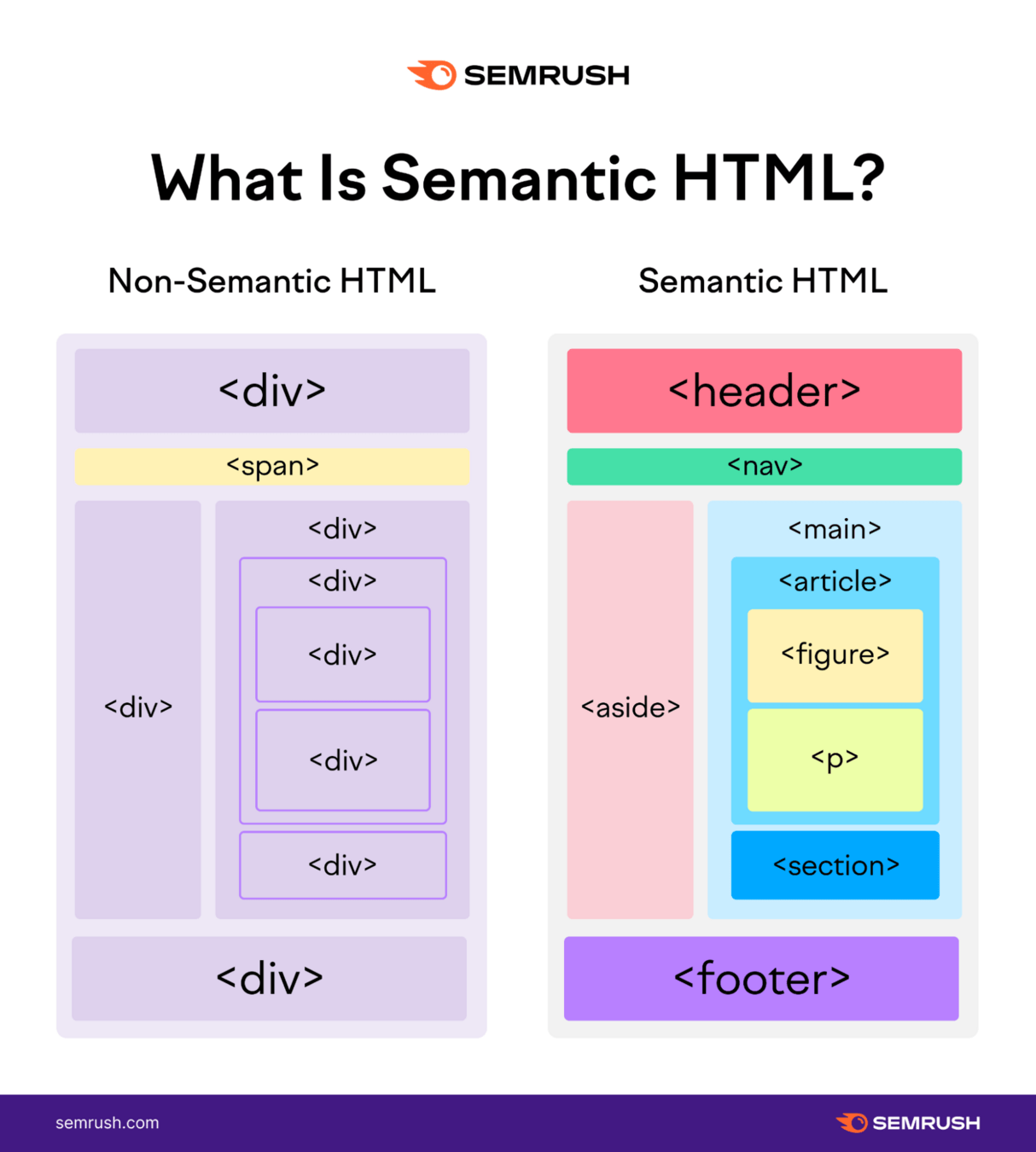
is typically a large strip at the top of the page featuring a prominent heading, logo, and possibly a tagline.
<!DOCTYPE html>
<html lang="en-US">
  <head>
  </head>
  <body>
    <header>
      <h1>Header</h1>
    </header>
  </body>
links to the main sections of the site, usually represented by menu buttons or tabs. It does need to be in the header, it can be a separate component.
  <body>
    <header>
    	<nav>
          <ul>
            <li><a href="#">Home</a></li>
            <li><a href="#">Our team</a></li>
            <li><a href="#">Projects</a></li>
            <li><a href="#">Contact</a></li>
          </ul>
    	</nav>
    </header>
  </body>
is a large central area containing the unique content of a given webpage.
  <body>
    <header>
    	<nav>
          <ul>
            <li><a href="#">Home</a></li>
            <li><a href="#">Our team</a></li>
            <li><a href="#">Projects</a></li>
            <li><a href="#">Contact</a></li>
          </ul>
    	</nav>
    </header>
    <main>
      <section>
      	<h2> Content of the section </h2>
      </section>
    </main>
  </body>
⚠️ The main content is typically divided into various content subsections, represented by <article>, <section>, and <div> elements.
includes peripheral information, links, quotes, ads, etc., often contextually related to the main content.
  <body>
    <main>
      <section>
      	<h2> Content of the section </h2>
      </section>
      <aside>
     	 <ul>
            <li><a href="#">About us</a></li>
            <li><a href="#">Our team</a></li>
            <li><a href="#">Projects</a></li>
            <li><a href="#">Contact</a></li>
         </ul>
      </aside>
    </main>
  </body>
is a strip at the bottom of the page, usually containing fine print, copyright notices, or contact information.
  <body>
    <main>
		...
    </main>
    <footer>
          <p>©Copyright 2050 by nobody. All rights reversed.</p>
    </footer>
  </body>
Teacher Juan Romero Luis
Apr 7, 2025
Unit 4
bit.ly/BWD24U4
bit.ly/BWD24U4
<head>
  <link href="URL" rel="stylesheet">
</head>
body {
  font-family: "Font name", sans-serif;
}
/*CSS stylesheet*/
@import url('URL');

body {
  font-family: "Font family", sans-serif;
}
By Juan Romero-Luis


