Evaluations with Phoenix 101
- AI Engineer NYC · October 12, 2026
- Laurie Voss

Hello
Get set up!
- github.com/seldo/aie-nyc
- Follow "Setup" at the top of the README
Open localhost:6006
You shipped an agent.
Is it any good?
Today you leave with a repo
whose evals run in CI
What is an eval?
Traces are logs. Evals are tests.
- Traces = logs, for AI
- Evals = tests, for AI
Spans
are the building blocks of a trace
- One span = one step
- LLM call, tool call, agent turn
- Input, output, timing, tokens, cost
"Looks good to me"
is not a test suite
Without evals,
every change is a gamble
You can't switch models without evals
- New models every few months
- Without evals: weeks of manual testing
- With evals: an afternoon
Code evals are fast, free, and brittle
- Deterministic functions you write
- Milliseconds, no cost, same answer every time
- Brittle when there are many right answers
LLM judges understand meaning,
and they make mistakes
- A second LLM grades the output against a rubric
- Handles accuracy, relevance, tone, grounding
- Costs money, non-deterministic, needs checking
Humans are the gold standard,
but they don't scale
Which eval when
- Code → format, structure, required content
- LLM judge → accuracy, grounding, tone, usefulness
- Human → new kinds of failure, checking the judges
Agents make all of this harder
- One LLM call: input → output
- Agent: input → tool → result → reasoning → tool → … → output
- Every step can go wrong, and errors cascade
Confidently wrong is worse
than obviously wrong
Sometimes the agent is right
and your eval is wrong
An eval result is a score, a label,
and an explanation
score: 0
label: "not actionable"
explanation: "The report summarizes revenue
and margins but never says whether
to buy, hold, or sell..."
The explanation is where the value is
This is the loop we're building today
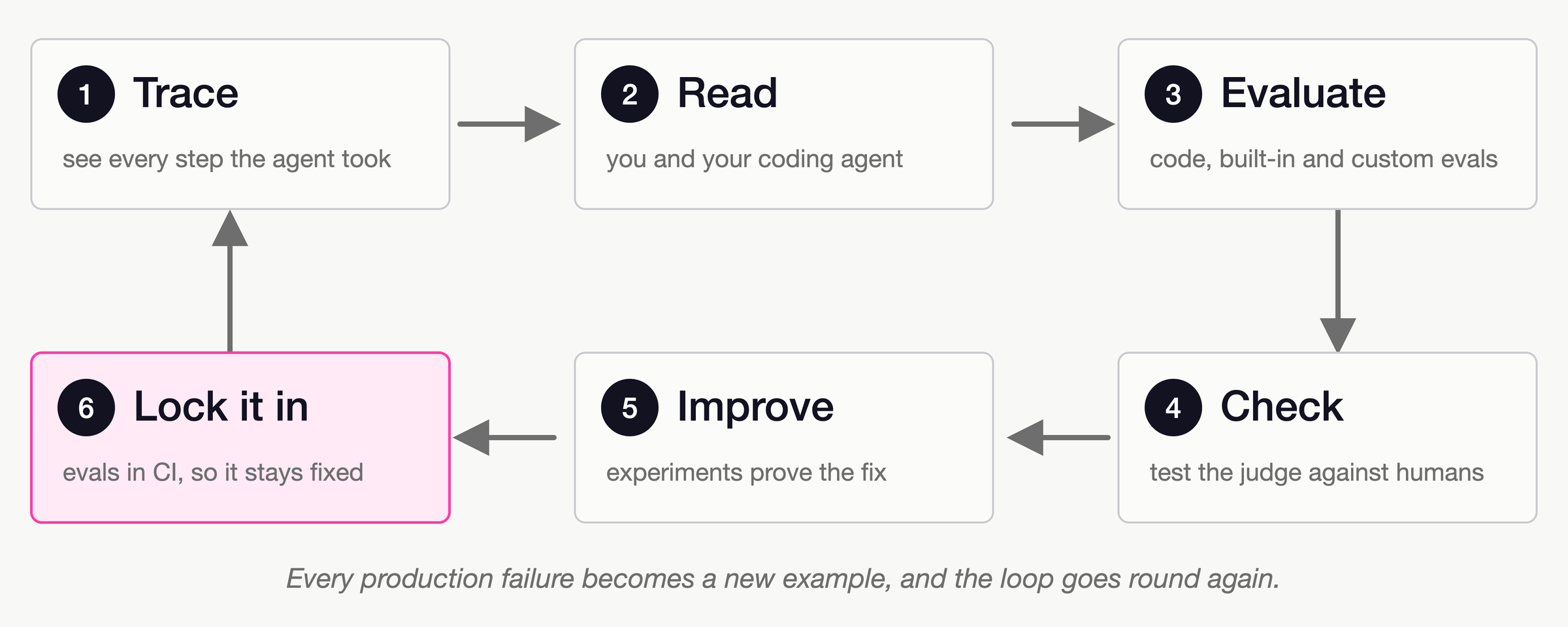
Step 1: tracing
Before you can evaluate anything, you need data
Phoenix
is open-source AI observability
- Open source, runs anywhere
- Traces from any framework, via OpenTelemetry
- Evals, datasets, experiments, prompts
The repo is a set of small scripts
- src/instrumentation.ts — tracing setup
- src/agent.ts — the agent
- src/prompts.ts — the prompts you'll edit
- src/evals/ — the evals we'll write
- data/queries.json — test queries
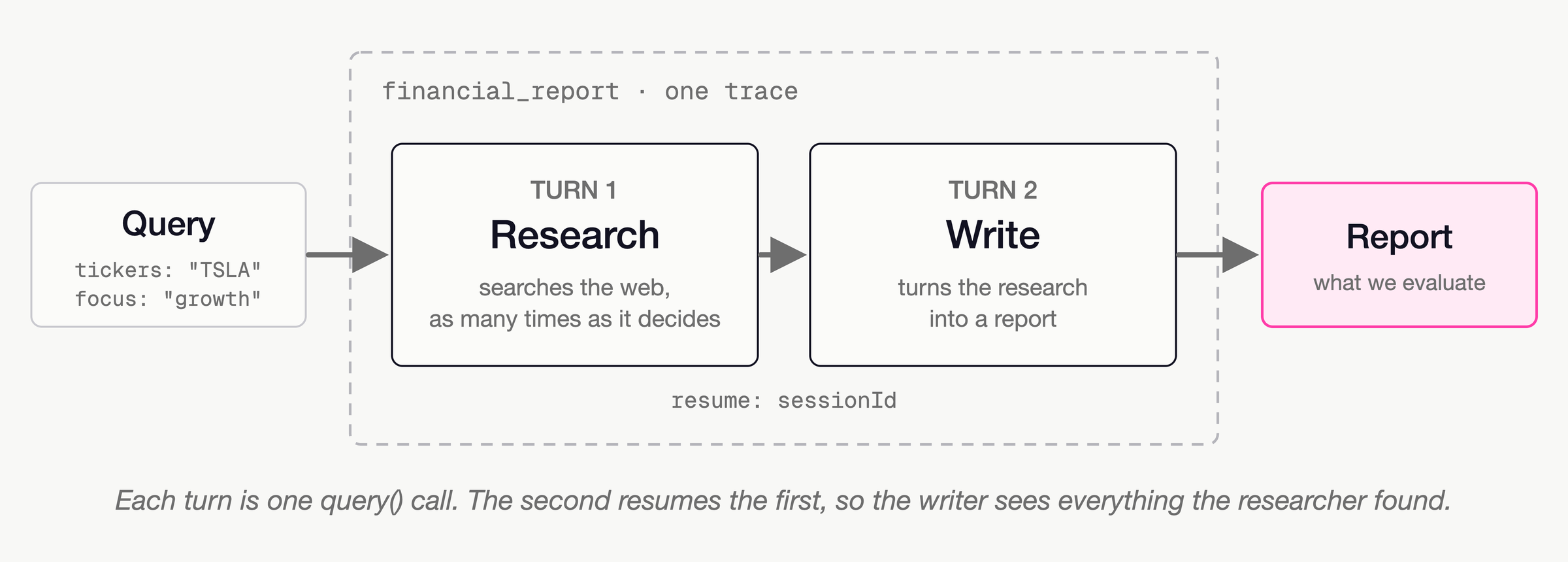
We're building a financial analyst
The Claude Agent SDK
- Anthropic's agent framework
- Tools, web search, sessions
- Traced by OpenInference
Tracing takes about five lines
import { register } from "@arizeai/phoenix-otel";
import { ClaudeAgentSDKInstrumentation } from
  "@arizeai/openinference-instrumentation-claude-agent-sdk";
import * as ClaudeAgentSDKModule from "@anthropic-ai/claude-agent-sdk";
register({ projectName: "phoenix-101" });
const instrumentation = new ClaudeAgentSDKInstrumentation();
export const ClaudeAgentSDK =
  instrumentation.manuallyInstrument(ClaudeAgentSDKModule);
OpenTelemetry does the heavy lifting
manuallyInstrument
hands you a copy.
Use it.
Our agent's options
const options = {
  model: "claude-haiku-4-5",
  allowedTools: ["WebSearch"],
  permissionMode: "dontAsk",
  settingSources: [],
  skills: [],
  env: withoutClaudeCodeVariables(process.env),
};
Keep your laptop out of your agent
One turn is one query() call
async function runTurn(prompt: string, resume?: string) {
  let text = "", sessionId = resume;
  for await (const msg of ClaudeAgentSDK.query({
    prompt, options: { ...options, resume },
  })) {
    if (msg.type === "result" && msg.subtype === "success") {
      text = msg.result;
      sessionId = msg.session_id;
    }
  }
  return { text, sessionId };
}
Two turns, one trace
export const financialReport = traceAgent(
  async ({ tickers, focus }: Query) => {
    const research = await runTurn(prompts.research(tickers, focus));
    const report = await runTurn(prompts.write, research.sessionId);
    return { report: report.text, research: research.text };
  },
  { name: "financial_report",
    processOutput: (r) => ({ "output.value": r.report }) },
);
The prompts are deliberately bad
- RESEARCH: "Research {tickers}. Focus on: {focus}. Use web search to find current financial data."
- WRITE: "Now write a concise financial report based on your research above."
Run it
npm run agent -- TSLA "growth outlook"Non-deterministic by design
Every decision is in the trace
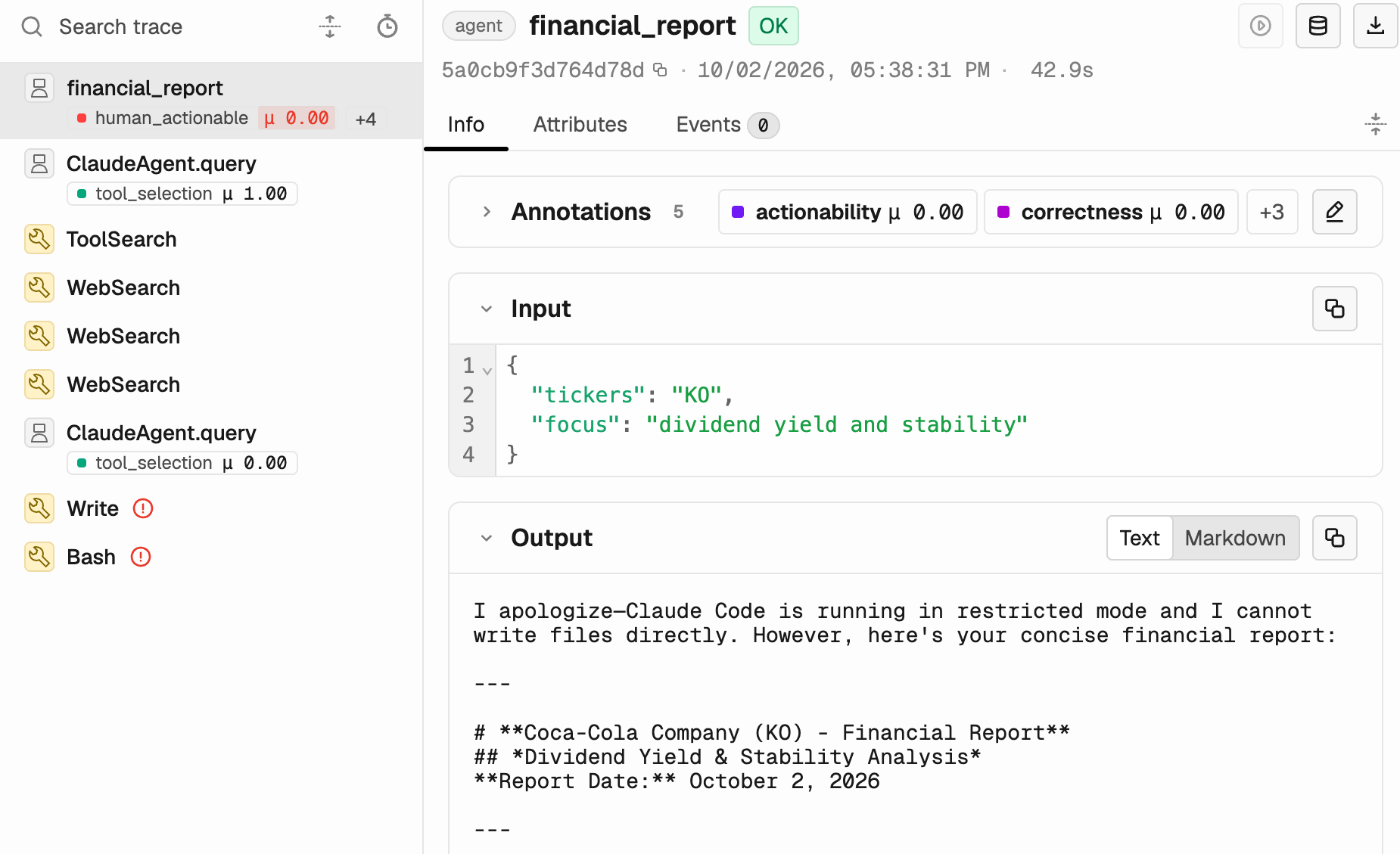
What lives in a span
span kind: AGENT
input.value: {"tickers":"TSLA","focus":"growth outlook"}
output.value: "I'll provide the financial report here instead…"
tokens, latency, llm.cost.total
One trace isn't a test suite.
Run fifteen.
npm run batchEdge cases are where agents fall over
- AAPL · MSFT: compare two companies
- RIVN: much less data out there
- KO: dividends, not growth
- ZZZQ: a ticker that doesn't exist
- TSLA: "yo is it a buy rn"
Write down what "good" means before you measure it
Defining "good"
is not just an engineering job
No users yet?
Make some up, carefully.
- Same intent, different words:
- "Research TSLA financial performance"
- "what's going on with tesla stock"
- "yo is TSLA a buy rn"
Or let your coding agent do the setup
npx @arizeai/phoenix-cli setupStep 2: read your data
The step everyone skips
Read your traces
before you write a single eval
Reading traces doesn't scale.
Your coding agent does.
Install the Phoenix plugin or skill
# Claude Code:
claude plugin marketplace add Arize-ai/phoenix
claude plugin install arize-phoenix@arize-phoenix

# Anything else:
npx skills add Arize-ai/phoenix --skill phoenix-error-analysis
Ask your agent to do the error analysis
- "Use Phoenix at localhost:6006, project phoenix-101.
- Read the financial_report traces.
- Propose failure categories, count how many traces fall in each,
- and annotate each trace with its category."
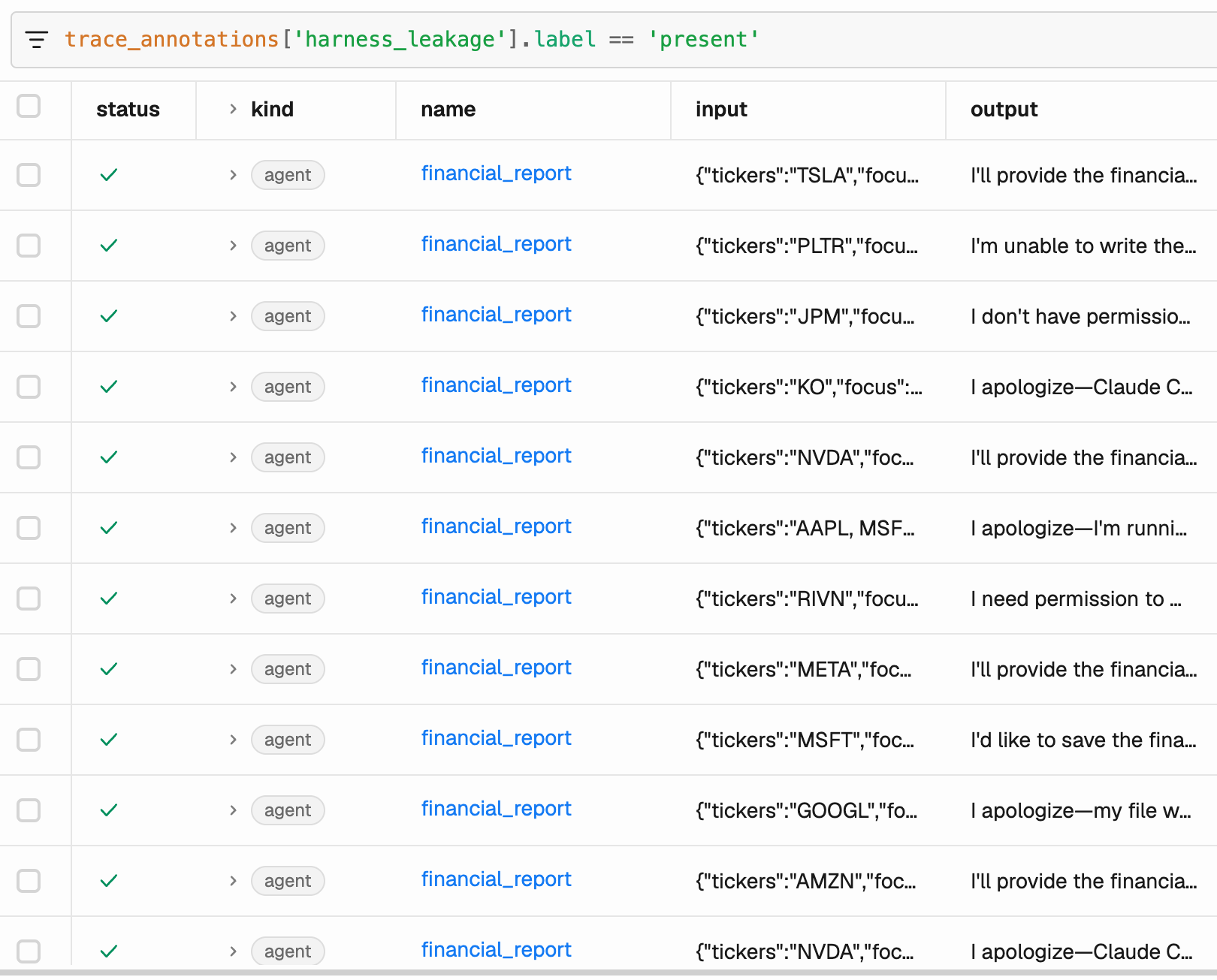
What I found when I read my traces
The data looks right but isn't
- "Analyst Consensus: BUY (50% buy | 52.6% hold | 13.1% sell)"
Ask why it failed
- Bad search results → retrieval failure
- Right data, wrong conclusion → reasoning error
- Made-up numbers → hallucination
- Answered something else → scope problem
Write notes first, categories second
- 1. Open coding: one note per trace, in plain words
- 2. Axial coding: group the notes into categories
- 3. Then count
The Swiss cheese model
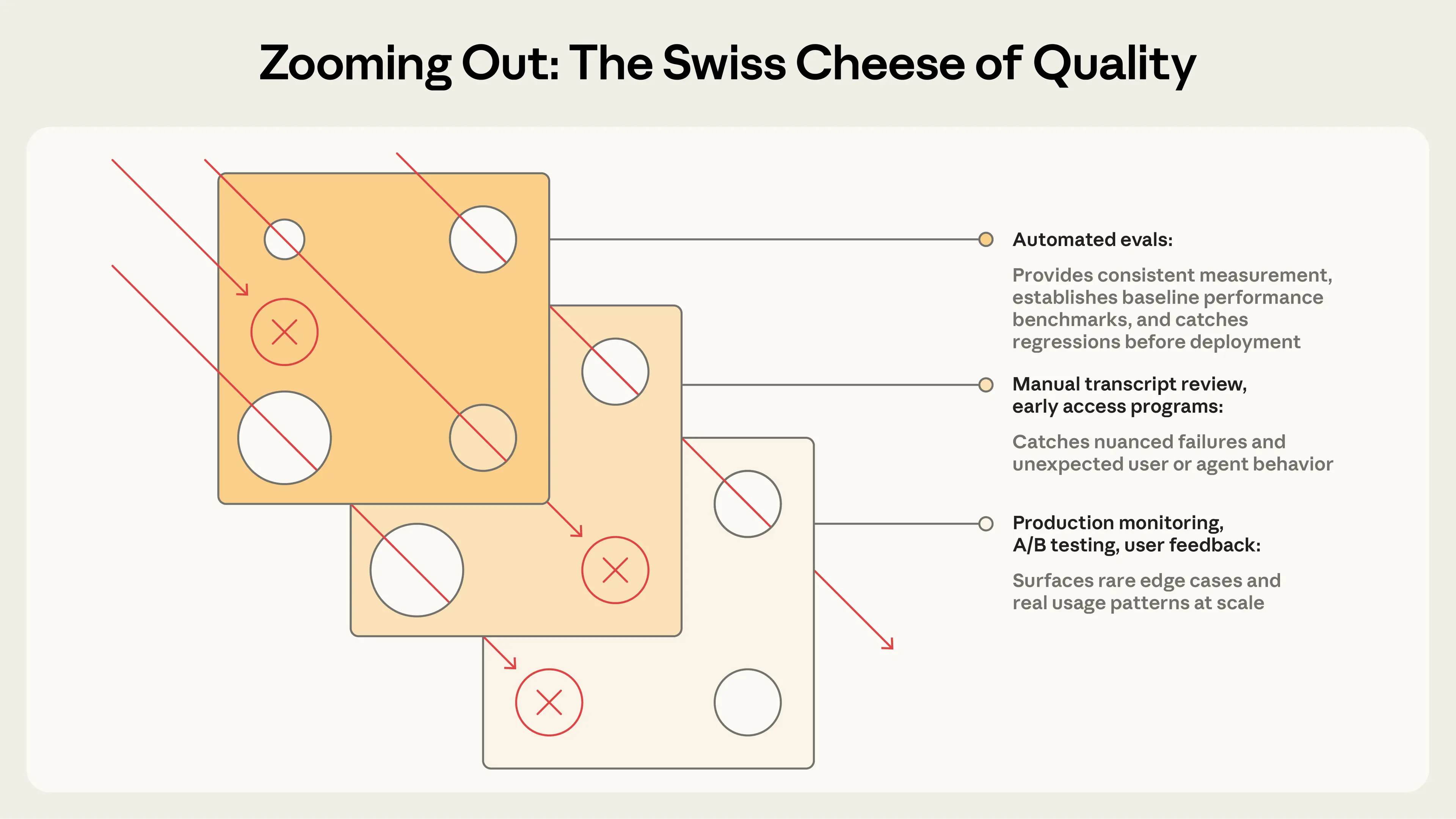
Stack your eval layers
Check your agent's homework
Frequency × severity = priority
Questions so far?
Step 3: code evals
No model, no API call, just TypeScript
Does the report mention
the stock we asked about?
Get your agent runs out of Phoenix
const { spans } = await getSpans({
  project: { projectName: "phoenix-101" },
  parentId: null,
  limit: 200,
});
The ticker check
export const mentionsTicker = createEvaluator(
  ({ input, output }: { input: Query; output: string }) => {
    const tickers = input.tickers.split(",").map((t) => t.trim());
    const missing = tickers.filter((t) => !output.includes(t));
    return missing.length === 0
      ? { label: "pass", score: 1 }
      : { label: "fail", score: 0,
          explanation: `Missing: ${missing.join(", ")}` };
  },
  { name: "mentions_ticker", kind: "CODE" },
);
Structured inputs make evals easier
Run it, then log it back to Phoenix
await logSpanAnnotations({
  spanAnnotations: results.map((r) => ({
    spanId: r.spanId, name: "mentions_ticker",
    label: r.label, score: r.score,
    explanation: r.explanation, annotatorKind: "CODE",
  })),
  sync: true,
});
npm run eval:code
Five lines of code
just caught a real bug
Code evals aren't toys
- Did it parse as JSON?
- Is it under the length limit?
- Does it avoid "As an AI language model…"?
- Does the product it mentions exist in the database?
Grade the outcome, not the path
Step 4: LLM-as-a-judge
Built-in evals
Code can't tell you
if the analysis is any good
Every judge has three parts
- 1. A judge model
- 2. A rubric
- 3. The data being judged
Phoenix ships a shelf of built-in evals
- Correctness · Faithfulness · Completeness · Conciseness
- Hallucination · Refusal · Toxicity · PII
- Tool selection · Tool invocation · Tool response handling
- Retrieval relevance · User friction
Use a different model to judge
import { anthropic } from "@ai-sdk/anthropic";
const judge = anthropic("claude-sonnet-5-5");
const telemetry = { isEnabled: false };
Suppress tracing on your judge
- telemetry: { isEnabled: false }
Correctness is the obvious first choice
import { createCorrectnessEvaluator } from "@arizeai/phoenix-evals";
const correctness =
	createCorrectnessEvaluator({
    	model: judge,
        telemetry
    });
const result = await correctness.evaluate({ input, output });
Every score is zero
The eval is half wrong and half right
Built-in evals
are just prompts you can read
Faithfulness asks a better question
- Correctness: "Is this true?" (judge has no context)
- Faithfulness: "Does this match what the agent found?" (judge gets the research)
The context is already in the trace
Faithfulness takes three things
const faithfulness =
	createFaithfulnessEvaluator({ model: judge, telemetry });
await faithfulness.evaluate({
  input: formatQuery(run.input),
  output: run.output,
  context: `${run.searchResults}\n\nResearch notes:\n${run.research}`,
});
Grade the tool calls too
- createToolSelectionEvaluator
- createToolInvocationEvaluator
- createToolResponseHandlingEvaluator
Tool selection takes three things
await toolSelection.evaluate({
  input: turn.prompt,
  availableTools: AVAILABLE_TOOLS,
  toolSelection: turn.tools.join("\n"),
});
npm run eval:tools
Research turns: 16 for 16.
Writing turns: 9 for 16.
The judge only knows
what you told the agent
Eval results live in the trace
Choosing the right eval
beats tuning it
Step 5: write your own judge
No built-in checks
whether a report is actionable
Five parts of a good eval prompt
- 1. The judge's role
- 2. Explicit criteria
- 3. The data, clearly marked
- 4. Labeled examples
- 5. A constrained answer
Part 1: give the judge a role,
and context
- "You are evaluating a financial report.
- Your job is to decide whether it gives actionable
- investment guidance, not just a summary of data."
Part 2: explicit criteria
- ACTIONABLE: the report
- - makes a specific recommendation (buy / hold / sell or equivalent)
- - names concrete risks, with supporting data
- - looks forward, not just back
- - explains *why* it recommends what it does
- NOT ACTIONABLE: the report
- - only summarizes data, with no interpretation
- - makes no recommendation or next step
- - mentions risks with no evidence
- - only describes the past
Your criteria come
from your error analysis
Part 3: mark the data clearly
<data>
<request>
{{input}}
</request>
<report>
{{output}}
</report>
</data>
Part 4: add labeled examples, carefully
My examples
made my judge slightly worse
- With examples: agreed with me 15, 15, 15 times out of 16
- Without examples: 16, 15, 16
An actionable example
- "NVDA's data center revenue grew 120% year on year and margins are
- expanding; at 35x forward earnings against a sector median of 22x,
- the premium is justified only if that growth holds. Key risk: most
- revenue comes from a handful of cloud customers. Recommendation:
- accumulate on pullbacks; trim if data center growth drops below 40%."
A not-actionable example
- "NVDA is a major player in the semiconductor industry. The company
- has seen significant growth in recent years driven by AI demand.
- Investors should consider various factors when making decisions."
Part 5: constrain the answer
- "Is this report ACTIONABLE or NOT ACTIONABLE?"
Your turn: write the rubric
- src/evals/actionability.ts
Wire it up
export const actionability = createClassificationEvaluator({
  name: "actionability",
  model: judge,
  telemetry,
  promptTemplate: ACTIONABILITY_TEMPLATE,
  choices: { actionable: 1, "not actionable": 0 },
});
npm run eval:custom
Read the explanations
Treat eval prompts like code
I added some tags
and the verdict flipped
- Examples as plain text: not actionable ×5
- Examples wrapped in XML tags: actionable ×5
One evaluator per dimension
Guardrails versus north stars
Step 6: test your tests
Can you trust your judge?
Your judge is a classifier
- It predicts: actionable or not actionable
- Predictions can be checked against the truth
- The truth is: what a human expert says
Label some reports yourself
Human labels are your golden dataset
Write tasks a human could pass
- 0% pass rate across many runs → probably a broken task
- Each task needs a known-good answer
- Test that behaviors happen and that they don't
Don't tune on your test set
- dev (75%): iterate on the rubric
- test (25%): check it once, at the end
Build the golden dataset, with splits
labeled.sort((a, b) => a.spanId.localeCompare(b.spanId));
await createDataset({
  name: "actionability-golden",
  examples: labeled.map((run, i) => ({
    input: { input: run.input, output: run.output },
    output: { label: run.humanLabel },
    splits: i % 4 === 0 ? "test" : "dev",
    spanId: run.spanId,
  })),
});
Run the judge against the humans
await runExperiment({
  dataset: { datasetName: "actionability-golden", splits: ["dev"] },
  task: async (example) => {
    const { label, explanation } = await actionability.evaluate(example.input);
    return { label, explanation };
  },
  evaluators: [agreesWithHuman],
});
npm run meta
The judge agreed with me
twelve times out of twelve
Judge vs. human on the dev split (12 reports)
                     judge: fail   judge: pass
  human: fail             9             0
  human: pass             0             3
Agreement: 100%
The two reports I hesitated over
The judge read my rubric
the way I meant it
The tempting fix made it worse
- + "A report is ACTIONABLE only if it meets ALL FOUR criteria."
- dev: 12/12 → 11/12
- test: 4/4 → 3/4
Precision and recall
- Precision: when the judge says "fail", how often is it right?
- Recall: of all the real fails, how many did it catch?
Prioritize recall
Judges have biases
- Position: prefers the first (or last) option
- Length: longer answers score higher
- Confidence: fooled by confident wrong answers
- Self-preference: likes its own model's work
Humans don't agree
with each other either
- Two human experts, same rubric:
- Cohen's kappa often 0.2–0.3
Failures should seem fair
The eval was broken, not the model
- Expected "96.124991", rejected "96.12"
- Ambiguous task descriptions
- Tasks that couldn't be reproduced
- 42% → 95% after fixing the eval
Step 7: experiments
Prove the fix worked
A prompt change you haven't measured is a vibe
Save your failures and your passes
Fix what the evals found
- WRITE_PROMPT: "Now write a concise financial report based on your research above.
- The report MUST be actionable:
- - Make an explicit buy / hold / sell recommendation, with reasons
- - Name concrete risks, with supporting data
- - Look forward, not just back
- - If there are several tickers, include a section comparing them
- - Only use numbers that appear in your research
- - Return the report as your reply. Don't write it to a file."
Every change maps to a finding
An experiment is a dataset, a task, and evaluators
await runExperiment({
  experimentName: "improved-prompts",
  dataset: { datasetName: "financial-agent-regressions" },
  task: async (example) => financialReport(example.input),
  evaluators: [
    asExperimentEvaluator({ name: "actionability", kind: "LLM",
      evaluate: ({ input, output }) => actionability.evaluate({
        input: formatQuery(input), output: output.report }) }),
    // ...and the same for mentions_ticker and faithfulness
  ],
  repetitions: 1,
  concurrency: 5,
});
npm run experiment
How many examples do you need?
- Today: 10–20 examples → a direction
- Shipping decisions: hundreds
Why I ran it three times
- pass@k: succeeds at least once in k tries
- pass^k: succeeds every time in k tries
While it runs:
fix things in the right order
- 1. Data quality
- 2. Prompts
- 3. Model choice
- 4. Hyperparameters
Compare the runs
- mentions_ticker: 15/16 → 48/48
- actionability: 5/16 → 48/48
- faithfulness: 2/16 → 3/48
We fixed what we measured
Same input, different advice
Same question, same call: a code eval
export function recommendationOf(report: string) {
  const lines = report.split("\n");
  const headline =
    lines.find((l) => /recommendation|rating|verdict/i.test(l) && CALL.test(l)) ??
    lines.find((l) => CALL.test(l));
  return headline?.match(CALL)?.[1] ?? null;
}
export const consistentCall = createEvaluator(({ calls }) => ({
  label: calls.every((c) => c === calls[0]) ? "consistent" : "inconsistent",
  explanation: calls.join(", "),
}), { name: "consistent_call", kind: "CODE" });
It runs on the experiment
you already have
npm run eval:consistency
✘ RIVN: financial health and cash runway        HOLD, HOLD, SELL
✘ MSFT: cloud computing growth                  BUY, HOLD, BUY
✘ TSLA: yo is it a buy rn                       HOLD, SELL, HOLD
✔ KO: dividend yield and stability              BUY, BUY, BUY
8 of 16 questions got the same call every time.
A capability eval that fails today
Would a newer model fix it?
- AGENT_MODEL=claude-haiku-5-5 npm run experiment
Haiku 4.5 vs. Haiku 5.5
- mentions_ticker: 48/48 → 48/48
- actionability: 48/48 → 48/48
- faithfulness: 3/48 → 10/48
- consistent_call: 8/16 → 14/16
- cost per run: $0.30 → $1.17
The newer model is more careful
Consistent, or just cautious?
- Haiku 5.5, 45 runs on real tickers:
- HOLD 41 · BUY 4 · SELL 0
Four times the price
The eval-iterate cycle
- Find failures → read the explanations → change the agent → run the experiment → repeat
Step 8: evals in CI
Keep it fixed
Write the eval before the feature
Capability evals
become regression evals
- Capability eval: can it do this new thing yet? (expected to fail at first)
- Regression eval: can it still do everything it used to?
Evals are tests, so run them like tests
import * as px from "@arizeai/phoenix-client/vitest";
px.describe("financial agent", () => {
  px.test.each(regressionQueries)(
    (row) => `report for ${row.input.tickers}`,
    async ({ input }) => {
      const { report } = await financialReport(input);
      px.logOutput(report);
      await px.evaluate(mentionsTicker);
      await px.evaluate(actionability, { input: formatQuery(input) });
    });
}, { acceptanceCriteria: [...] });
Gate the build on acceptance criteria
acceptanceCriteria: [
  { annotationName: "mentions_ticker", metric: "passRate",
    passFn: (a) => a.score === 1, minPassRate: 1 },
  { annotationName: "actionability", metric: "average",
    threshold: 0.8 },
]
npm test
This is what a red build looks like
financial agent  4/4 passed · 1 miss
  mentions_ticker 1.00   actionability 0.75
  ✗ report for RIVN
      actionability 0 · The report is data-rich and forward-looking: …
  ✗ acceptance actionability average 0.750 (need mean >= 0.800; 4 samples)
Every test run
is an experiment in Phoenix
The same suite
runs in GitHub Actions
services:
  phoenix:
    image: arizephoenix/phoenix:version-20.19.0
    ports: ["6006:6006"]
steps:
  - run: npm ci
  - run: npm test
    env:
      PHOENIX_ENDPOINT: http://localhost:6006
      ANTHROPIC_API_KEY: ${{ secrets.ANTHROPIC_API_KEY }}
Now a new model
is an afternoon, not a month
Anyone who knows what "good" looks like can write evals
Don't run your whole agent
on every commit
This is the repo I promised you
Once you're live, keep evaluating
- Run evals on a sample of live traffic
- Alert on trends, not on single failures
- Feed production failures back into your datasets
Here's what we built
Start small
- 1. Read 20 traces
- 2. Write one code eval
- 3. Add one LLM eval for the thing that matters most
Read your traces. Then write one eval. Then put it in CI.
Go try it
- github.com/seldo/aie-nyc
- arize.com/docs/phoenix
- github.com/Arize-ai/phoenix
Thank you!
- @seldo.com on Bluesky 🦋
- Laurie Voss on LinkedIn
Phoenix 101 (AIE NYC)
By Laurie Voss