Angular 2 - Basics
Angular 2 -what?
- Advance SPA framework
- Designed for big application, with complex GUI interfaces and logic (?)
- Build using TypeScript and modern tools for web development
- Strong push towards modularity and clean architecture

High level architecture
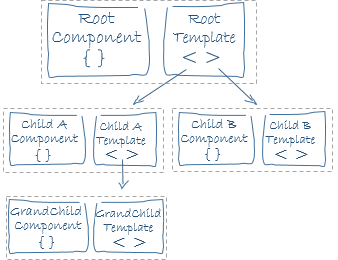
- Components as building blocks
- Application is a tree of components
- Clear communication patterns
- Clearly separated template (HTML) and the logic (TypeScript)
- Dependencies resolved using Dependency Injection
- Application divided in modules
What is a module in NG2?
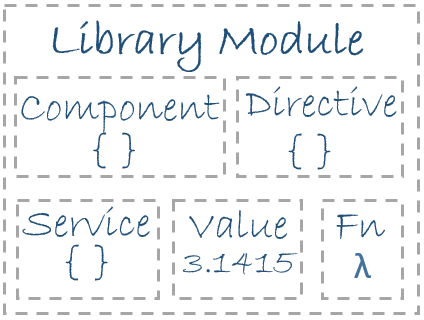
What is a module in NG2?
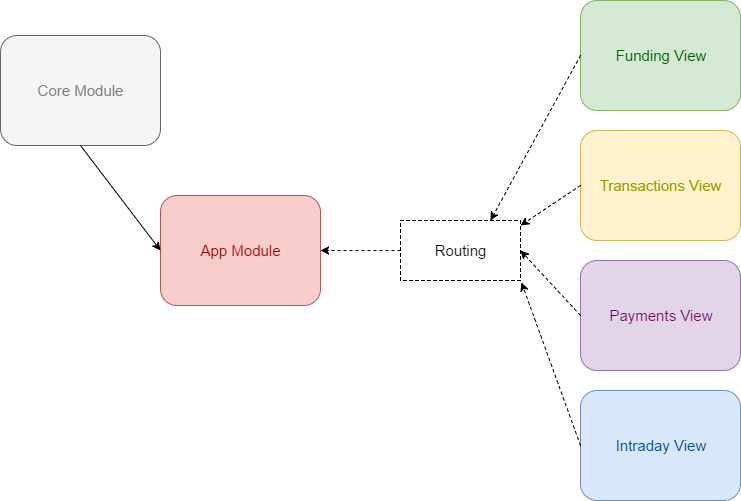
Application module
Simple application might have only one module (AppModule). Bigger have multiple ones, containing encapsulated functionalities.
import { NgModule }      from '@angular/core';
import { BrowserModule } from '@angular/platform-browser';
import { ModalsModule } from '@dcafii/modals';

import { Logger } from './services/logger';
import { AppComponent } from './app.component';

@NgModule({
  imports:      [ BrowserModule, ModalsModule ],
  providers:    [ Logger ],
  declarations: [ AppComponent, OtherComponent, ExportedComponent ],
  exports:      [ ExportedComponent ],
  bootstrap:    [ AppComponent ]
})

export class AppModule { }
NgModule is a decorator
-
declarations - the view classes that belong to this module. For example: components, directives, and pipes.
-
exports - the subset of declarations that should be visible and usable in the component templates of other modules.
-
imports - other modules whose exported classes are needed by component templates declared in this module.
-
providers - creators of services that this module contributes to the global collection of services; they become accessible in all parts of the app.
-
bootstrap - the main application view, called the root component, that hosts all other app views. Only the root module should set this bootstrap property.
Components module
Example of a feature module: Set of components
import { NgModule }      from '@angular/core';

@NgModule({
  providers:    [ SomeModalsRelatedService ],
  declarations: [ ButtonComponent, OtherComponent,
                  ModalComponent, PromptComponent, FlyoutComponent
                ],
  exports:      [ ModalComponent, PromptComponent, FlyoutComponent ],
})
export class ModalsModule { };
Component
The building block of Angular 2 app
Simple component
@Component({
  selector:    'person',
  templateUrl: 'person.component.html'
})

export class PersonComponent {

  person: Person,

  showMessage: boolean;

  constructor() {
     this.person = new Person({ login: 'sosnowsd', name: 'Damian' });
     this.showMessage = false;
  }

  toggleMessage() {
    this.showMessage = !this.showMessage;
  }
}
Simple component template
<section>
    <h1>Person data</h1>
    <p>Name: {{person.name}}</p>
    <p>Login: {{person.login}}</p>

    <button (click)="toggleMessage()">Toggle message</button>

    <section *ngIf="showMessage">
        <p>Hi there! Have you heard about our lord and savior, Angular?</p>
    </section>
</section>
Components
- Responsible for the given part of the screen
- Represents part of GUI functionality
- Encapsulated logic and data
- Defines data displayed in the template
- Reacts on template events
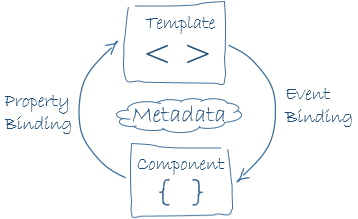
@Component decorator
-
selector: CSS selector that tells Angular to create and insert an instance of this component where it finds a <person> tag
-
templateUrl: module-relative address of this component's HTML template, shown above.
-
template: HTML string template
Template bindings
<section>
    <h1>Person data</h1>
    <p>Name: {{person.name}}</p>
    <p>Login: {{person.login}}</p>

    <button (click)="toggleMessage()">Toggle message</button>

    <section *ngIf="showMessage">
        <p>Hi there! Have you heard about our lord and savior, Angular?</p>
    </section>
</section>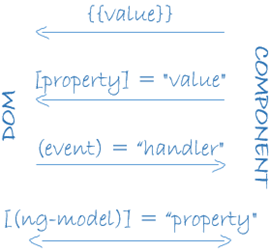
Component communication
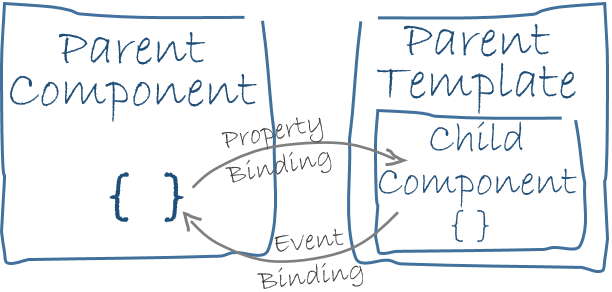
Passing data to the component
import {Component, Input} from '@angular/core';

@Component({
  selector: 'person-details',
  //....
})
export class PersonDetailsComponent {

    @Input()
    person: Person;

    constructor() {

    }
}

// usage inside app.component.html

<person-details [person]="selectedRecord"></person-details>
Passing data from the component
import { Component, EventEmitter, Input, Output } from '@angular/core';

@Component({
  selector: 'person-details',
  //....
})
export class PersonDetailsComponent {

    @Input() person: Person;

    @Output() onDelete = new EventEmitter<Person>();

    //this is executed in the template, f.e. when the button is clicked
    onButtonClick() {
        this.onDelete.emit(this.person);
    }
}


// PersonDetails template
<p>Click me to emit event: </p>
<button (click)="onButtonClick()">Click to emit</button>
// usage inside app.component.html
<person-details [person]="selectedRecord" (onDelete)="parentDeleteMethod($event)">
</person-details>
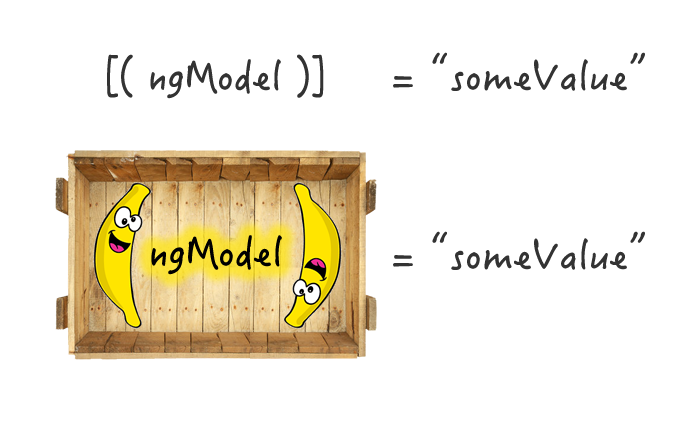
[(ngModel)]
Forms
Template based forms
Simple form
<form (ngSubmit)="onSubmit()" #personForm="ngForm">

Person Name: <input type="text" required name="name" [(ngModel)]="person.name"/>

Person Login: <input type="text" name="login" [(ngModel)]="person.login"/>

<button type="submit" [disabled]="!personForm.form.valid"></button>

</form>
Let's code
BMI calculator ng2
//python and visual c++ required

npm install "@angular/cli" -g
ng new ngbmi --skip-install

cd ngbmi
npm install --global --production windows-build-tools
npm install -g node-gypIf failed try:
If instalation successful
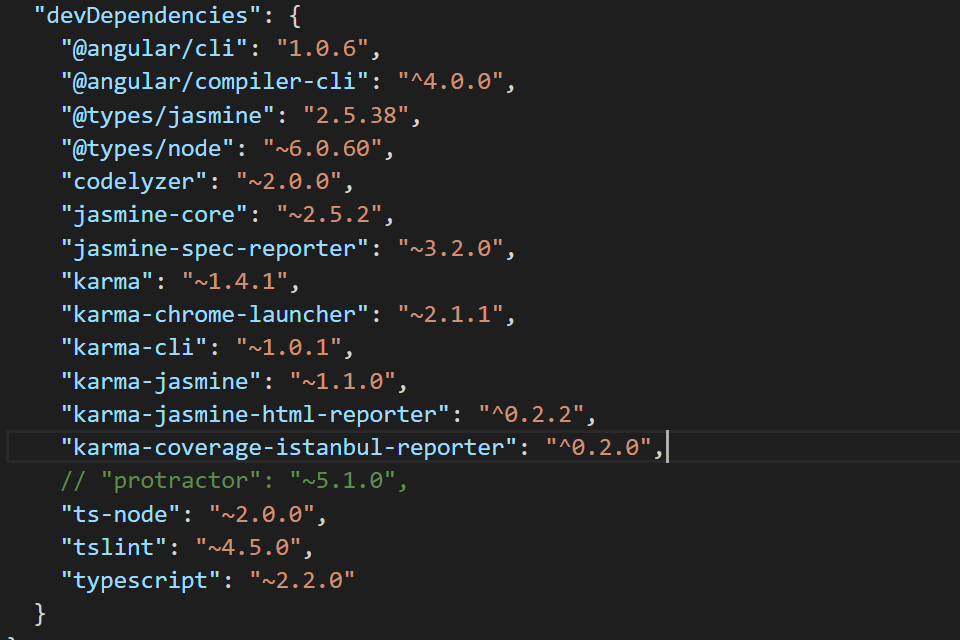
remove protractor from package.json
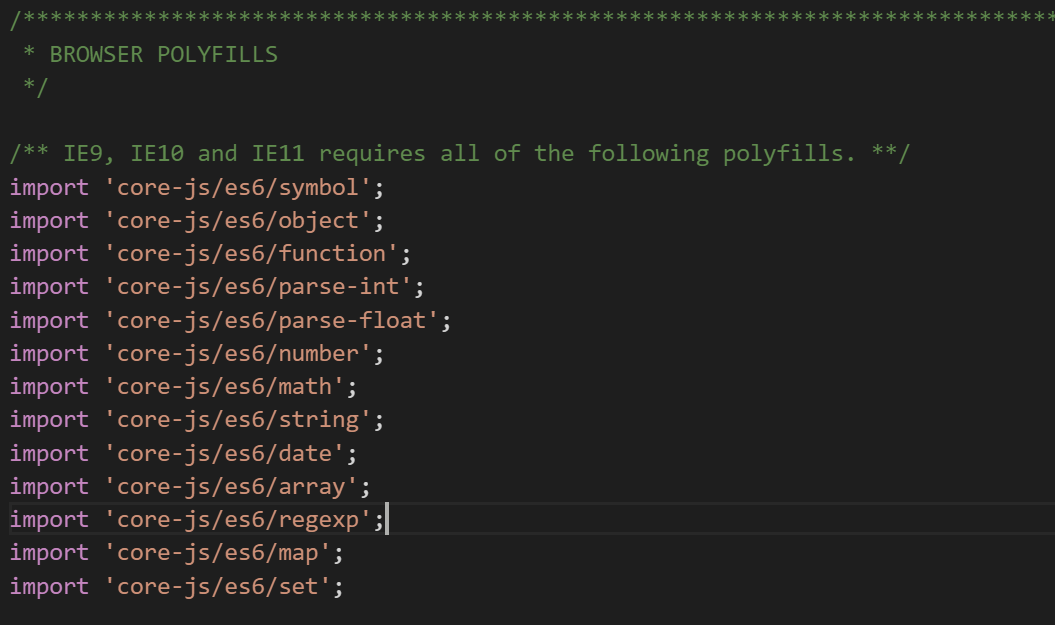
add polyfills at polyfills.ts
Install and run
npm install

ng serve
Let's code
BMI calculator ng2
- Main Component
- Form Component
- Model
- Form template
- Slider components
Services and Dependency Injection
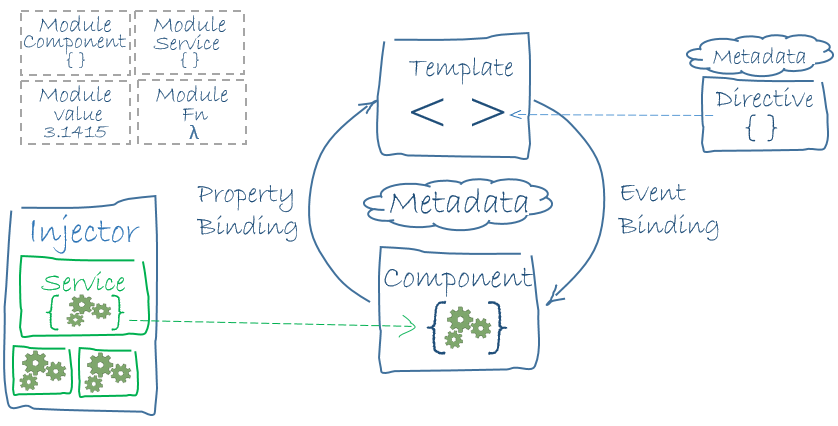
What is DI?

Creating a Service
import { Injectable } from '@angular/core';


@Injectable()

export class Logger {

  logs: string[] = [];

  log(message: string) {
    this.logs.push(message);
    console.log(message);
  }

}
Using a service
import { NgModule }      from '@angular/core';
import { BrowserModule } from '@angular/platform-browser';

import { Logger } from './services/logger';

@NgModule({
  providers:    [ Logger ],
  declarations: [ AppComponent, OtherComponent ],
  bootstrap:    [ AppComponent ]
})

export class AppModule { }
import { Logger } from './services/logger';
@Component({
selector: 'person',
// ....
})
export class PersonComponent {
constructor(logger: Logger) {
this.logger = logger;
}
someAction() {
this.logger.log('Some action');
// ...
}
}How does it work?
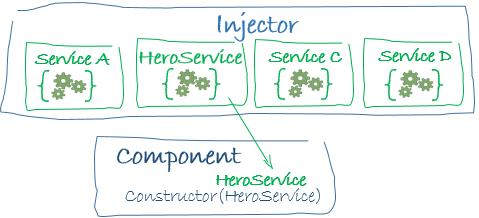
Let's code
BMI Calculator service
Angular 2 - Basics
By sosnowsd