實作1-1
楓資 廖姸惁
目錄
介紹遊戲規則
打地鼠
遊戲規則
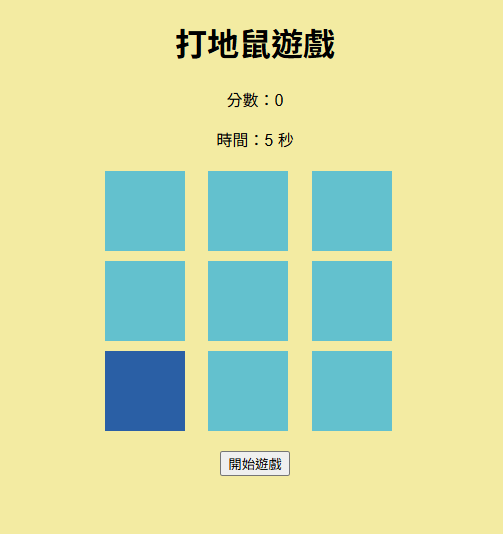
標題
計分和倒計時
打地鼠的區域
標題
開始/重來
完整程式碼
<!DOCTYPE html>
<html lang="zh-Hant">
<head>
  <meta charset="UTF-8">
  <title>打地鼠</title>
  <link rel="stylesheet" href="style.css">
</head>
<body>

<h1>打地鼠遊戲</h1>
<p>分數:<span id="score">0</span></p>
<p>時間:<span id="time">30</span> 秒</p>

<div id="game">
  <div class="hole"></div>
  <div class="hole"></div>
  <div class="hole"></div>
  <div class="hole"></div>
  <div class="hole"></div>
  <div class="hole"></div>
  <div class="hole"></div>
  <div class="hole"></div>
  <div class="hole"></div>
</div>

<button onclick="startGame()">開始遊戲</button>

<script src="script.js"></script>
</body>
</html>
body {
text-align: center;
font-family: sans-serif;
background-color: rgb(243, 235, 162);
}
#game {
width: 300px;
margin: 20px auto;
display: grid;
grid-template-columns: repeat(3, 1fr);
gap: 10px;
}
.hole {
width: 80px;
height: 80px;
background-color: #63c1ce;
cursor: pointer;
}
.mole {
background-color: rgb(42, 95, 165);
}let holes = document.querySelectorAll(".hole");
let score = 0;
let time = 30;
let timer;
let moleTimer;
let isPlaying = false; // ⭐ 新增
function startGame() {
score = 0;
time = 30;
isPlaying = true; // ⭐ 開始遊戲
document.getElementById("score").textContent = score;
document.getElementById("time").textContent = time;
clearInterval(timer); // ⭐ 防止重複計時
clearInterval(moleTimer); // ⭐ 防止重複地鼠
timer = setInterval(countDown, 1000);
moleTimer = setInterval(showMole, 500);
}
function countDown() {
if (!isPlaying) return; // ⭐ 保護
time--;
document.getElementById("time").textContent = time;
if (time <= 0) {
isPlaying = false; // ⭐ 關閉遊戲
clearInterval(timer);
clearInterval(moleTimer);
alert("遊戲結束!分數:" + score);
}
}
function showMole() {
if (!isPlaying) return; // ⭐ 保護
holes.forEach(h => h.classList.remove("mole"));
let random = Math.floor(Math.random() * 9);
holes[random].classList.add("mole");
}
holes.forEach(hole => {
hole.addEventListener("click", function () {
if (!isPlaying) return; // ⭐ 遊戲結束不能點
if (this.classList.contains("mole")) {
score++;
document.getElementById("score").textContent = score;
this.classList.remove("mole");
}
});
});html
css
js
HTML
打地鼠
html
<h1>打地鼠遊戲</h1>
<p>分數:<span id="score">0</span></p>
<p>時間:<span id="time">30</span> 秒</p>
<div id="game">
<div class="hole"></div>
<div class="hole"></div>
<div class="hole"></div>
<div class="hole"></div>
<div class="hole"></div>
<div class="hole"></div>
<div class="hole"></div>
<div class="hole"></div>
<div class="hole"></div>
</div>html
span: 行內元素 不換行 常用來更改部分文字
例如
<p>我的分數是 <span id="score">0</span></p>
會顯示
我的分數是 0
js就可以直接改數字
document.getElementById("score").textContent = 10;
html
div: 區塊元素 常用來分區、排版 會自動換行 預設佔滿一整行
舉例
<div id="game">
<div class="hole"></div>
<div class="hole"></div>
</div>外層div : 遊戲區域
內層div : 每一格
CSS
打地鼠
CSS
body {
  text-align: center;
  font-family: sans-serif;
  background-color: rgb(243, 235, 162);
}

#game {
  width: 300px;
  margin: 20px auto;
  display: grid;
  grid-template-columns: repeat(3, 1fr);
  gap: 10px;
}

.hole {
  width: 80px;
  height: 80px;
  background-color: #63c1ce;
  cursor: pointer;
}

.mole {
  background-color: rgb(42, 95, 165);
}文字排版
text-align: center;
font-family: sans-serif;
text-align : (文字和按鈕都適用)
left 往左貼
center 放中間
right 往右貼
justify 左右都貼(中間拉開)
font-family : 設定字體
例如 : Arial、Helvetica、sans-serif等
區塊位置(外距)
margin: 20px auto;margin = 元素外面的空間
padding = 元素裡面的空間
[其他元素] ← margin → [這個元素] ← padding → [內容]
m
p
margin-top: 10px;
margin-right: 20px;
margin-bottom: 10px;
margin-left: 20px;
可縮寫成
1個值 : 上右下左
2個值 : 上下 左右
3個值 : 上 左右 下
4個值 : 上 右 下 左
margin: 幾個值
讓元素水平置中
版面配置(Grid)
display: grid;
grid-template-columns: repeat(3, 1fr);
gap: 10px;
grid : 可以想像成格子排版 就是把把 div 變成棋盤
3欄 每一格一樣大 重複
gap : 每個格子之間的距離
display :
block(區塊): 會換行 占整行空間 可以設定 width / height
inline(行內): 不會換行 只佔內容大小 不能設 width / height
inline-block: 不換行 可以設大小 (像前兩者混合體)
grid: 做「格子排版」
互動效果
cursor: pointer;滑鼠變成手指
讓使用者知道這是可以點擊的元素
Kahoot!
打地鼠
實作1-1
By ys