React render under hood
agenda
-
Component, instance, element
-
JSX
-
Virtual DOM – React Dom
-
Overview
-
Mount
-
1. Component, Instance, Element
Component, Instance, Element
Component
Instance
Element
COMPONENT, INSTANCE, ELEMENT
-
Component – it’s a class or function, which is a blueprint. There can be several instances of a component.
-
Instance – is an actual object, representing component in its current condition – Internal components
-
Element – is an object, which describes the DOM element or a component. Immutable. No methods. Just pure representation
REACT element(creation)
React.createElement(
  type, // DOM element or component
  [props],
  [...children]
)
React.createElement(
  'button', // or FancyButton class
  {
    className: 'button button-blue',
    children: ['Confirm'] // OPTIONAL!
  },
  'Confirm' // OPTIONAL!

)
React element(Instance)
{
  $$typeof: Symbol(react.element),
  type: "button", // or FancyButton
  key: null,
  ref: null,
  props: {
    className: ‘confirm-button’,
    children: ‘Confirm’
  }
// …internalProperties
}
2.JSX
JSX
•JSX is a syntax extension for JS
•JSX is transpiled by Babel into…
React.createElement()
Transpiled into function call, which evaluates to JS object. That allows us:
-
to use expressions inside JSX with all of its benefits;
-
to use JSX as common expressions;
-
JSX prevents injection attacks. It is safe to use user inputs as all characters are escaped.
3. Render()
Render() can return
-
Responsible for returning a template for a component.
-
Use JSX or plain JavaScript
-
Should return only one React node (or, component)(>16 some hooks for returning multiple elements, such as Fragment, array of elements)
-
Return null for preventing component from rendering
WHY THIS WON’T WORK?
render() {
    return (
    <h1>Hello</h1>
    <p>I won’t work!</p>
    <h3>WHY?</h3>
    );
}
Virtual DOM – React DOM
Virtual dom
- Virtual DOM is a pattern, not a specific technology;
- Virtual DOM and Shadow DOM are not the same;
- React DOM is a library, which implements the Virtual DOM ideas;
- The ideas are:
- DOM read & write is SLOW!
- Object CRUD operations are cheap
- Object DOM representation is stored in memory
- Only the necessary parts are updated
- Reconciliation (diffing algorigthm) - The process of syncing React DOM and real DOM;
- React 15 – Stack Reconciliation, React 16 – Fiber Reconciliation
React DOM
React DOM is an API for interacting with various utilities. This API includes:
- ReactMount.js;
- ReactUpdates.js;
- Transactions.js;
- ReactEventListener.js;
TL;DR
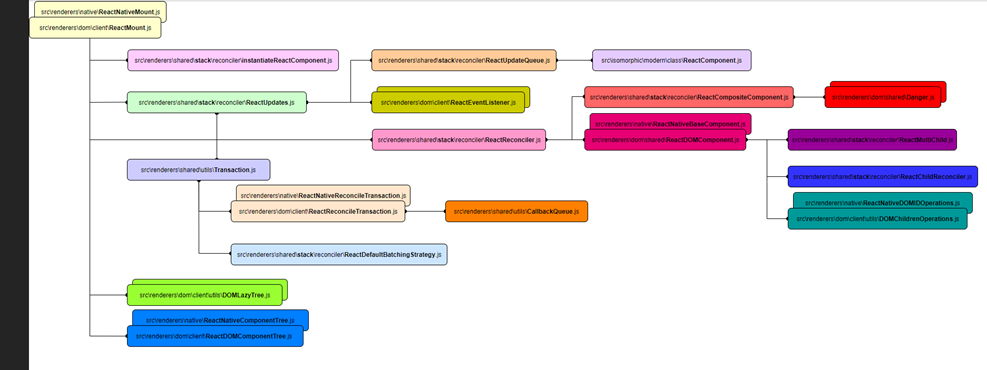
ReactDOM scheme
Let’s recap
A React Element is what gets returned from components. You can use JSX or plain JavaScript definition.
render() {
return <button onClick={() => this.setState({ liked: true })}>Like</button>
}
render() {
return React.createElement("button", {
onClick: () => this.setState({
liked: true
})
}, "Like");
}
const domContainer = document.querySelector('#like_button_container');
ReactDOM.render(<LikeButton/>, domContainer);
But what goes after…
ReactDOM does not render components in the browser

ReactDOM.render(<LikeButton/>, domContainer);
ReactDOM does not render instances
ReactDOM does not render elements either
But what, then?
From <Component /> to <div>
Let’s see through a wonderful metamorphose!
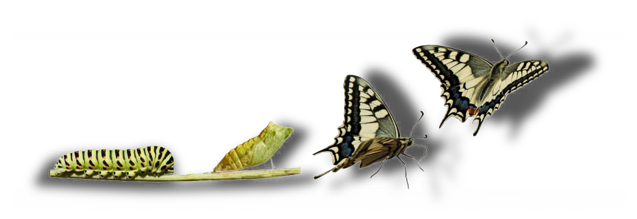
1. DNA – Class declaration
const e = React.createElement;
class LikeButton extends React.Component {
constructor(props) {
super(props);
this.state = { liked: false };
}
render() {
if (this.state.liked) {
return 'You liked this.';
}
return e(
'button',
{ onClick: () => this.setState({ liked: true }) },
'Like'
);
}
}
It renders DOM elements!
The first React element is the one we start with in the ReactDOM.render call
ReactDOM.render(<LikeButton/>, domContainer);
React now needs to answer the question: What is LikeButton?


ReacDOM.render(<LikeButton />, document.getElementByID(‘root))
ReactMount.render(<LikeButton />, document.getElementByID(‘root))
TopLevelWrapper.prototype.render = function () {
return this.props.child;
};
ReactDOM – just an interface!
3 hours later…
ReactDOM.render(<LikeButton/>, domContainer);
LikeButton.render()
createElement: createElementWithValidation()
export function createElementWithValidation(type, props, children) {
  const validType = isValidElementType(type);
  ...
  const element = createElement.apply(this, arguments);
function createElement(type, config, children) {
      return ReactElement(…);

So far …
CreateElement(type) -> ReactElement.type
Two calls to the createElement function — the first one with the type of the LikeButton class reference and the second one with the string button.
BUT!
Where is DOM ELEMENT created ?
Where is INSTANCE created?
2. EGG – Transpiling and call
const nextElement =

React.createElement(

   'button',

      { onClick: () =>

this.setState({ liked: true }) },

      'Like')
// nextElement

{
$$typeof: Symbol(react.element), type: "button", key: null, ref: null, props: {…}, …}
$$typeof: Symbol(react.element)
key: null
props: {onClick: ƒ, children: "Like"}
ref: null
type: "button"
_owner: FiberNode {tag: 2, key: null, type: ƒ, stateNode: LikeButton, return: FiberNode, …}
_store: {validated: false}
__proto__: Object
}
3. Caterpillar – InStance
//componentInstance

{
context: {}
props: {}
refs: {}
state: {liked: false}
updater: {isMounted: ƒ, enqueueSetState: ƒ, enqueueReplaceState: ƒ, enqueueForceUpdate: ƒ}

__proto__: Component

}
function constructClassInstance(workInProgress, props, renderExpirationTime) {
  var ctor = workInProgress.type;
  var props = …
  vaer context = …
  var instance = new ctor(props, context);
}
4. Cocoon – ReactDomComponent
// DOM element
{
innerHTML: "Like"
innerText: "Like“,
outerHTML: "<button></button>“,
tagName: "BUTTON"
textContent: "Like"
type: "submit“,…
__proto__: HTMLButtonElement
}
var domElement = createElement$1(type, props, rootContainerInstance, parentNamespace);
...
domElementWithChildren = finalizeInitialChildren(domElement, type, props, rootContainerInstance, hostContext)
More exploring…
- function that creates DOM nodes is called createElement$1
- React references document as ownerDocument


AddEventListener Set textContent
function addEventBubbleListener(element, eventType, listener) {  element.addEventListener(eventType, listener, false);

}
var setTextContent = function (node, text) {
…
node.textContent = text;
};
5. Butterfly – DOM elements
1.Building a tree
2.Recursive render on children
3.Mounting DOM elements, using document.createElement() and document.appendChild()

React
BASIC WORKFLOW
1.React.createElement – merge defaultProps into props, validate propTypes (for Components);
2.mount ReactDOMcomponent – HTML validation to ensure, that tags are nested correctly (for DOM elements);
3.Creating DOM elements -> assigning attributes and props -> rendering children -> mounting to DOM;
4.Assign updaters;
5.Calling the lifecycleHooks – componentWillMount() and componentDidMount();
6.Suppressing events to avoid focus / blur on reconciliation;
7.Caching scroll values;
…. AND MUCH MORE!
Thank you!
Q & A
React render
By Maryia Krauchanka
React render
Let's explore some magic of react render() process