
ISTIO





Introduction
Service Mesh
Istio Architecture
Istio features
Trafic Management
Gateway
VirtualService
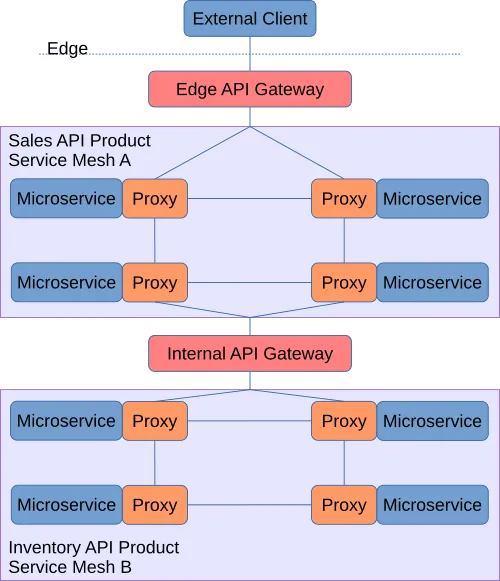
API gateway vs Service Mesh
North-south traffic for Api gateway,
East-west traffic for service Mesh
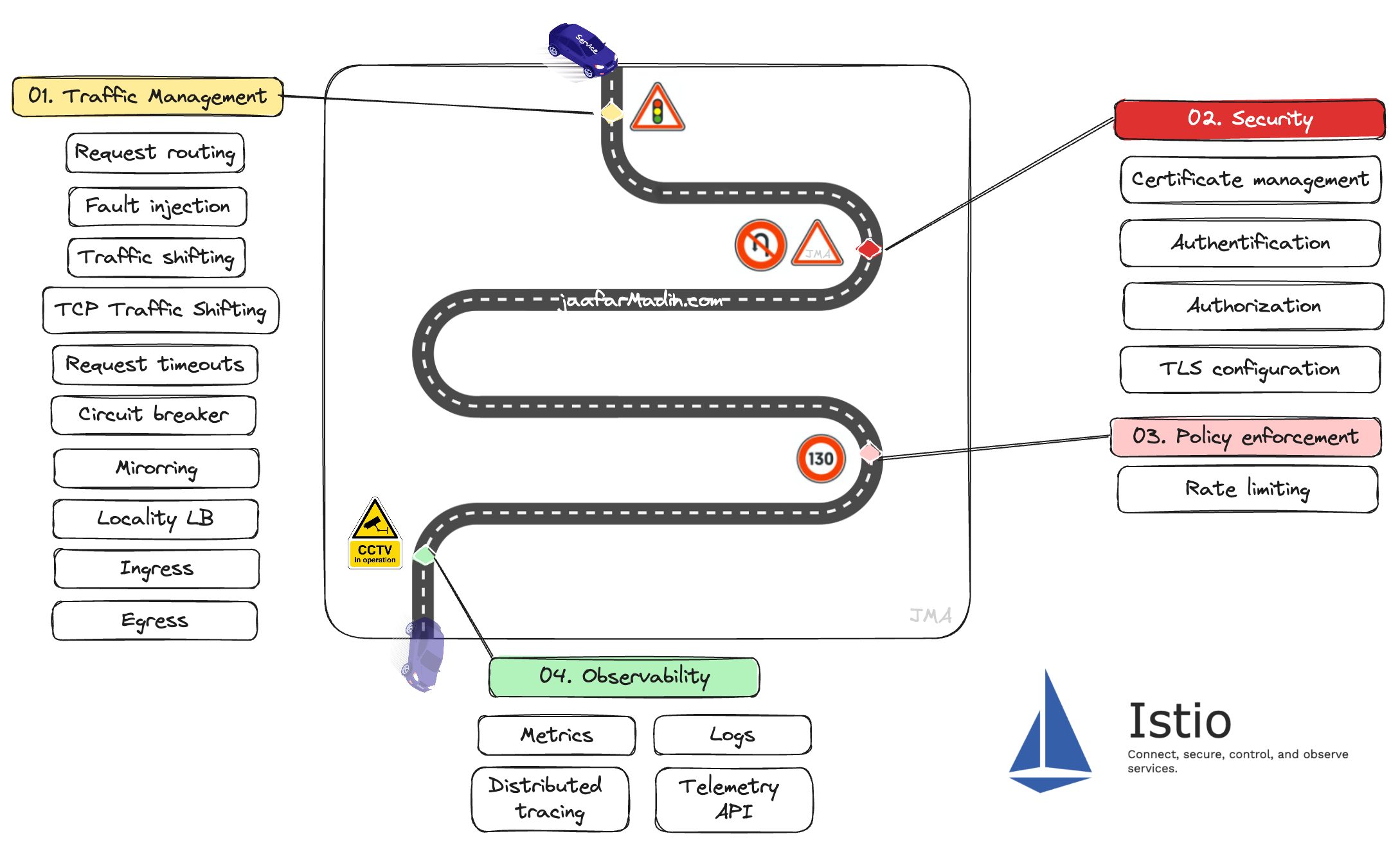
Service Mesh : DP/CP
Envoy
Features :Telemetry ;Trafic management; Load balancing; Gateways; Fault injection; Circuit breaker;Mutual TLS; Dark release
Ambient Mesh (New)

Observability Monitoring Tracing
Logging









Metrics
TraceSpan
LogEntry
Capturing Telemetry headers (OpenTelemtry)

SECURITY

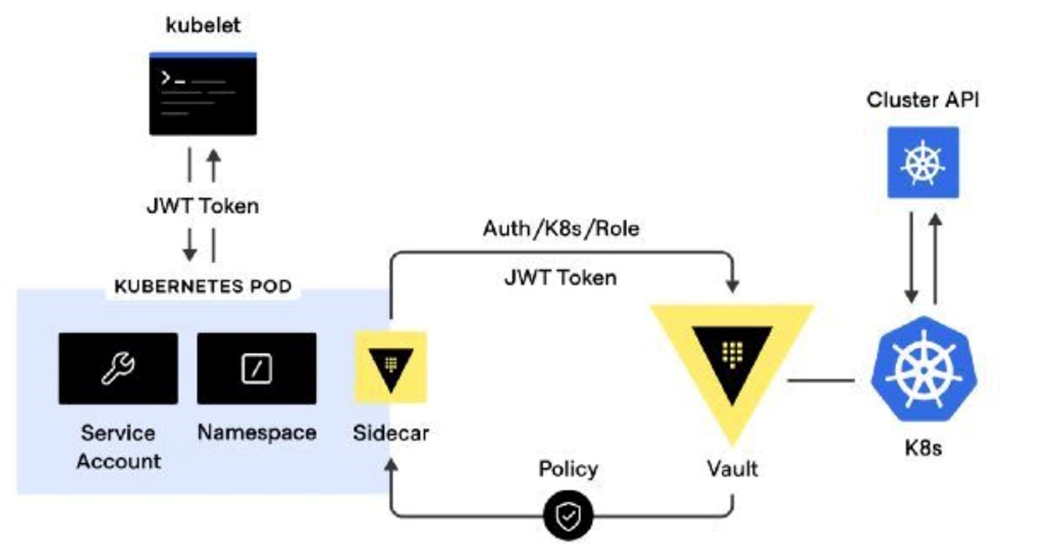
Updates
-
Policy and Meshpolicy are removed since istio 1.6.0
use PeerAuthentication instead
apiVersion: security.istio.io/v1beta1
kind: PeerAuthentication
metadata:
  name: default
  namespace: default
spec:
  selector:
    matchLabels:
      app: myApp
  mtls:
    mode: STRICT / PERMESSIVE / DISABLED
Composition
-
Istio core
-
Istiod
-
Ztunnel
-
Ingress gateways
-
CNI plugin
Refer to the latest getting started with ambient mesh doc for updated instructions.
Composition
CNI plugin
Is responsible for detecting which application pods are part of ambient and configuration the traffic redirection between them and the ztunnel
The CNI DaemonSet on each node constantly watches for pods (on the same node) that are running in ns whith the "istio.io/dataplane-mode=ambient" label
If a pod is detected, it applies iptables redirect rules to redirect all the outgoing and incoming traffic from/to the pod to the ztunnel running on the same node.
Ztunnel
Ztunnel
Client
web-api
Istiod
mTLS
Layer 4 aka transport layer

Layer 7 aka application layer

Management by ambient
kubectl label namespace default istio.io/dataplane-mode=ambientPolicies
apiVersion: security.istio.io/v1beta1
kind: AuthorizationPolicy
metadata:
	name: allow-nothing
    namespace: default
spec: {}
Zero trust architecture
L7 authorization policies
wayPointProxy
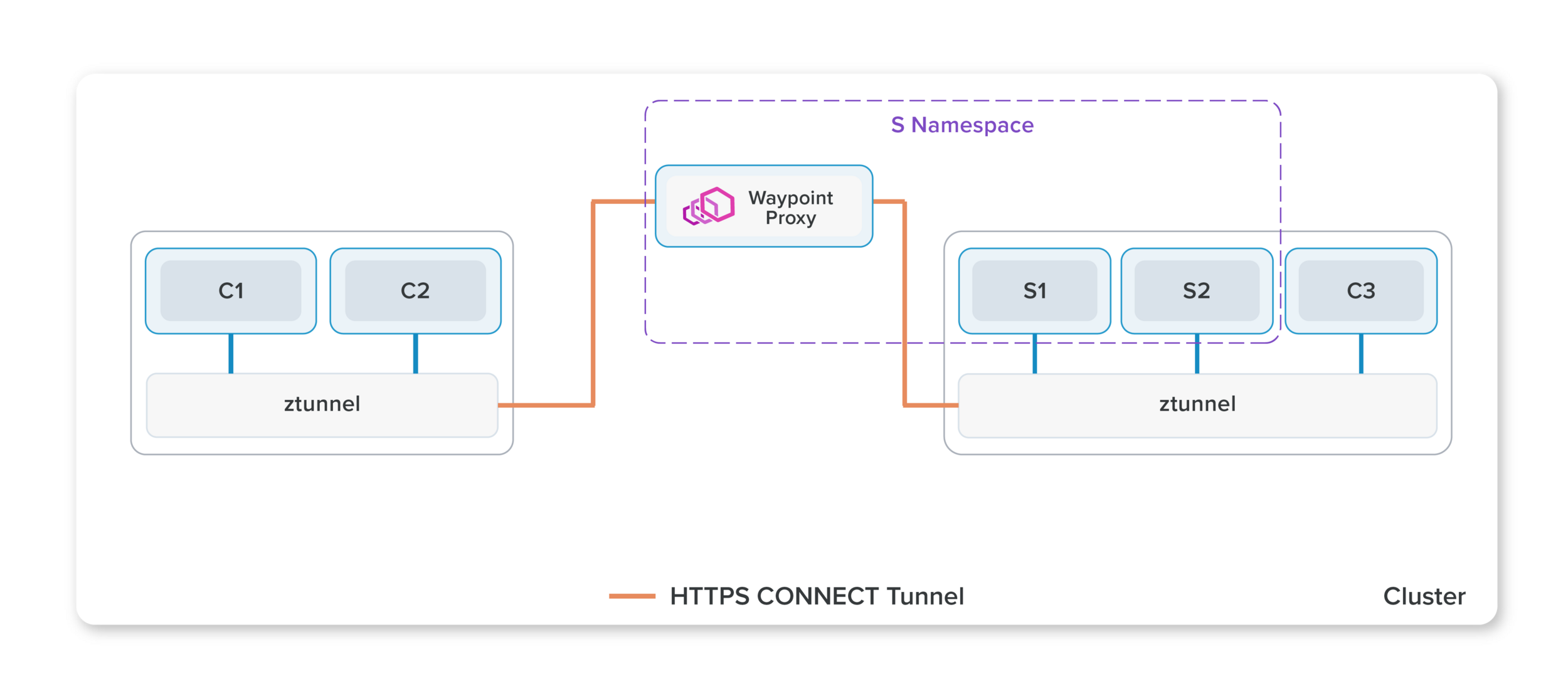
L7 authorization policies
wayPointProxy
Ambient mesh uses HTTP CONNECT over mTLS to implement its secure tunnels and insert waypoint proxies in the path, a pattern we call HBONE (HTTP-Based Overlay Network Environment).
Ztunnel
Ztunnel
Client
web-api
Istiod
mTLS
wayPP
mTLS
apiVersion: gateway.networking.k8s.io/v1aplha2
kind: Gateway
metadata:
	name: web-api
    namespace: default
    annotations:
    	istio.io/service-account: web-api
spec:
	gatewayClassName: istio-mesh


// kubectl get pods -l ambient-type=waypoint
wayPointProxy
Ztunnel
Ztunnel
Client
web-api
Istiod
mTLS
wayPP
mTLS
wayPointProxy
Authorisation for L7 layer (exemple: allow GET and not DELETE verb)
Fault Injection
Traffic Shifting
Security change

Ztunnel Packet Flow


Ztunnel Packet Flow
Source Ztunnel

Aka Hbone tunnel
Ztunnel Packet Flow
Destination Ztunnel

Packet Flow
Ztunnels + Waypoint Proxy

Packet Flow
Ztunnels + Outside of Mesh


Egress
Ingress
Q/A
With the persistent Hbone connection how does the load balancing work ? Are there multiple connections in endpoints or the traffic just always flow to a single destination service ?
So the currently works is that there would be a new connection for each workload Tuple. Right now i think it just all they all share a single Hbone connection. I imagine it wouldn't be that difficult to do some sort of load balancing for Ztunnel to Ztunnel. We are looking at the ability to scale the WaypointProxies in which case there would be some sort of L4 LB
"Justin Pettit"


SandBox testing
Env: Mac M1Pro 16go & K3s cluster (2 nodes : 1 master , 1 agent)
Installation
curl -L https://istio.io/downloadIstio | ISTIO_VERSION=1.18.0-alpha.0 TARGET_ARCH=x86_64 sh -

export PATH="$PATH:/istio-1.18.0-alpha.0/bin"

istioctl install --set profile=ambient
This will install the Istio 1.18.0 ambient profile with ["Istio core" "Istiod" "CNI" "Ztunnel" "Ingress gateways"] components into the cluster

All components are ready !
Deploy The book App
kubectl apply -f samples/bookinfo/platform/kube/bookinfo.yaml

# The curl clients
kubectl apply -f samples/sleep/sleep.yaml
kubectl apply -f samples/sleep/notsleep.yaml

#Access to the app from outside the cluster
kubectl apply -f samples/bookinfo/networking/bookinfo-gateway.yaml

Testing the deployment:
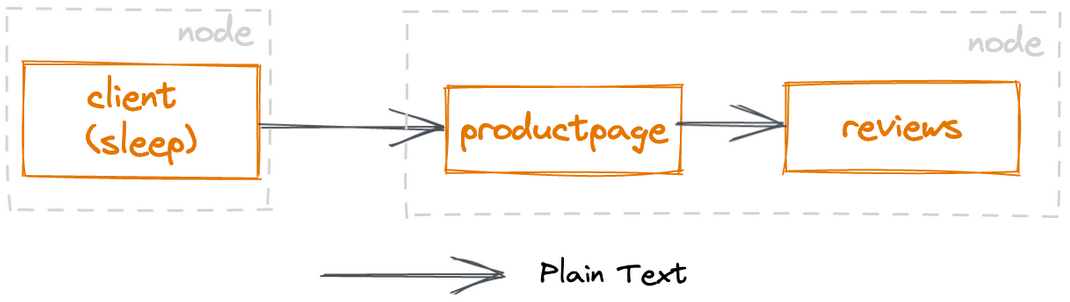
Deploy The book App
kubectl label namespace default istio.io/dataplane-mode=ambient
Add the application to ambient Mesh
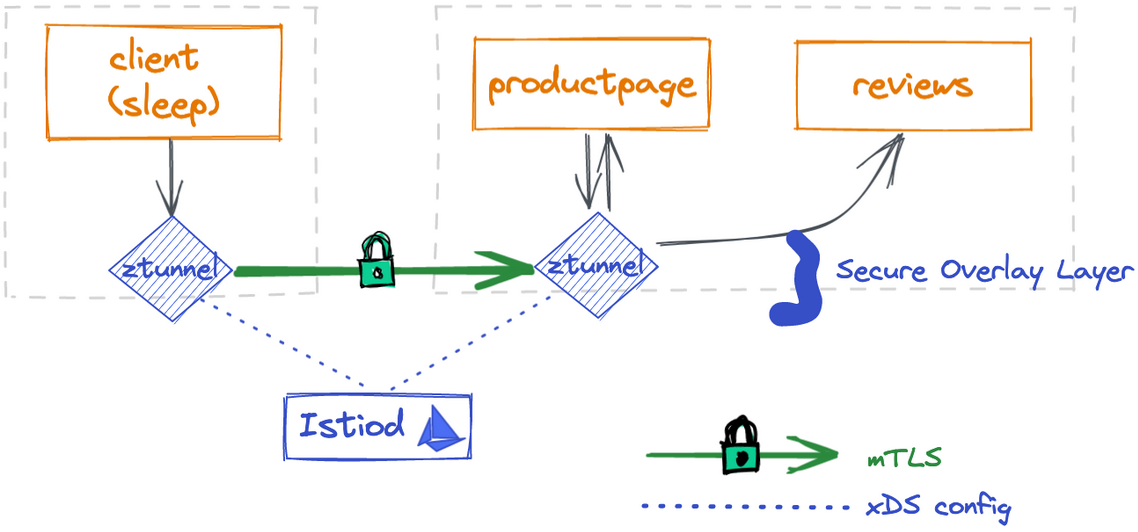
The best part is that there was no need to restart or redeploy anything
Watch the traffic
kubectl apply -f https://raw.githubusercontent.com/istio/istio/master/samples/addons/prometheus.yaml

kubectl apply -f https://raw.githubusercontent.com/istio/istio/master/samples/addons/kiali.yaml
Install Prometheus and Kiali
Troubleshooting
Istio CNI is configured as chained plugin, but cannot find existing CNI network config: no networks found in /host/etc/cni/net.dProblem 1
Check if the CNI configuration files exist in the expected directory /etc/cni/net.d. If they do not exist, make sure that the installation script has permissions to write to that directory.
If the CNI configuration files do exist in the expected directory, but the Istio CNI plugin is still failing to find them, check the Istio CNI plugin configuration to make sure it is configured correctly. The configuration files for the Istio CNI plugin should be located in the /etc/cni/net.d/istio-cni.conflist file.
If it doesn't exist create it.
Solution :
Troubleshooting
Problem 1File: istio-cni.conflist
{
    "cniVersion": "0.3.0",
    "name": "istio-cni",
    "plugins": [
        {
            "name": "istio-cni",
            "type": "istio-cni",
            "hairpinMode": true,
            "ipam": {
                "type": "host-local",
                "subnet": "10.10.0.0/16",
                "routes": [
                    { "dst": "0.0.0.0/0" }
                ]
            }
        },
        {
            "type": "flannel",
            "delegate": {
                "hairpinMode": true,
                "isDefaultGateway": true
            }
        },
        {
            "type": "portmap",
            "capabilities": {
                "portMappings": true
            }
        }
    ]
}
sudo systemctl stop k3s & vi /etc/cni/net.d/istio-cni.conflistsudo systemctl start k3sDo the same thing to all your agents
Troubleshooting
Problem 2
kubectl exec deploy/sleep -- curl -s http://istio-ingressgateway.istio-system/productpageupstream connect error or disconnect/reset before headers. retried and the latest reset reason: connection failure, transport failure reason: delayed connect error: 22
Troubleshooting
Problem 2
upstream connect error or disconnect/reset before headers. retried and the latest reset reason: connection failure, transport failure reason: delayed connect error: 22
Solution:

istioctl proxy-config route istio-ingress-[YOU POD ID] -n istio-system
First verify that the Istio configuration is correct, the svc and pods are running and that traffic is being correctly routed.
You can use the command:
kubectl logs -n istio-system istio-ingressgateway-[YOUR POD ID]And check the logs:
Istio
By Sydelab - Shaping Tomorrow
Istio
Introduction to istio