Model Context Protocol in Metals
Tomasz Godzik
VirtusLab
Model Context Protocol

Model Context Protocol is very similar to Language Server Protocol, but instead of people it's for agents.
Host with MCP Client
MCP protocol
MCP protocol
MCP protocol
MCP Server 1
MCP Server 2
MCP Server 2
Local Data Source 1
Local Data Source 2
Web API
Why do we even need Model Context Protocol?
Hallucinations are a problem, we want to reduce the amount of non-determinism in your tools
MCP provides information to your AI coding agent that it can use to verify and enrich its responses
But it's also a way to better query your information
Core MCP Concepts
MCP uses Json RPC, so each possible request and response is represented by json schema
Agents can ask the server for static content (resources) that might be useful for the current context
resources/list - list all available resource
resources/read - read specific resource
Resources
{
  uri: string;           // Unique identifier for the resource
  name: string;          // Human-readable name
  description?: string;  // Optional description
  mimeType?: string;     // Optional MIME type
}
Resources
Example
{
  uri: "file:///logs/app.log",
  name: "Application Logs",
  mimeType: "text/plain"
}
Agents interact with external systems, perform computations, and take actions in the real world.
tools/list - list all the tools available on the server
tools/call - invoke the tool
Tools
{
  name: string;          // Unique identifier for the tool
  description?: string;  // Human-readable description
  inputSchema: {         // JSON Schema for the tool's parameters
    type: "object",
    properties: { ... }  // Tool-specific parameters
  },
  annotations?: {}       // Optional hints about tool behavior
}
Tools
Example
{
  "name" : "compile-file",
  "description": "Compile a chosen Scala file",
  "schema" : {
    "type": "object",
    "properties": {
      "fileInFocus": {
         "type": "string",
         "description": "The file to compile..."
      }
    }
  }
}
- reusable prompt templates and workflows
- standardize and share common LLM interactions
- prompts/list and prompts/get requests
Prompts

{
  name: string;              // Unique identifier for the prompt
  description?: string;      // Human-readable description
  arguments?: [              // Optional list of arguments
    {
      name: string;          // Argument identifier
      description?: string;  // Argument description
      required?: boolean;    // Whether argument is required
    }
  ]
}
Prompts
Example
{
  name: "explain-code",
  description: "Explain how code works",
  arguments: [
      {
        name: "code",
        description: "Code to explain",
        required: true
      },
      {
        name: "language",
        description: "Programming language",
        required: false
      }
    ]
}
MCP with Scala

compile-full: Compile the entire Scala project.
compile-module: Compile a single module
compile-file: Compile current module and show errors from the current file
In case of MBT not supported currently.
Compile Tools
test: Run a Scala test suite or case
Test tools
Often used, but my require additional direction for the agent
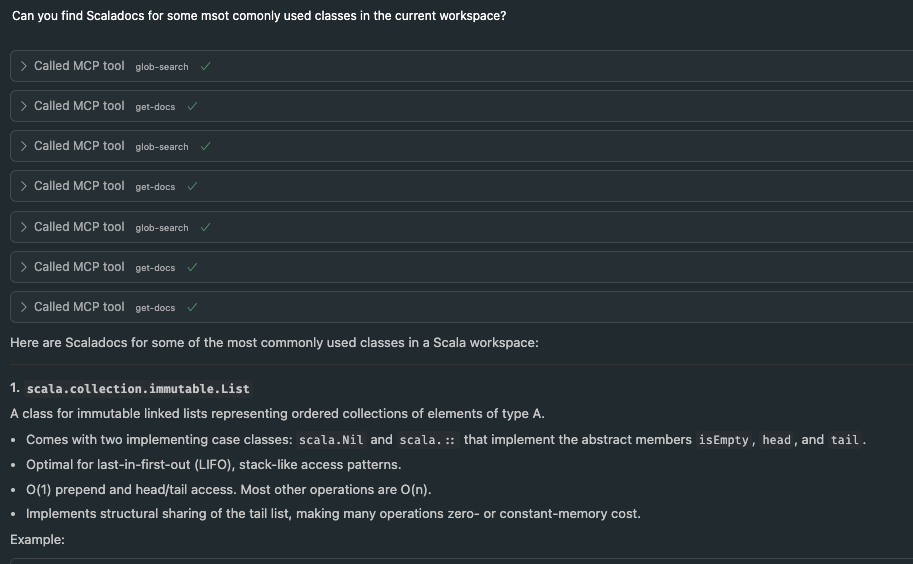
glob-search: Search for symbols using a glob pattern.
typed-glob-search: Search for symbols by type.
inspect: Inspect a symbol for members, signatures...
get-docs: Retrieve documentation for a symbol
get-usages: Find usages of a symbol.
Search Tools
import-build: Trigger a build import in the IDE. format-file: Format given file, results applied directly find-dep: API to allow coursier complete-dep get-source: Get the source file for a symbol
Utility Tools
generate-scalafix-rule: ask metals to compile and run given generate scalafix rule (highly experimental)

run-scalafix-rule: run existing or previously generated rule

list-scalafix-rules: list all existing and previously generated rules
Scalafix Tools
What's your tool idea!?
Might be worth implementing in Metals if general enough
More Tools
It requires a lot of work to make a good and useful tool.
MCP Tools
But it's still useful to have that in your arsenal
- Keep note of what model is used whether it uses some tools.
- Add agentic files to force agent to use the tools at specific times.
- Don't add too many tools! Context is king.
MCP Tools
MCP in Metals
By Tomek Godzik