CSS3

Live slides
Francesco Soncina
- Bachelor degree in Computer Science
- Full Stack Developer
- DevOps
- SysAdmin
- JavaScript Enthusiast
Abstract
- CSS3
- Bootstrap
CSS3
STORIA
- 1995: Browser war
- 1996: W3C pubblica specifiche CSS1
- 1998: W3C pubblica specifiche CSS2
- 2011: W3C pubblica specifiche CSS2.1
- 2012-2013: W3C pubblica specifiche CSS3
SINTASSI
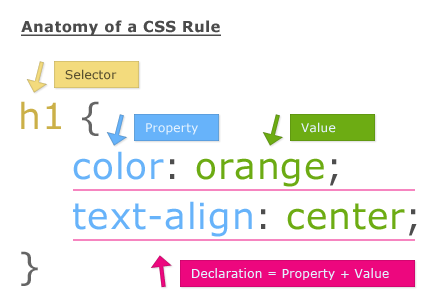
SELETTORI
| .class | .intro | Selects all elements with class="intro" | 1 |
| #id | #firstname | Selects the element with id="firstname" | 1 |
| * | * | Selects all elements | 2 |
| element | p | Selects all <p> elements | 1 |
| element,element | div, p | Selects all <div> elements and all <p> elements | 1 |
| element element | div p | Selects all <p> elements inside <div> elements | 1 |
| element>element | div > p | Selects all <p> elements where the parent is a <div> element | 2 |
| element+element | div + p | Selects all <p> elements that are placed immediately after <div> elements | 2 |
| element1~element2 | p ~ ul | Selects every <ul> element that are preceded by a <p> element | 3 |
Selettore
Esempio
Descrizione
CSS
SELETTORI
| [attribute] | [target] | Selects all elements with a target attribute | 2 |
| [attribute=value] | [target=_blank] | Selects all elements with target="_blank" | 2 |
| [attribute~=value] | [title~=flower] | Selects all elements with a title attribute containing the word "flower" | 2 |
| [attribute|=value] | [lang|=en] | Selects all elements with a lang attribute value starting with "en" | 2 |
| [attribute^=value] | a[href^="https"] | Selects every <a> element whose href attribute value begins with "https" | 3 |
| [attribute$=value] | a[href$=".pdf"] | Selects every <a> element whose href attribute value ends with ".pdf" | 3 |
| [attribute*=value] | a[href*="w3schools"] | Selects every <a> element whose href attribute value contains the substring "w3schools" | 3 |
| :active | a:active | Selects the active link | 1 |
| ::after | p::after | Insert something after the content of each <p> element | 2 |
| ::before | p::before | Insert something before the content of each <p> element | 2 |
SELETTORI
| :checked | input:checked | Selects every checked <input> element | 3 |
| :disabled | input:disabled | Selects every disabled <input> element | 3 |
| :empty | p:empty | Selects every <p> element that has no children (including text nodes) | 3 |
| :enabled | input:enabled | Selects every enabled <input> element | 3 |
| :first-child | p:first-child | Selects every <p> element that is the first child of its parent | 2 |
| ::first-letter | p::first-letter | Selects the first letter of every <p> element | 1 |
| ::first-line | p::first-line | Selects the first line of every <p> element | 1 |
| :first-of-type | p:first-of-type | Selects every <p> element that is the first <p> element of its parent | 3 |
| :focus | input:focus | Selects the input element which has focus | 2 |
| :hover | a:hover | Selects links on mouse over | 1 |
SELETTORI
| :in-range | input:in-range | Selects input elements with a value within a specified range | 3 |
| :invalid | input:invalid | Selects all input elements with an invalid value | 3 |
| :lang(language) | p:lang(it) | Selects every <p> element with a lang attribute equal to "it" (Italian) | 2 |
| :last-child | p:last-child | Selects every <p> element that is the last child of its parent | 3 |
| :last-of-type | p:last-of-type | Selects every <p> element that is the last <p> element of its parent | 3 |
| :link | a:link | Selects all unvisited links | 1 |
| :not(selector) | :not(p) | Selects every element that is not a <p> element | 3 |
| :nth-child(n) | p:nth-child(2) | Selects every <p> element that is the second child of its parent | 3 |
| :nth-last-child(n) | p:nth-last-child(2) | Selects every <p> element that is the second child of its parent, counting from the last child | 3 |
| :nth-last-of-type(n) | p:nth-last-of-type(2) | Selects every <p> element that is the second <p> element of its parent, counting from the last child | 3 |
SELETTORI
| :nth-of-type(n) | p:nth-of-type(2) | Selects every <p> element that is the second <p> element of its parent | 3 |
| :only-of-type | p:only-of-type | Selects every <p> element that is the only <p> element of its parent | 3 |
| :only-child | p:only-child | Selects every <p> element that is the only child of its parent | 3 |
| :optional | input:optional | Selects input elements with no "required" attribute | 3 |
| :out-of-range | input:out-of-range | Selects input elements with a value outside a specified range | 3 |
| :read-only | input:read-only | Selects input elements with the "readonly" attribute specified | 3 |
| :read-write | input:read-write | Selects input elements with the "readonly" attribute NOT specified | 3 |
| :required | input:required | Selects input elements with the "required" attribute specified | 3 |
| :root | :root | Selects the document's root element | 3 |
| ::selection | ::selection | Selects the portion of an element that is selected by a user | |
| :target | #news:target | Selects the current active #news element (clicked on a URL containing that anchor name) | 3 |
| :valid | input:valid | Selects all input elements with a valid value | 3 |
| :visited | a:visited | Selects all visited links | 1 |
SPECIFICITA'
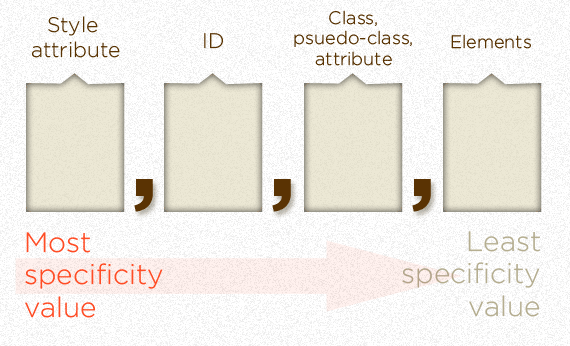
SPECIFICITA'
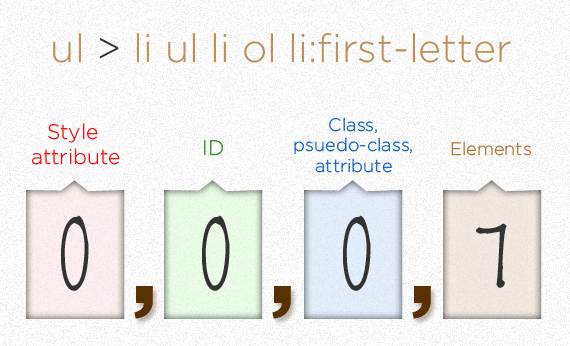
SPECIFICITA'
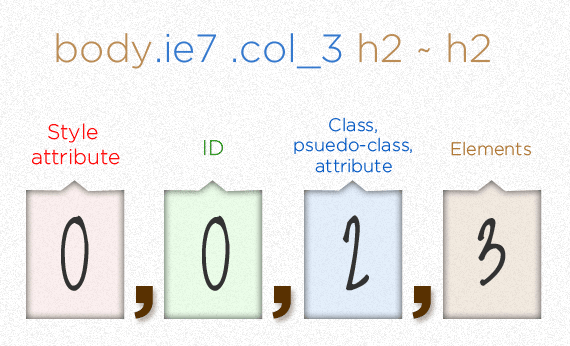
SPECIFICITA'
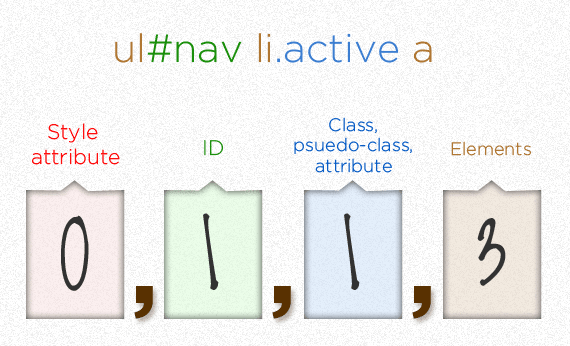
SPECIFICITA'
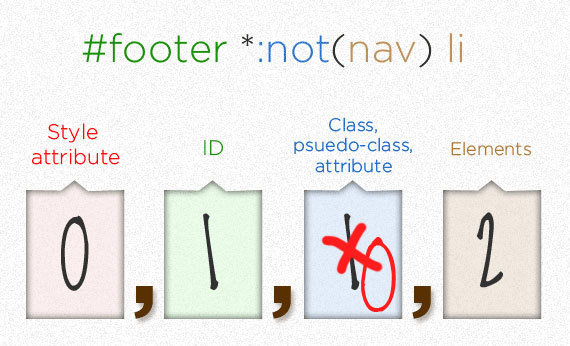
SPECIFICITA'
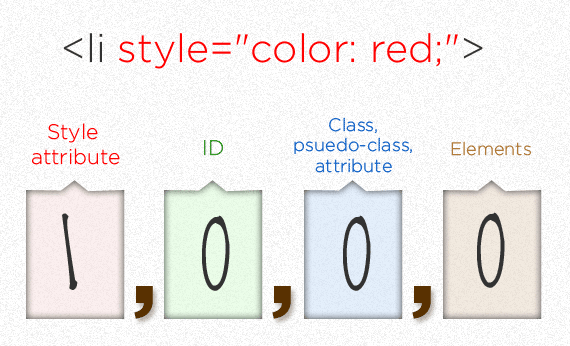
BOX MODEL
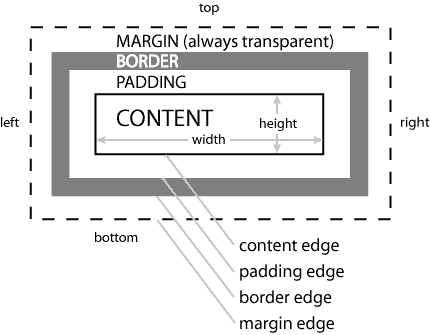
BOX SIZING
Contenuto
Padding
Border
Margin
#contenuto {
    width: 300px;
    box-sizing: content-box;
}

#contenuto {
    width: 300px;
    box-sizing: border-box;
}
width
width
DISPLAY
elemento
elemento
elemento
elemento
elemento
.elemento {
    display: block;
}
FLOW
DISPLAY
elemento
.elemento {
    display: inline;
}
elemento
elemento
elemento
elemento
elemento
elemento
elemento
FLOW
DISPLAY
elementoA
.elementoA {
    display: inline-block;
    height: 200px;
}

#elementoB {
    display: inline-block;
    height: 300px;
}
elementoA
elementoA
elementoA
elementoA
elementoB
elementoA
elementoA
FLOW
POSITION
- Static: default, l'elemento segue il naturale flow del documento
- Absolute: l'elemento si posiziona relativo al primo padre che definisce una position non static
- Fixed: l'elemento si posiziona relativo alla viewport (finestra del browser)
- Relative: l'elemento si posiziona relativo al normale posizionamento
- Initial: resetta la proprietà al valore di default (quindi static)
- Inherit: eredita la proprietà dal padre
FLOAT
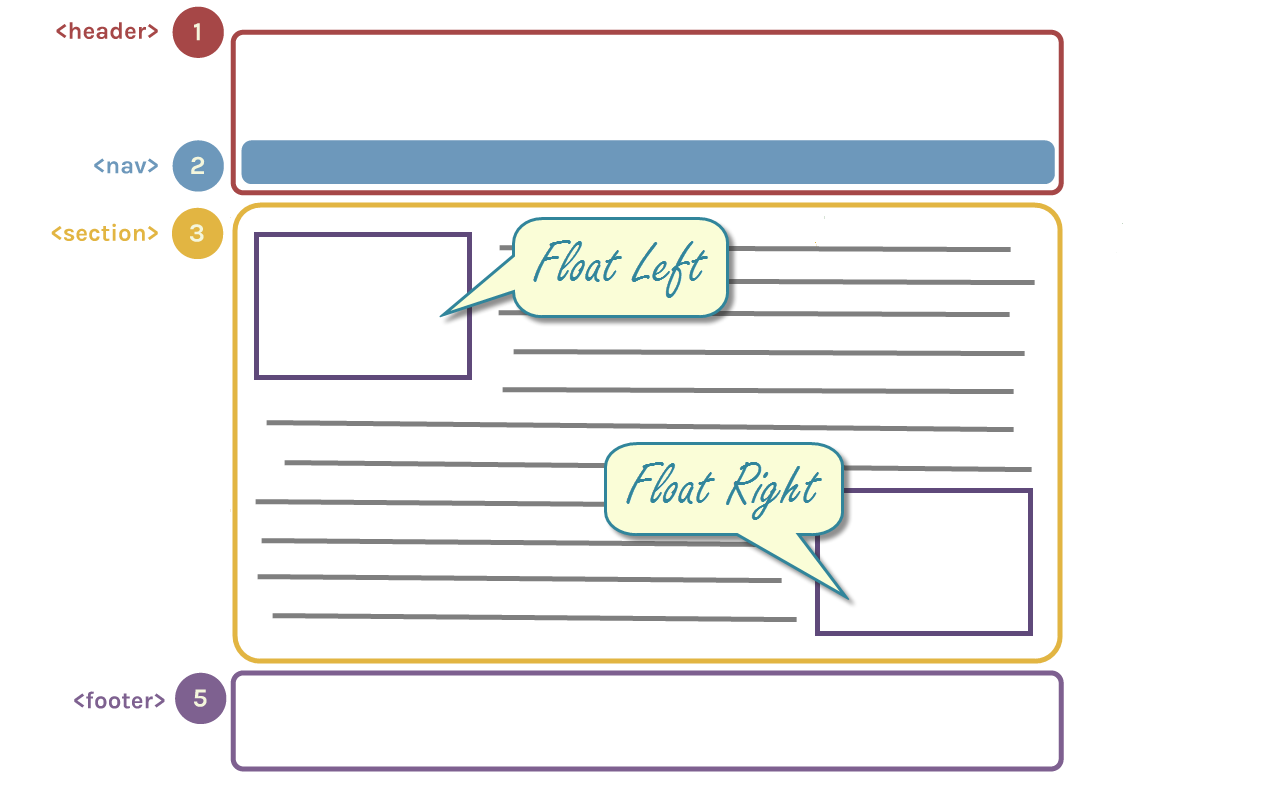
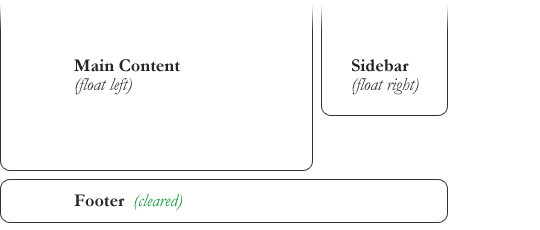
CLEAR
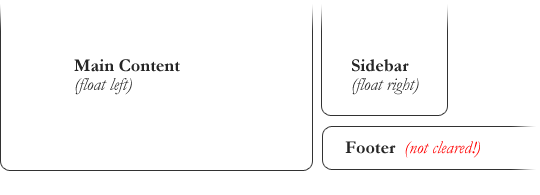
#content {
    float: left;
}

#sidebar {
    float: right;
}

footer {
    clear: both;
}
#content {
float: left;
}
#sidebar {
float: right;
}
footer {
clear: none;
}FLOAT COLLAPSE
- Quando un elemento è flottante esce dal naturale flow del documento
- Se un contenitore ha solo elementi figli flottanti collassa perché uscendo dal flow non vengono conteggiati nel calcolo dell'altezza del contenuto
- Per ovviare a questo problema sono stati inventati i clearfix
- Attualmente è consigliabile usare il seguente
.clearfix::after {
    content:"";
    display:block;
    clear:both;
}
PSEUDOSELETTORI
Pseudoclassi:
Pseudoelementi:
permettono di alterare lo stile di un elemento quando si trova in uno stato particolare
permettono di alterare lo stile di una sola porzione dell'elemento interessato
a:hover
p::first-letter
VENDOR PREFIXES
INCLUSIONE
<link rel="stylesheet"
    type="text/css"
    href="foglio.css"
media="screen"/>- screen
- handheld
- braille
- embossed
- projection
- speech o aural
- tty
- tv
L'attributo media permette di caricare il file css a secondo del tipo di dispositivo utilizzato per visualizzare la pagina.
Ecco la lista completa di valori possibili:
Bootstrap

FUNZIONALITA'
- Sviluppato da Twitter
- Scritto in CSS (SASS/LESS) e JS
- Fornisce elementi pronti da utilizzare
- Responsive & mobile first
- Leggero
- Facilmente integrabile con altre tecnologie
- UI Framework più popolare (+75000 stars on github)
- Glyphicons incluse
ELEMENTI
- Dropdown
- Navbar
- Breadcrumb
- Pagination
- Label
- Badge
- Jumbotron
- Alert
- Progress bar
- and many others
ESEMPIO
<!DOCTYPE html>
<html lang="en">
  <head>
    <meta charset="utf-8">
    <meta http-equiv="X-UA-Compatible" content="IE=edge">
    <meta name="viewport" content="width=device-width, initial-scale=1">
    <title>Bootstrap 101 Template</title>

    <!-- Bootstrap -->
    <link href="css/bootstrap.min.css" rel="stylesheet">

    <!-- HTML5 Shim and Respond.js IE8 support of HTML5 elements and media queries -->
    <!-- WARNING: Respond.js non funziona se guardate la pagina attraverso file:// -->
    <!--[if lt IE 9]>
      <script src="https://oss.maxcdn.com/libs/html5shiv/3.7.0/html5shiv.js"></script>
      <script src="https://oss.maxcdn.com/libs/respond.js/1.4.2/respond.min.js"></script>
    <![endif]-->
  </head>
  <body>
    <h1>Hello, world!</h1>

    <script
        src="https://ajax.googleapis.com/ajax/libs/jquery/1.11.0/jquery.min.js"></script>
    <script src="js/bootstrap.min.js"></script>
  </body>
</html>
Question time
Live coding


CSS3
By Francesco Soncina